
Wallet Marketplace
Buy aged wallet inventory into a trading profile or Wallet Farm.

Wallet Marketplace lets you buy aged wallet inventory instead of generating every wallet from a seed or importing private keys. Marketplace wallets have prior centralized-exchange funding and trading activity, so they are less likely to look like brand-new wallets on Bubblemaps or common token screeners. External classifications are not controlled by Sumo, so this should be treated as inventory history rather than a guaranteed label.
Use Wallet Marketplace when you need aged operational wallets quickly for a trading profile, a launch draft, or Wallet Farm preparation.
Marketplace inventory is chain-specific and is available on Solana, Ethereum, Base, Robinhood Chain, BNB Chain, Tron, and Arc. The purchase dialog shows the selected network, available inventory, wallet tier, unit price, total price, and the Sumo wallet used to pay for the purchase. It also shows inventory statistics for the selected tier: the average and range of native balance, confirmed swaps, and funding age across wallets currently in stock. These statistics are refreshed a few times a day, and the dialog notes when they were last updated. Pricing is charged from your Sumo Balance in the chain's native asset.
Solana offers Basic and Premium. All other networks offer Basic only. Arc Basic requires a minimum 2 USDC native balance, 5 confirmed swaps, and 7 days of funding age.
| Tier | Inventory profile |
|---|---|
| Basic | Aged wallets with a small native balance, 10+ swaps, CEX funding history, and 7+ days of aging |
| Premium | Aged wallets with a larger native balance, 20+ swaps, CEX funding history, and 10+ days of aging |
Per-wallet pricing by chain:
| Chain | Basic | Premium |
|---|---|---|
| Solana | 0.1 SOL | 0.15 SOL |
| Ethereum | 0.03 ETH | Not offered |
| Base | 0.02 ETH | Not offered |
| Robinhood Chain | 0.02 ETH | Not offered |
| BNB Chain | 0.03 BNB | Not offered |
| Tron | 100 TRX | Not offered |
| Arc | 10 USDC | Not offered |
When to Use It
Use Wallet Marketplace when:
- You need aged wallets without managing your own private-key import files
- You want aged wallets added directly to a profile or Wallet Farm folder
- You are preparing launch wallets and want to avoid starting only from newly generated addresses
- You want wallets with prior funding and trade history instead of brand-new wallet activity
Use generated wallets instead when you want deterministic wallets from your own seed. Use imported wallets when you already control the private keys you want Sumo to manage.
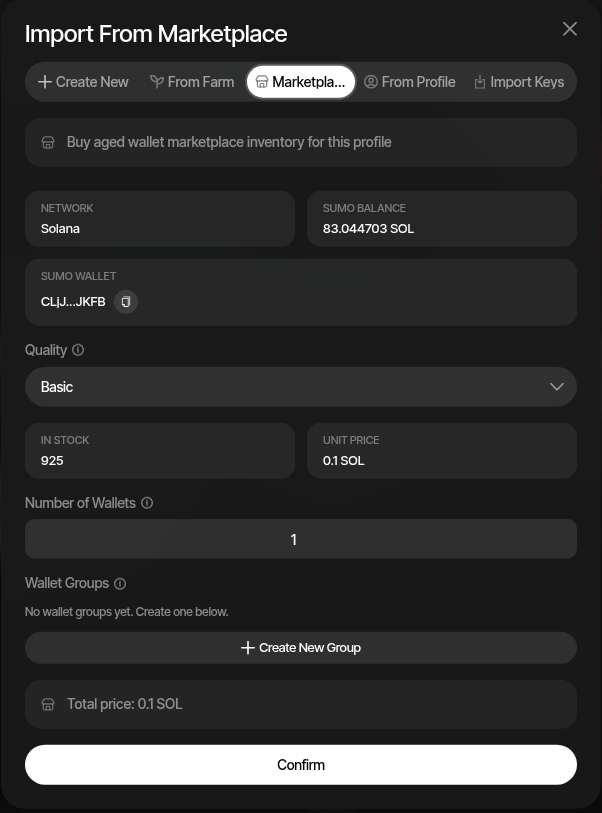
Buy Into a Trading Profile
Use this path when you want the purchased wallets attached directly to a token profile.
- Navigate to the target profile's Wallets tab
- Click + New Wallets
- Select the Marketplace tab
- Choose the wallet quality tier
- Enter the Number of Wallets
- Optionally assign the purchased wallets to a wallet group or create a new group
- Review the total price and click Confirm
Purchased wallets are added to the profile and can be organized with normal wallet groups.
Buy Into Wallet Farm
Use this path when you want wallets prepared outside a specific trading profile, then later imported into a launch or trading profile.
- Open Wallet Farm
- Click Add Wallets
- Select the Marketplace tab
- Choose the target Chain
- Choose the wallet quality tier
- Enter the Number of Wallets
- Optionally assign the purchased wallets to a folder or create a new folder
- Review the total price and click Confirm
After purchase, you can fund the wallets, generate activity, and later import them into a profile.
Launch Workflows
Launch wizards also support wallet creation and marketplace purchase paths. During wallet setup, you can create new wallets, import ready wallets, pull wallets from Wallet Farm, reuse wallets from another profile, or buy aged inventory from Wallet Marketplace.