
Generate Activity
Build natural on-chain transaction history for Wallet Farm wallets by executing real token swaps through an aggregator or directly against a DEX pool.
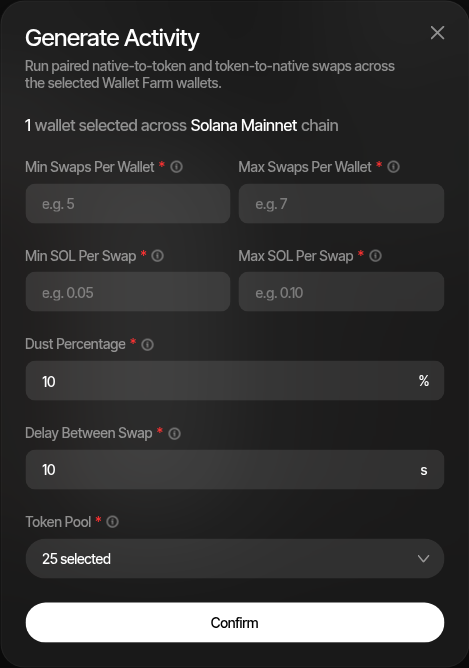
Generate Activity executes real token swaps across your selected Wallet Farm wallets to build on-chain transaction history. Each wallet performs a configurable number of buy-and-sell swap pairs on tokens drawn from a token pool, creating a diverse and organic-looking footprint of normal trading behavior. Successful swaps are reflected in the Wallet Farm table so you can quickly see which wallets have enough activity.
How It Works
- Select wallets in the Wallet Farm table using the checkboxes
- Click the Generate Activity toolbar button
- Configure the parameters (see below)
- Click Confirm to start
For each selected wallet, Sumo:
- Picks a random number of swap pairs (between your min and max)
- For each pair, selects a token from the token pool
- Executes a native-to-token swap (buy) with a randomized amount within your configured range
- Executes a token-to-native swap (sell) to convert back, minus the configured dust percentage
- Waits the configured delay before the next swap pair
Each wallet runs as its own background job. Sumo processes wallets in batches, with wallets in the current batch progressing in parallel while the swap pairs within a single wallet run one after another. The next batch starts after every wallet in the current batch finishes.
Configuration
| Parameter | Description |
|---|---|
| Min/Max Swaps Per Wallet | The number of buy-sell swap pairs each wallet executes, up to 1000. A random count is chosen per wallet within this range. |
| Min/Max {Native} Per Swap | The native asset amount used for each buy. The label follows the chain, such as Min SOL Per Swap or Min ETH Per Swap. A random amount is chosen per swap within this range. |
| Batch Size | The number of wallets processed concurrently, from 1 to 250. Defaults to 8. The next batch starts after every wallet in the current batch finishes. This also applies to cleanup runs. |
| Dust Percentage | The percentage of purchased tokens to leave behind after selling back. Defaults to 0, which sells the full amount. A value of 10 leaves 10% of purchased tokens in the wallet. |
| Delay Between Swap | Seconds to wait between consecutive swap pairs on the same wallet, up to 3600. Defaults to 5. Adds natural timing variation. |
| Execution Provider | How swaps are routed. The options and default depend on the chain — see Execution Providers. |
| Token Source | Trending Tokens (default) pulls from trending markets, or Custom Tokens lets you paste your own mints. |
| Token Pool | The set of tokens to swap against, up to 25. Deselect any tokens you want to exclude. |
| Slippage | Direct DEX only. Maximum slippage per swap, from 0.1% to 25%. Defaults to 1%. |
| Allowed DEXs | Direct DEX only. Which venues pool discovery may search. Defaults to All DEXs for the chain. |
A single run covers up to 250 wallets.
Custom Tokens
Switching Token Source to Custom Tokens reveals a text box where you can paste mint addresses, one per line or comma separated, then click Add. Sumo validates each address for the chain, ignores duplicates, and rejects the chain's wrapped native asset. The result is reported back as the number added, ignored, and invalid. Custom tokens are required on chains where Sumo does not source trending markets.
Execution Providers
| Chain | Options | Default |
|---|---|---|
| Solana | DFlow, Jupiter, OKX DEX, Direct DEX | DFlow |
| Ethereum, BNB Chain, Base, Robinhood Chain | 0x, Uniswap API, Direct DEX | 0x |
| Ethereum Sepolia | Uniswap API, Direct DEX | Uniswap API |
| Stable Mainnet | Direct DEX | Direct DEX |
| Tron | Routes directly through SunSwap; no provider choice | — |
Sells With No Route
An aggregator sometimes has a route to buy a token but none to sell it back. When the run's aggregator answers that it has no route for a sell, Sumo asks the chain's other aggregators in turn and sells through the first one that can route it, so the token is not left in the wallet. This applies to activity sells and cleanup sells. Buys always use the aggregator you selected, and a token it cannot route is skipped.
The sell keeps the run's slippage settings and pays the same platform swap fee. If no aggregator can route the sell, it is recorded as failed and the token stays in the wallet for a later cleanup run. Direct DEX and Tron runs have no fallback.
When every aggregator answers that it has no route to sell a token, no wallet in the run buys that token again, including after the run is paused and resumed by a restart. If a later sell of the token confirms on-chain, the run may buy it again; a sell that fails or reverts does not. The wallets keep trading the run's other tokens, and a wallet with no other token left stops buying. A wallet that ends without a single swap is marked failed with the reason, for example "No sellable token left in this run" or "No route to buy any token in this run", which the activity log shows on a run that did not complete and the failure notification includes. A sell that failed for any other reason, such as a provider outage or rate limit, does not stop the token from being bought.
Direct DEX
Direct DEX skips aggregators entirely and trades against a single token/wrapped-native pool per token. When you confirm the run, Sumo searches your Allowed DEXs for every token in the pool, quotes the actual trade size against each candidate pool, and locks in the venue that returns the most output. Every wallet in the run then trades that same pool.
Choose Direct DEX when you want control over which venues your wallets touch, or on chains where no aggregator is available. Points to keep in mind:
- Confirming takes longer. Pool discovery runs before any swap is queued and can take up to 45 seconds.
- Slippage is manual. Auto-slippage is disabled, so the Slippage field is the only tolerance applied.
- Tokens without a pool are dropped from the run rather than failing it. If none of your tokens have a token/wrapped-native pool, the run is rejected so you can pick different tokens.
- Universal routers cannot be selected alone. Pick the underlying venues, such as Uniswap V2, V3, and V4, rather than only a router.
- On EVM chains that support it, direct swaps are submitted through a private relay for MEV protection.
Pool Discovery Timed Out
If a venue is slow to respond, Sumo stops searching it for the rest of the run. When tokens are still unresolved at that point, the request fails with a retryable error rather than silently trading fewer tokens. Retry, select fewer tokens, or narrow Allowed DEXs to healthy venues.
Supported Chains
Generate Activity works on Solana, Ethereum, Ethereum Sepolia, BNB Chain, Base, Robinhood Chain, Stable Mainnet, and Tron. All selected wallets must be on a single chain per run.
- Solana and EVM chains — Swaps route through the selected execution provider, either an aggregator or Direct DEX.
- Stable Mainnet — Direct DEX only, with custom tokens.
- Tron — Swaps execute directly on SunSwap against WTRX pools. Trending tokens without a SunSwap pool are skipped automatically.
Cleanup Mode
Setting both Min and Max Swaps Per Wallet to 0 switches the dialog into Sell/Cleanup Tokens mode. Instead of generating new activity, Sumo sells the token balances already held by the selected wallets back to the native asset. The amount, dust, and delay fields disappear, and on Solana the token pool is discovered from wallet balances automatically. The submit button becomes Cleanup Tokens.
Dust Tokens
Leaving a small dust percentage of tokens in each wallet creates a more natural-looking wallet profile, since real traders often hold small residual balances across many tokens. If the dust percentage is set to 0, Sumo waits for the buy transaction to confirm before executing the sell to ensure the exact token balance is known.
Monitoring Results
After starting an activity generation run, you can track progress in the Activity Logs tab. Each run creates:
- A summary entry with the total wallet count, swap count, and success/failure breakdown
- Per-swap entries with individual transaction hashes, amounts, and confirmation status
A Solana or EVM swap that fails on slippage shows "Price moved more than ... slippage" as its reason. Direct DEX runs name the Slippage the swap ran with and suggest raising it. Aggregator runs use your organization's Wallet Farm slippage setting (auto-slippage by default), which this dialog does not edit, so their message names no percentage and only states what happened. On Solana, when the token charges a Token-2022 transfer fee, the reason also names the fee.
Activity and funding logs are scoped to the inventory you are viewing, so a run started from Wallet Farm appears under Wallet Farm logs and a run started from Wallet Marketplace appears under Marketplace logs. Switching inventory keeps you on the logs tab and swaps in that inventory's rows.
Swap transactions are submitted and then confirmed best-effort in the background. The summary status will be one of:
| Status | Meaning |
|---|---|
| Accepted | Run is in progress |
| Completed | All swaps succeeded |
| Partial Failed | Some swaps failed, others succeeded |
| Failed | All swaps failed |
Individual swaps are skipped without retrying when the selected pool is no longer usable — for example if a bonding curve graduated, or the pool was drained or migrated after the run started.
Wallet Balance Required
Each wallet needs a sufficient native asset balance to cover the maximum possible swap amount plus transaction fees and the platform fee. Fund your wallets before running activity generation — see Privacy Funding for a private funding approach.
Platform Fee
Activity swaps pay the standard platform swap fee — the same rate as instant trades and strategy orders for your organization. With the default fee setting, buys pay it from the native amount spent and sells from the native amount received, so the balance check at start already accounts for it. Venues that cannot collect a fee atomically execute the swap without one rather than failing it.
Add Wallets
Generate new wallets, buy Wallet Marketplace inventory, import from private keys or seed phrases, or pull wallets from an existing trading profile into Wallet Farm.
Privacy Funding
Distribute funds to multiple Wallet Farm wallets using privacy-preserving providers, so destination wallets are not publicly linked to the funding source.