
Uniswap V4 Robinhood Launch
Launch a Robinhood Chain token straight into its own hookless Uniswap V4 pool, with an LP fee you choose, single-sided or full-range liquidity quoted in ETH or an ERC-20, the position locked for fees forever by default, an atomic launch bundle, and starter strategies.
Robinhood Uniswap V4 creates a fixed-supply ERC-20 on Robinhood Chain and a hookless Uniswap V4 pool for it, mints the launch liquidity position, and runs every bundle buy, all in one atomic transaction. As on Uniswap V3, the dev wallet never buys: it keeps its share of the supply outside the pool for free. You choose the pool's LP fee; the position belongs to you, so that fee is your income from every trade. Hookless pools need no Uniswap allowlisting: Uniswap's own routing and every V4-capable aggregator and trading terminal trade them like any other Uniswap V4 pool.
Choose this launch method for your own LP fee, any quote token, and liquidity locked for fees at launch. For a WETH pool with optional launch taxes, see Uniswap V2 Robinhood Launch; for a tax-free WETH pool at a standard fee tier, see Uniswap V3 Robinhood Launch. The same launch on the other chain: Uniswap V4 Base Launch.
| Robinhood Uniswap V4 | |
|---|---|
| Pool type | Hookless Uniswap V4 pool, LP fee 0.01% to 10% |
| Quote | ETH, USDG, cbBTC, TAO, and about 190 tokenized stocks and ETFs, or a custom ERC-20 |
| Liquidity | Single-sided or full-range; locked in a fee locker by default |
| Bundle wallets | Up to 80, all in one atomic transaction |
| Holder cleanup | Off, Token Transfer, or Sell / Buy |
Sumo offers Bundle mode only: there is no bonding curve and no migration, so there is no Graduation Bundle.
Prerequisites
Before launching, make sure you have:
- Token metadata ready: name, ticker, image, description, and social links
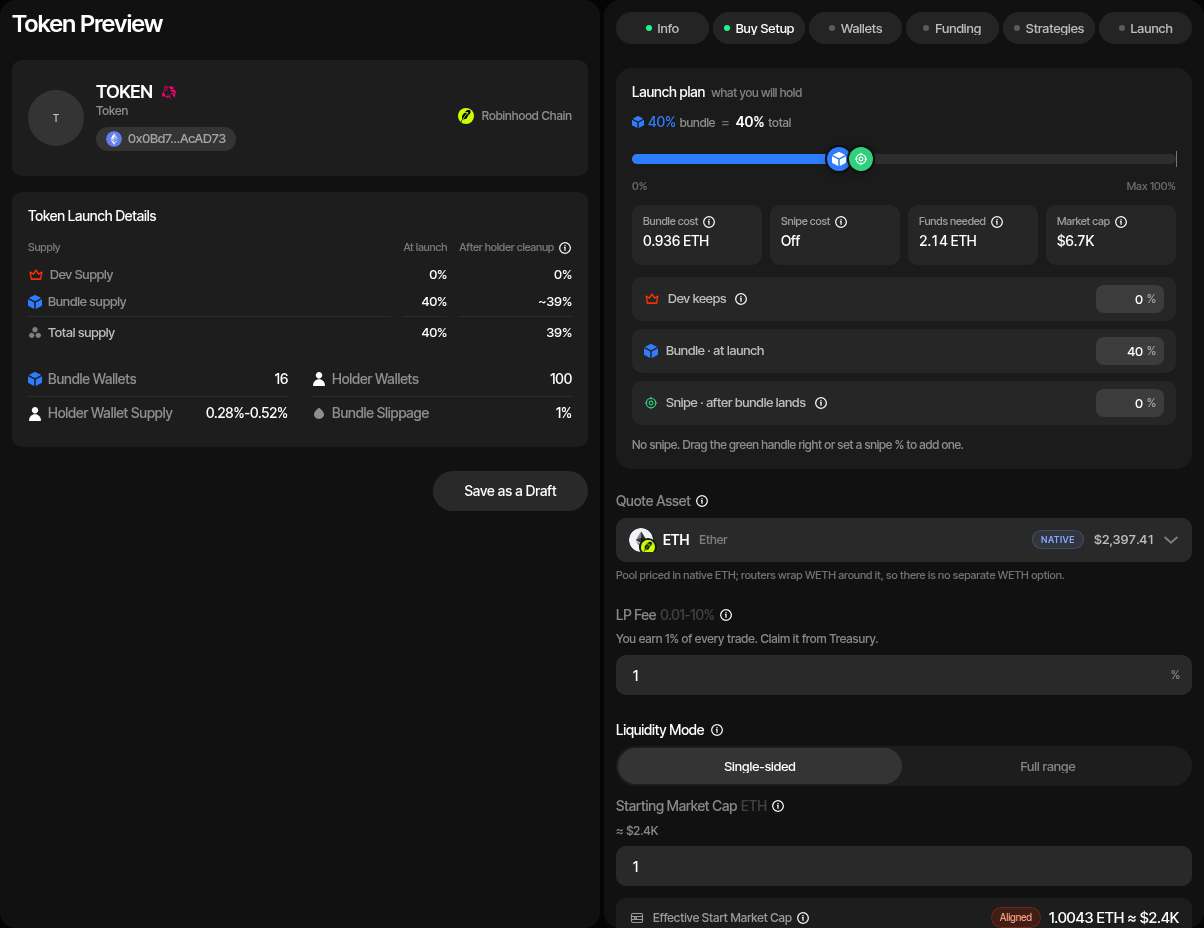
- ETH on Robinhood Chain for the launch buys (or, on a non-ETH quote, for the funding swap that acquires the quote), the quote you pair into a full-range position, the creator gas reserve, and per-wallet buffers
- A launch plan: quote asset, LP fee, liquidity mode and starting price, the supply the dev wallet keeps outside the pool, Lock liquidity, bundle size, bundle wallet count, and holder cleanup preference
- A wallet plan: use ready wallets from private keys, Wallet Farm, or another profile, or create new wallets / buy aged EVM wallets through Wallet Marketplace during the wizard
The LP Fee
Every swap in the pool pays its LP fee to the liquidity position, which you own. You choose it from 0.01% to 10% in 0.01% steps; the default is 1%. The fee is paid in the swap's input currency: buys pay it in the quote, sells pay it in your token (see LP Fee Claims).
The fee also sets the pool's tick spacing, the grid prices move on: tick spacing = fee ÷ 50 in Uniswap's units (0.05% → 10, 0.3% → 60, 1% → 200, 10% → 2,000). The Launch Preview shows it beside the fee. A higher fee means coarser price steps: at 1% one step is about 2% of price, at 10% about 22%. This is why the starting market cap you enter is aligned to the grid (see Liquidity Mode).
A High Fee Invites a Cheaper Pool
Anyone can open a second pool for your token at a lower fee. Once it has liquidity, routers prefer it for the cheaper trades and your pool earns less. A moderate fee, and keeping all of the token's liquidity in your launch position, limit this.
Uniswap's own protocol fee (about 0.10% of swap volume) can also apply to these pools. A new pool starts with no protocol fee, and Uniswap governance turns it on pool by pool; your launch buys land before it can. When on, it goes to Uniswap, not to you.
Quote Assets
| Quote | Notes |
|---|---|
| ETH | The default. The pool pairs with native ETH itself, so nothing is wrapped and buyers spend ETH directly. There is no separate WETH option: an ETH pool already trades against WETH through every router. |
| Catalogue tokens | USDG, cbBTC, TAO, and about 190 tokenized stocks and ETFs. |
| Custom ERC-20 | Paste any other token address. Sumo checks it on-chain before accepting it: it must be a token contract with readable metadata (at most 18 decimals) and a swap route from ETH and back. |
Fee-on-transfer and rebasing tokens are not supported as quotes. A token that takes a fee on transfer is caught by the launch simulation before anything is sent.
The quote is fixed after the first save of the draft. Start a new draft to change it.
On every quote except ETH the wallets are funded in ETH and swapped into the quote before the launch (see Funding). Thin quote markets, such as many stock tokens, can lose a noticeable share of a large funding swap to price impact, which the funding swap preview shows before you confirm.
Liquidity Mode
| Single-sided (default) | Full-range | |
|---|---|---|
| What goes in | Tokens only | Tokens plus an amount of the quote you provide |
| Price range | From the starting market cap upward | The full price range |
| You set | Starting Market Cap, in the quote | Liquidity Quote Amount, in the quote; the opening price follows from it and the tokens in the pool |
| Paid by | Nothing beyond the tokens | The dev wallet pays the quote amount |
In single-sided mode the starting market cap is aligned to the pool's price grid. The form shows the effective starting market cap after alignment, which is never below what you entered; at a high fee the difference can be noticeable (one step is about 22% at 10%). Because the position holds no quote below the starting price, sells can only take back quote that buys put in.
Dev Supply and Initial Liquidity Tokens
The supply splits as on Uniswap V3. Dev keeps (Dev Supply) is the share the dev wallet keeps outside the pool, for free: the dev never buys from the pool. Initial Liquidity Tokens, the rest (100% minus Dev Supply), goes into the launch position. The two are complements: editing one updates the other. Bundle wallets then buy from the position.
Lock Liquidity
Lock liquidity is on by default.
| On (default) | Off | |
|---|---|---|
| Position NFT | Held by a permanent, ownerless fee locker | Held by the dev wallet |
| LP fees | Claimable by you forever | Claimable by the dev wallet |
| Liquidity | Can never be removed, by anyone | The dev wallet can burn the position to the dead address with Burn Liquidity or lock it later with Lock Liquidity (UNCX). Sumo has no remove-liquidity action. |
| Fee rights | Can be handed to another address with Transfer Fee Rights | Move with the NFT |
Locked liquidity is the commitment buyers look for, and your fee income continues either way. Turn locking off only if you need control of the liquidity itself.
Launch Flow
1. Info
Choose Robinhood Uniswap V4 in the Launchpad field, then enter the token and profile details.
| Field | Required | Description |
|---|---|---|
| Launchpad | Yes | Select Robinhood Uniswap V4. The launchpad is locked after the draft is saved. |
| Profile Name | Yes | Internal Sumo profile name used after launch |
| Token Name | Yes | Public token name |
| Ticker | Yes | Public token symbol, auto-uppercased |
| Image | Yes | JPG or PNG image, up to 2 MB |
| Total Supply | Yes | Whole tokens, from 1 to 1,000,000,000,000,000 (1015). Defaults to 1,000,000,000. Decimals are fixed at 18. |
| Description | No | Public token description |
| X, Telegram, Website | No | Public social links attached to the profile |
The token is a plain ERC-20 with permit and burn: no owner, no tax, no trading gate, and the whole supply minted at creation. Sumo verifies its source on the chain's explorer.
2. Buy Mode
| Setting | Description |
|---|---|
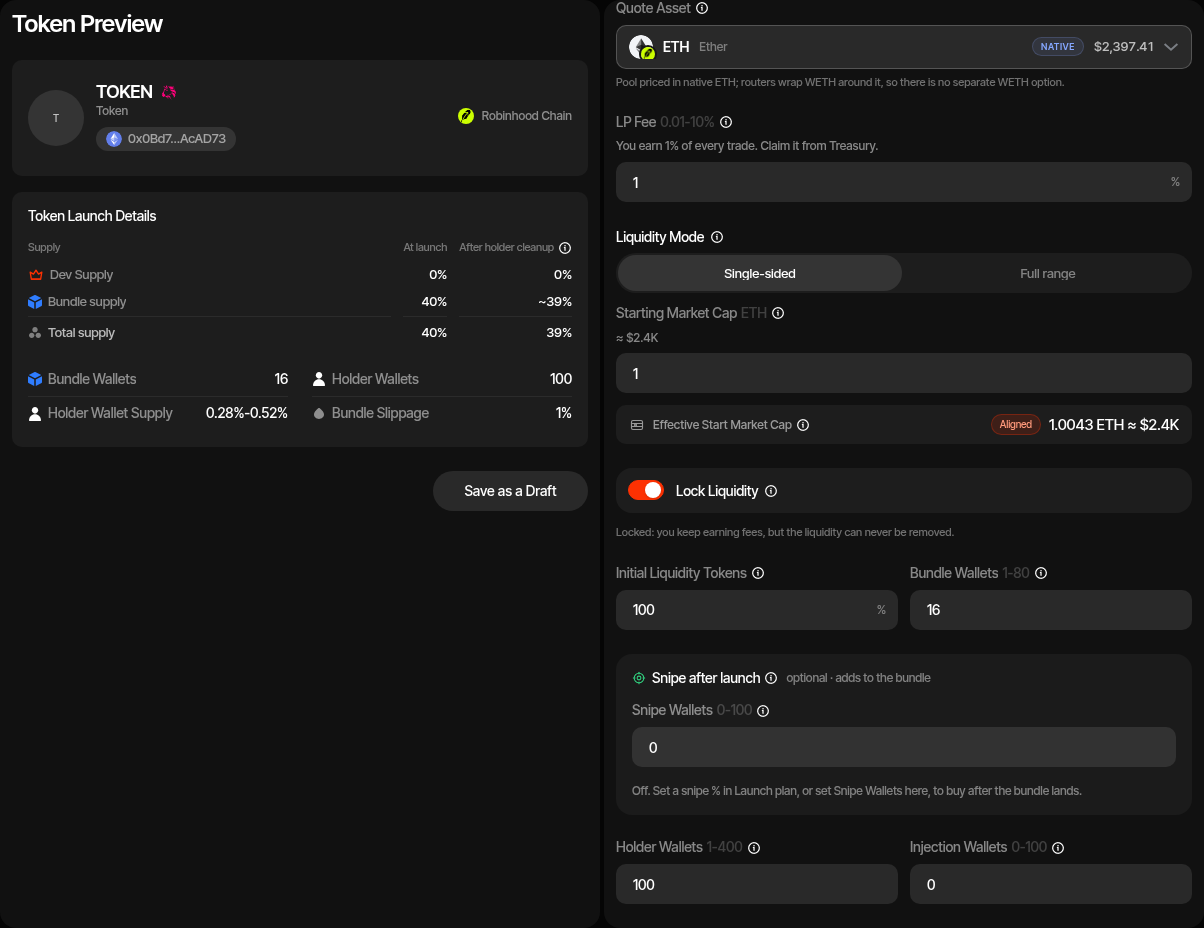
| Quote Asset | ETH, a catalogue token, or a custom ERC-20 address. Fixed after the first save. See Quote Assets. |
| LP Fee | 0.01% to 10% in 0.01% steps, default 1%. The hint under it states your share, for example "You earn 1% of every trade. Claim it from Treasury." The tick spacing the fee sets is shown in the Launch Preview. See The LP Fee. |
| Liquidity Mode | Single-sided (tokens only, from a starting market cap) or Full-range (tokens plus a quote amount). See Liquidity Mode. |
| Starting Market Cap | Single-sided: the opening market cap in the quote. The form shows the effective value after alignment, never below the one entered. |
| Liquidity Quote Amount | Full-range: the quote the dev wallet pairs into the position. |
| Initial Liquidity Tokens | Percentage of total supply put into the launch position. The remainder stays with the dev wallet as Dev Supply. |
| Lock Liquidity | On by default. See Lock Liquidity. |
| Launch plan | Sets the supply the dev wallet keeps, the bundle and the snipe on one bar, with the cost strip under it; see Launch Plan. Dev keeps plus bundle is the supply you control after launch, at most 99.9999%; the bundle's maximum depends on your terms and wallet count and is shown in the form. |
| Dev keeps | Launch plan row: supply the dev wallet keeps outside the pool instead of buying, 0% to 99.9999%. It is the complement of Initial Liquidity Tokens: editing it also updates Initial Liquidity Tokens. |
| Bundle · at launch | Launch plan row: the share the bundle wallets buy from the pool, after the LP fee, without the supply the dev wallet keeps. At 0% the launch is dev-only (create-only when Dev keeps is 0% too). |
| Launch cost | The bundle buys, the full-range position's quote, the creator gas reserve and per-wallet funding buffers. On a non-ETH quote the quote amounts are priced in ETH at the live swap rate, and Launch cost in <QUOTE> shows the quote total. There is no launchpad fee. The funding swap's 5% margin and 0.01 ETH gas allowance per swapping wallet are added in the Total cost. |
| Estimated Market Cap | Projected post-bundle spot price from the planner's pool math, multiplied by the total supply. |
| Bundle Wallets | Number of launch buyers inside the atomic transaction: up to 80. With no bundle buy the launch is dev-only (create-only when Dev keeps is 0% too), and no bundle or holder wallets are created. |
| Injection Wallets | Optional extra wallets, up to 100, funded with ETH for activity after launch. |
| Holder Wallets | Post-launch destinations for transfer or sell/buy token cleanup. With Token Cleanup Method Off they are still created and stay empty. |
| Token Cleanup Method | Off, Token Transfer, or Sell / Buy through the launch pool. A Sell / Buy cleanup pays the LP fee on both legs; while your launch position holds the pool's liquidity, that fee accrues to it. |
| CEX Funding | Funds the launch wallets with ETH cashouts using the standard CEX funding flow. |
| Advanced Controls | Bundle supply jitter, bundle slippage, creator gas reserve (default 0.1 ETH), funding buffer per wallet (default 0.01 ETH), trading slippage, cleanup delay, holder supply jitter, and cleanup slippage (Sell / Buy only). |
One Transaction, Real Buyers
The token deployment, the pool, the liquidity position and its lock, and every bundle wallet's buy land in a single atomic transaction. Nobody can trade the token before your launch buys, because the token, the pool and the buys appear together. Each Sumo wallet is the Uniswap swap sender and the token recipient of its own buy, so the pool records distinct buyers. If any part fails, the whole transaction reverts and nothing is spent beyond gas.
Token Address Known in Advance
The token address is fixed by the draft, so the launch simulation already shows it and the pool. If someone opens the planned pool at another price before your launch, Sumo plans again with a fresh token address.
3. Wallets
| Role | Description |
|---|---|
| Dev Wallet | The creator. Deploys the token, opens the pool, mints the position (and locks it, or holds it with locking off), pays the full-range quote and the launch gas, keeps Dev Supply outside the pool (it never buys), and claims the LP fees. |
| Bundle Wallets | The launch buyers that execute the ordered pool buys inside the atomic transaction. |
| Injection Wallets | Optional wallets funded with ETH for activity after launch. |
| Holder Wallets | Receive tokens through post-launch cleanup when token cleanup is enabled. |
You can use ready wallets, create new wallets, or buy aged wallets at this step, as on every other EVM launchpad. Uniswap V4 launches have no tax, freeze or sniper wallets.
4. Funding
Save the draft before funding. With CEX funding on, deposit the estimated ETH into the funding wallet and use Fund; otherwise fund the dev and bundle wallets directly and use Check Balances.
On an ETH-quoted launch that is all: buyers spend their ETH directly in the launch transaction.
On every other quote the wallets are funded in ETH first and then swapped into the quote before the launch through the treasury aggregator route, exactly as on lunch.fun: Swap ETH to <QUOTE> previews the rate, each wallet's shortfall and the ETH it spends, and the <QUOTE> → ETH direction swaps quote back into ETH. In full-range mode the dev wallet's shortfall includes the quote it pairs into the position.
5. Strategies
Optionally add starter strategies to the profile before launch: Counter Trade, DCA, and Limit Order, by hand or from a preset.
6. Launch Preview
The preview summarizes the quote asset, LP fee and tick spacing, liquidity mode with the effective starting market cap or the full-range quote amount, Initial Liquidity Tokens, Dev Supply, Lock liquidity, total supply, bundle supply control, initial price, launch cost, and estimated market cap.
- Simulate Launch - Plans the exact launch transaction, including the token address, pool and position, and reports any blockers before funds move.
- Launch Bundle - Hands the launch to the durable runner, which submits the atomic transaction, reads the launch receipt, runs token cleanup when enabled, and activates the profile.
The action card reports Launch admitted, Submitting atomic bundle, Bundle included, Reading launch receipt, Activating project, and finally Launch complete, then shows the token and pool.
Fees
Uniswap V4 launches have no launchpad fee. You pay Sumo's usual launch charge - one Launch Ticket or the 0.5% token-supply dev allocation - as on every other launchpad. On a launch with no bundle wallets the token-supply fee comes from the supply the dev wallet keeps outside the pool, as on Uniswap V2 and V3, so Dev keeps must be at least 0.5% of supply; otherwise use a Launch Ticket. See Platform Fees.
Snipe After Launch
Optional Snipe after launch wallets buy right after the launch lands. See Snipe After Launch. Snipe wallets pay their own gas, unlike bundle wallets. With a token quote you also set the quote amount per snipe wallet; Funding swaps it from ETH. The snipe wallets can join the holder cleanup.
After Launch
When the launch lands and reconciliation completes, the profile becomes active and opens in Live Trading on the Uniswap V4 pool. Live trading, strategies, and holder cleanup all run against it immediately.
LP Fee Claims
LP fees accrue in each trade's input currency: buys pay the quote, sells pay your token. They are not converted; you claim both as they are.
Use Claim LP Fees in the profile wallet actions menu. It shows what is claimable in each currency and claims it to the claiming wallet, which pays only the gas:
- Locked position: the fee locker's beneficiary (the dev wallet, unless you transferred the rights) claims.
- Unlocked position: the wallet holding the position NFT claims.
Claims are manual and appear in Treasury Logs.
Transfer Fee Rights
On a locked position, Transfer Fee Rights hands the right to claim its fees to another address in one step, for example a team multisig. The liquidity stays locked either way, and only the new beneficiary can claim or transfer the rights afterwards. This needs the admin role.
Unlocked Positions
With Lock liquidity off, the dev wallet holds the position NFT. It can lock it later through UNCX with Lock Liquidity (enter the position NFT id), or burn it to the dead address with Burn Liquidity, which gives up the liquidity and every future fee for good. A locked position can never be burned or withdrawn.
Launch Logs
Uniswap V4 profiles add a Launch Logs tab for plan simulation, bundle submission, receipt reconciliation, and holder cleanup.
Uniswap V3 Robinhood Launch
Launch a tax-free Robinhood Chain ERC-20 token on a full-range Uniswap V3 WETH pool with a selectable fee tier, staged launch buys, holder cleanup, and starter strategies.
SushiSwap Robinhood Launch
Launch a Robinhood Chain token through the SushiSwap Launchpad with a single creator transaction, ETH-denominated bundle commitments, holder cleanup, and starter strategies.