
Four.meme BSC Launch
Launch a BNB Smart Chain token through Four.meme with fixed launch parameters, optional tax settings, BSC bundle buys, and starter strategies.
Sumo supports Four.meme BSC launches on BNB Smart Chain. Four.meme is not a Uniswap-style pool launch: Sumo obtains the create transaction through the Four.meme API, predicts the token address, builds bundle buys against the Four.meme curve, and submits the launch atomically through BSC bundle builders.
Prerequisites
Before launching, make sure you have:
- Token metadata ready: name, ticker, image, description, and social links
- BNB for token creation, dev buy, bundle buys, gas reserves, and bundle priority fee
- A launch plan: target supply control, dev buy, bundle wallet count, and optional tax settings
- A wallet plan: use ready wallets from private keys, Wallet Farm, or another profile, or create new BSC wallets / buy aged BSC wallets through Wallet Marketplace during the wizard
Fixed Four.meme Parameters
Four.meme fixes total supply at 1 billion tokens with 18 decimals, 80% sale allocation, and PancakeSwap as the migration DEX. The quote asset and its raise target come from Four.meme's published presets. Four.meme re-prices the raise target with the quote's price (about 13.8 BNB on the native curve and about 10,000 on a stablecoin in October 2026); Sumo reads the current value when you simulate or launch.
Launch Flow
1. Info
Choose Four.meme BSC in the Launchpad field, then enter the token and profile details.
| Field | Required | Description |
|---|---|---|
| Launchpad | Yes | Select Four.meme BSC. The launchpad is locked after the draft is saved. |
| Profile Name | Yes | Internal Sumo profile name used after launch |
| Token Name | Yes | Public token name |
| Ticker | Yes | Public token symbol, auto-uppercased |
| Image | Yes | JPG or PNG image, uploaded to Four.meme when saved |
| Description | No | Public token description |
| X, Telegram, Website | No | Public social links included with the Four.meme metadata |
Total supply and decimals are fixed by Four.meme and are not edited in the standard Sumo flow.
2. Buy Mode
Four.meme uses BNB buy planning against the Four.meme curve.
Launch mode
| Mode | Description |
|---|---|
| Bundle | Dev and bundle wallets buy the curve only, and the launch stops under Four.meme's 80% sale curve so it never completes it. |
| Graduation Bundle | Requires a tax token. Dev and bundle wallets buy out the whole 80% sale curve. The last bundle buy takes every remaining offer, which completes the curve and makes Four.meme migrate the token to PancakeSwap V2 inside that same transaction, and Post-Graduation Wallets keep buying from the new pair — all in one atomic BSC bundle. The target runs up to 99%. |
The mode and the quote asset are fixed once the draft is saved; start a new draft to change them.
Graduation Bundle
A Graduation Bundle turns one BSC block into the whole life of the curve: create, buy it out, migrate, and buy back from the pair.
- The token must be a tax token. Selecting Graduation Bundle turns Tax Controls on and locks the switch, and the API refuses a graduation draft without it. Only a taxed (Token8) Four.meme token runs TradeStop and the PancakeSwap V2 migration inside the buy that completes the curve; an untaxed token sells its curve out and waits for Four.meme's operator to migrate it minutes later, which would leave the Post-Graduation Wallets with no pair to buy from in the same block. The fee presets and the tax split stay yours to set.
- The curve leg is fixed at 80%. Dev buy plus every bundle wallet always sums to Four.meme's full
maxOffers(800M of the 1B supply). The Launch plan's Bundle · at launch row is derived: 80% minus the dev buy. - The last bundle wallet is the crossing wallet. It targets whatever offers are left rather than a fixed share, because that is what TokenManager2 fills before it stops trading. Sumo funds it with 2% extra so it still passes the launch-time balance check if the earlier legs over-deliver slightly; Four.meme fills only to the cap and refunds the rest in the same transaction. The crossing wallet must keep a floor of its own — 0.41% of supply on BNB and stablecoin quotes, 1.21% on a tokenized stock — which is why the Dev Buy ceiling drops in this mode. That floor is not protection against outside buyers: if someone else's buy lands before the crossing, the launch still migrates, the crossing wallet just receives less than it planned for.
- Post-Graduation Buy is everything above 80%. The Launch plan runs from
80% + 0.01% per Post-Graduation Walletup to 99%, and the difference is split across the Post-Graduation Wallets. They buy from the migrated pair, which receives 98% of the raise (Four.meme keeps 2% as its migration fee), the liquidity-directed share of accrued curve buy tax, and the unsold token seed. When tax is directed to liquidity, that token seed is slightly below 200M and funding estimates include a margin for the adjustment. Recipient-only tax keeps the nominal seed. Those buys pay the pair's 0.25% fee, and the token's buy tax—always on in this mode—is skimmed from the pair's output as well. Although the controls allow 99%, tax can make targets near that limit unreachable; the launch planner rejects those targets. - Bundle and Post-Graduation Wallets share one budget. The quote asset's gas class sets it — 48 on BNB, 40 on a stablecoin, 30 on a tokenized stock — and the two counts must add up to at most that. Raising one lowers the other's ceiling.
- On an ERC-20 quote the crossing headroom comes back as the quote token. Four.meme's Helper swaps the whole funded BNB into the raised token and the manager pulls only what the curve still needs, so the leftover stays in the crossing wallet as the stock or stablecoin, not as BNB. The Funding table's tooltip on that row says roughly how much.
- Post-launch cleanup. Token Transfer is available after either launch mode, including before migration. Sell / Buy requires a Graduation Bundle that migrated. See Holder cleanup below.
- If the crossing completes the sale without migrating (for example the migration ran out of gas), the profile activates on the curve and Sumo notifies you that the sale is complete and awaiting Four.meme's migration. Four.meme's operator migrates the token to PancakeSwap shortly after; curve buys revert until then, and the profile moves to the pair automatically once the migration lands.
Holder cleanup
After the bundle lands, Sumo can move the controlled supply out of the launch wallets and into fresh holder wallets, so the token's holder list does not read as a handful of bundle addresses. Pick the method with the Token Cleanup Method selector in Buy Setup.
| Method | Description |
|---|---|
| Off | No cleanup. The bundle and post-graduation wallets keep what they bought. |
| Token Transfer | Each launch wallet transfers its tokens straight to holder wallets. Cheapest, but the transfer is visible as a transfer on the holder's history. |
| Sell / Buy | Each launch wallet sells on the migrated PancakeSwap V2 pair and the holder wallet buys the tokens back from it, so every holder's first transaction is an ordinary pair buy. Default for a Graduation Bundle. |
Available in both launch modes. Bundle mode offers Off and Token Transfer; transfers can run after confirmation while the token is still on the curve. Graduation Bundle adds Sell / Buy, which needs the migrated PancakeSwap pair. If graduation does not complete, Token Transfer still runs, while Sell / Buy is skipped with a notification. Switching back to Bundle mode preserves cleanup as Token Transfer. New Bundle drafts default to Off.
The tax is paid on every pair leg. A Graduation Bundle is always a tax token, and the Token8 tax is skimmed on the base side of a pair trade — so Sell / Buy pays the pair's 0.25% fee plus the sell tax on the way out and the pair fee plus the buy tax on the way back in. At the default 5% presets that is roughly 10.5% of the redistributed supply, on top of price impact. The Buy Setup summary shows the result as Final Supply Control next to the initial target. Token Transfer pays no pair fee and no tax, because the token's tax applies to pair trades, not to a plain wallet transfer.
Sources follow the launch mode. Cleanup redistributes from the bundle wallets and, for a Graduation Bundle, the Post-Graduation Wallets, so the holder count must be at least one holder per source wallet and at most 100 per source wallet, up to 400 holders in total. Injection wallets take no part in cleanup.
| Setting | Description |
|---|---|
| Token Cleanup Method | Off or Token Transfer in Bundle mode; Graduation Bundle also offers Sell / Buy. |
| Holder Wallets | Fresh BSC wallets receiving the redistributed supply. Between one and 100 per bundle and post-graduation wallet, up to 400. New drafts start with cleanup Off and no holder wallets; picking a cleanup method seeds 100. With Token Cleanup Method Off the wallets are still created, but nothing funds or fills them, and the per-bundle-wallet limits do not apply. |
| Native Funds Per Holder Wallet | Sell / Buy only: BNB sent to each holder wallet whose balance is below the cleanup buy's gas requirement. Defaults to 0.01 BNB. Leave empty to skip automatic holder gas funding. |
| Cleanup Delay | Advanced control: seconds between each launch wallet's cleanup sequence. Defaults to 5. |
| Holder Supply Jitter | Advanced control: randomizes the token amounts each holder wallet receives, 0-100%. Defaults to 10%. |
Quote asset
A Four.meme curve is priced in one raised token — the asset every buy pays into. Sumo offers the presets Four.meme publishes as launchable:
| Option | Description |
|---|---|
| BNB | The native curve. Every buy pays BNB straight into the curve, and the dev buy rides on the create transaction. |
| Stablecoins | USD1, USDT, and UUSD. Each curve raises about 10,000 of the stablecoin; Four.meme adjusts the exact figure. |
| Tokenized stocks | Four.meme's bStocks — NVDAB, SPCXB, QQQB, GMEB, FLNCB, DJTB, MRNAB, HOODB, and BNCB. Each has its own raise target in that stock, which Four.meme re-prices with the stock (NVDAB went from 60 to about 43 in October 2026), so a "Stock Meme" is priced and graduates in the stock, not in BNB. |
Launch wallets stay funded in BNB for every quote. On an ERC-20 quote each buy goes through Four.meme's Helper, which swaps BNB into the raised token on the way in, so no wallet ever has to hold the stock or stablecoin. Sumo reads the live BNB-to-quote rate to size each wallet: while it is loading the BNB requirement reads "Quoting"; if it cannot be priced, the launch cannot be sized and the draft is refused.
Two things change on an ERC-20 quote:
- The dev buy becomes its own transaction. The create carries no pre-sale, and the dev wallet buys immediately after it, so the dev wallet keeps gas for that buy on top of its deploy reserve.
- The bundle is smaller. Each hop buy costs more gas than a native curve buy, so the wallet budget follows the quote: 48 wallets on BNB, 40 on a stablecoin, 30 on a tokenized stock. Lowering the budget re-clamps the Bundle Wallets count.
The quote asset is fixed once the draft is saved; start a new draft to change it.
| Setting | Description |
|---|---|
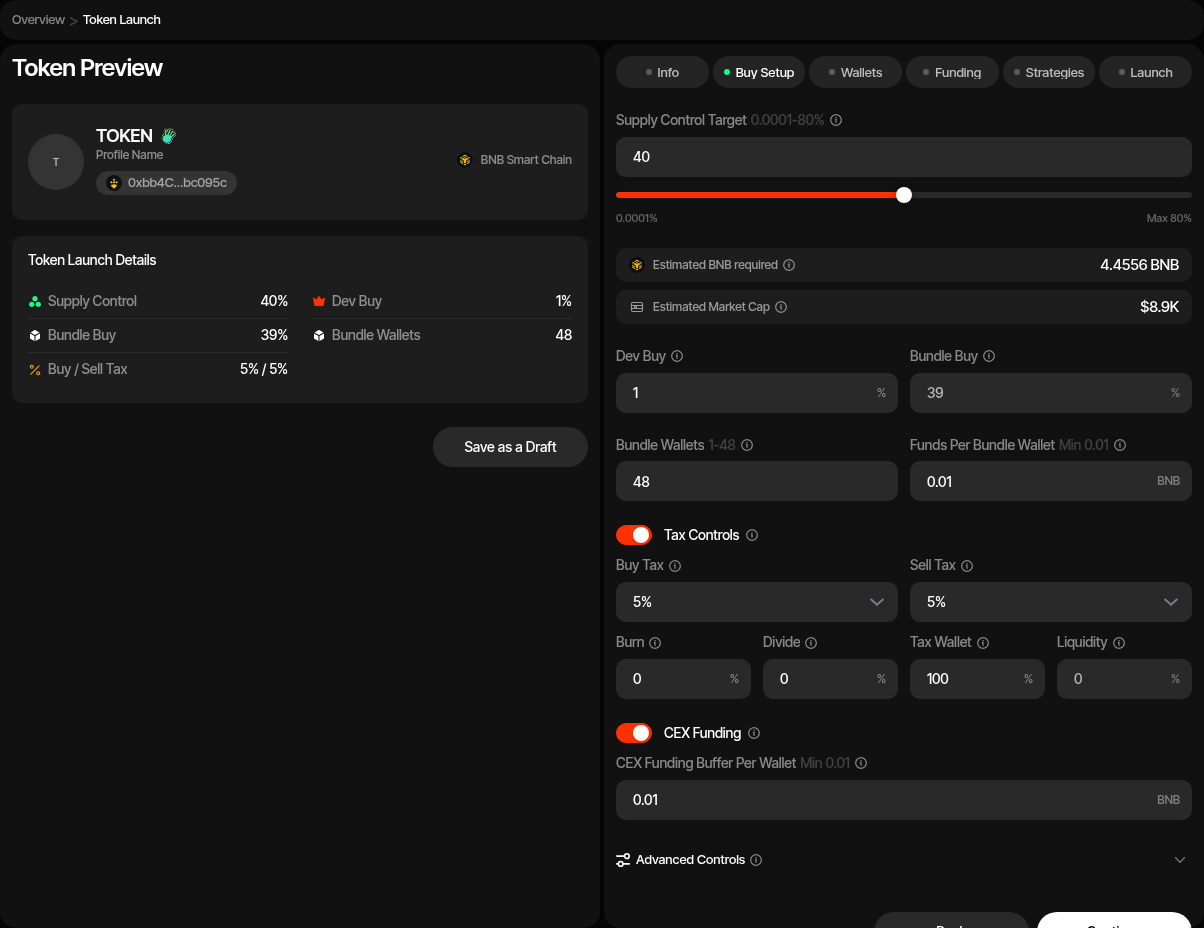
| Launch plan | Sets the dev buy, the bundle and the snipe on one bar, under the path cards; see Launch Plan. In Bundle mode Four.meme's sale curve completes at 80% of supply and a launch must leave part of it unsold, so dev buy plus bundle is capped at 79.6% on BNB and stablecoin quotes and 78.8% on a tokenized stock; the snipe can buy on to the 80% curve end. In Graduation Bundle mode the plan is the curve plus the pair, from 80% + 0.01% per Post-Graduation Wallet up to 99%. |
| Dev buy | Launch plan row: first buy on the curve, defaulting to 1%. On BNB it rides on the create transaction; on a catalogue quote it is its own transaction right after the create. In a Graduation Bundle it never buys from the pair, and its ceiling is 80% minus the crossing wallet's floor minus 0.01% for every other bundle wallet. |
| Bundle · at launch | Launch plan row: the share spread across the bundle wallets after the create transaction, without the dev buy. In a Graduation Bundle it is 80% minus the dev buy: the wallets buy the rest of the sale curve, and the last one is the crossing buy that completes it and migrates the token. |
| Post-Graduation Buy | Graduation Bundle only, read-only: the planned supply above 80%, bought from the migrated PancakeSwap V2 pair. |
| Post-Graduation Wallets | Graduation Bundle only: BSC wallets buying from the pair after the crossing buy migrates it. Shares the quote asset's wallet budget with Bundle Wallets. |
| Quote Asset | Asset the curve prices every buy in: native BNB or a catalogue stablecoin / tokenized stock. Locked after the draft is saved. |
| Bundle Wallets | Number of BSC wallets used for bundle buys. The budget follows the quote asset: up to 48 on BNB, 40 on a stablecoin, 30 on a tokenized stock. A Graduation Bundle shares that budget with the Post-Graduation Wallets. When the Launch plan's bundle is 0% there is no bundle buy (the row reads Dev buy only): the launch is dev-only (create-only when the dev buy is 0% too), so Bundle Wallets and Holder Wallets are hidden, no bundle or holder wallets are created, and no token cleanup runs unless snipe wallets join holder cleanup (see Snipe After Launch in Launch a New Token). With Token Supply launch-fee payment the fee then comes from the dev wallet, so the dev buy must be at least the fee share of supply; otherwise use a Launch Ticket. Bundle mode only; a Graduation Bundle always needs bundle wallets. |
| Bundle cost | Launch plan cost strip: create value, dev buy, bundle buys, and gas reserve. Quote-denominated buys are converted at the live hop rate. On a catalogue quote the tooltip shows the raised token the ordered buys need on the curve; the BNB shown is what Four.meme's Helper converts into it. CEX funding buffers, when enabled, are added in Funds needed. |
| Market cap | Launch plan cost strip (MCap after with a snipe). Estimated from the selected quote's curve math, its USD price, and the BNB/USD reference price. In a Graduation Bundle it comes from the migrated pair's spot price after the planned post-graduation buys. |
| Funds Per Bundle Wallet | BNB gas reserve per bundle wallet. |
| Injection Wallets | Optional extra wallets, up to 100, funded with BNB for activity after launch. They do not buy in the launch or take part in cleanup. |
| Funds Per Injection Wallet | Shown when Injection Wallets is above 0. BNB sent to each injection wallet during funding. Defaults to 0. |
| CEX Funding | Optional Husher funding path for distributing BNB. |
| CEX Funding Buffer Per Wallet | Extra BNB added per wallet when CEX funding is enabled. |
| Advanced Controls | Supply jitter and BSC bundle priority fee. |
| Trading slippage | Default 1%, at most 10%. Becomes the new profile's default slippage for strategies and instant trades, changeable later in profile settings. On a taxed token the tax is added on top and saved (for example 1% + 5% tax = 6%). |
| Cleanup slippage | Sell / Buy holder cleanup only. Default 2%, at most 10%, not counting tax: the token's buy or sell tax is added automatically for each leg. Each cleanup sell and buy gets up to three attempts, each with 1% more tolerance, up to 10%. |
Tax Controls
Four.meme tax settings are different from the shared Uniswap-style tax contract.
| Setting | Description |
|---|---|
| Buy Fee Rate | Four.meme buy fee preset. Allowed values are 1%, 3%, 5%, and 10%. |
| Sell Fee Rate | Four.meme sell fee preset. Allowed values are 1%, 3%, 5%, and 10%. |
| Burn Rate | Percentage of collected tax allocated to burn. |
| Dividend Rate | Percentage of collected tax allocated to holder dividends. |
| Recipient Rate | Percentage of collected tax allocated to the tax recipient wallet. Defaults to 100%. |
| Liquidity Rate | Read-only remainder after burn, dividend, and recipient rates. |
| Tax Wallet | Wallet used as the tax recipient when tax is enabled. |
The four split rates must add up to 100%. In the wizard, liquidity rate is derived from the other three values.
3. Wallets
Add, import, or generate wallets for each required BSC role.
| Role | Description |
|---|---|
| Dev Wallet | Authenticates with Four.meme, uploads metadata, creates the token, pays create value, and performs the dev buy. |
| Bundle Wallets | Execute Four.meme curve buys in the BSC launch bundle. |
| Post-Graduation Wallets | Graduation Bundle only. Buy the launched token from the migrated PancakeSwap V2 pair in the same block. |
| Holder Wallets | Either mode. With cleanup on, receive the launch wallets' supply after confirmation. On Sell / Buy they are also funded with BNB for their own pair buy. With Token Cleanup Method Off they are still created and stay empty. |
| Injection Wallets | Optional wallets funded with BNB for activity after launch. They take no part in the launch or cleanup. |
| Tax Wallet | Required only when Four.meme tax is enabled. |
You can use ready wallets, create new wallets, or buy aged wallets at this step. Ready-wallet paths include importing private keys, pulling wallets from Wallet Farm, or reusing wallets from another profile. Additional paths include creating new wallets or buying aged inventory from Wallet Marketplace.
Sniper wallets are not used by Four.meme BSC launches, and holder wallets appear in either mode with holder cleanup enabled.
4. Funding
Save the draft before funding. Sumo uploads the image to Four.meme when needed and stores the Four.meme image URL on the launch draft.
The funding table tracks BNB requirements for token creation, dev buy, bundle buys, gas reserves, and BSC bundle priority fee. With Sell / Buy holder cleanup it also carries one fixed BNB row per holder wallet for its cleanup buy. If CEX funding is enabled, deposit the estimated BNB into the funding wallet and use Fund to distribute it through Husher. If CEX funding is disabled, fund the dev and bundle wallets directly and use Check Balances.
5. Strategies
Optionally add starter strategies to the profile before launch. You can configure Counter Trade, DCA, and Limit Order strategies by hand, or apply a strategy preset: Sumo ships built-in Hyped, Standard, and Staircase presets, and your org can save its own presets for reuse across launches and imports. Strategies are saved with the draft and can be reviewed after the token is live.
6. Launch Preview
The preview shows:
- Four.meme metadata and uploaded image status
- Predicted token address
- Dev and bundle wallet counts
- BNB funding rows
- Supply split across dev and bundle buys
- Optional tax configuration and tax wallet
When launched, Sumo builds the Four.meme create transaction, appends bundle buys, simulates the BSC bundle, submits it to supported BSC builders, and confirms the landed transactions on-chain.
Snipe After Launch
Optional Snipe after launch wallets buy right after the launch lands, with their own sizing, delay, max premium, pacing and gas priority. Set Snipe Wallets to 0 (the default) and the launch is unchanged. See Snipe After Launch. On a token quote, snipe wallets hold BNB only and Four.meme converts it inside each buy, so there is no quote amount to fund. Snipe after launch is not available on a Graduation Bundle with a token quote (after migration the pool needs the quote token).
After Launch
When the bundle lands, the profile becomes active and opens in Live Trading. Four.meme profiles use the Four.meme connector for quotes, trades, migration progress, and post-launch spot-price data.
Launch Logs
Four.meme profiles add a Launch Logs tab for metadata upload, create transaction preparation, bundle simulation, bundle submission, and confirmation.
Further Reading
- What Are Memecoin Bonding Curves? — this launchpad's curve overlaid on every other supported launchpad, with graduation math
- How Much Does It Cost to Launch a Memecoin? — simulate launch cost, starting market cap, and supply held for this launchpad
PancakeSwap V2 BSC Launch
Launch a BNB Smart Chain ERC-20 token on PancakeSwap V2 with WBNB liquidity, BSC bundle submission, tax controls, and starter strategies.
Flap BSC Launch
Launch a BNB Smart Chain token through Flap with a BNB or catalogue quote asset, Bundle or Graduation Bundle mode, Tax V3 controls, dividend distribution, BSC bundle buys, and starter strategies.