
Insights
Trading pulse, strategy breakdowns, and execution health analytics.

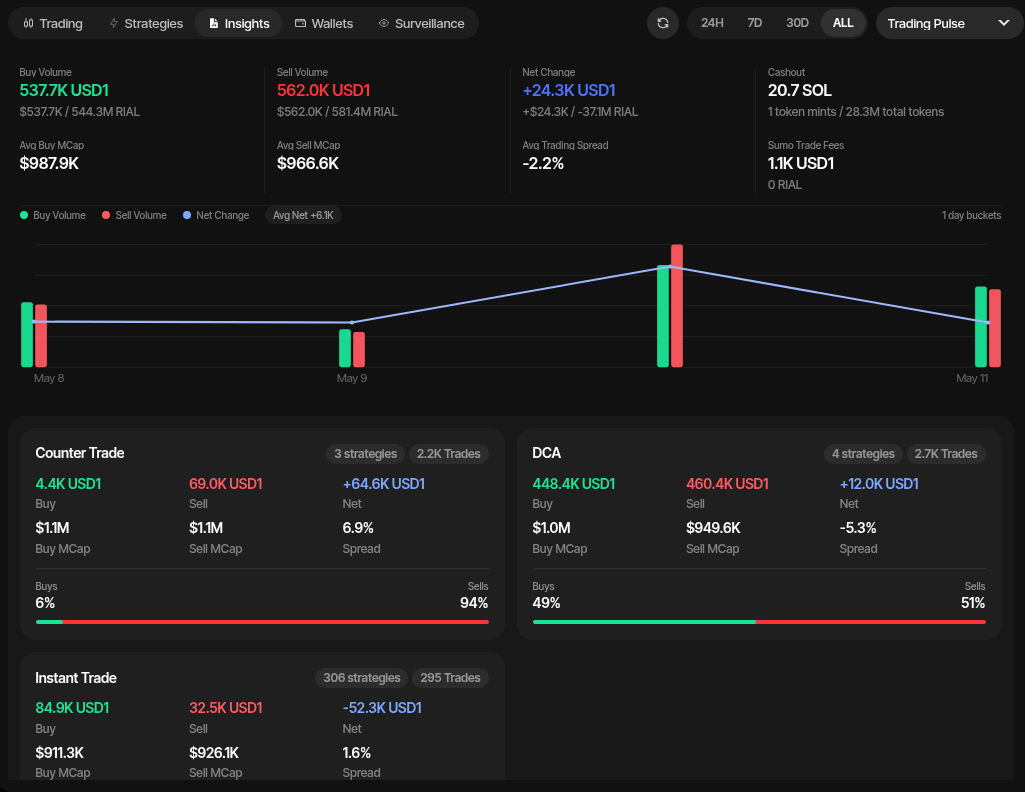
The Insights tab gives you a performance view for the active profile. Use it to understand buy/sell flow, net position change, strategy contribution, withdrawals, Sumo trading fees, and execution quality without leaving the live trading workspace.
Access it from the profile workspace by opening Live Trading and selecting Insights below the chart.
Time Range
Filter all metrics by time range using the buttons in the top right:
- 24H — Last 24 hours
- 7D — Last 7 days
- 30D — Last 30 days
- ALL — All time
- Custom — Pick a start and end date and time (up to 400 days). The window is remembered in your browser. The chart's Measure Range tool can also open Insights on the window you dragged.
Trend percentages compare the selected window with the window of the same length just before it.
Use the section selector beside the range controls to switch between Trading Pulse, Market Flow, Strategy Breakdown, and Execution Health.
Trading Pulse
Trading Pulse summarizes profile-level trading activity for the selected period:
| Metric | Description |
|---|---|
| Buy Volume | Total buy volume in quote asset, USD, and tokens |
| Sell Volume | Total sell volume in quote asset, USD, and tokens |
| Net Change | Net position change (buys minus sells) |
| Withdraw | Total withdrawn in native asset and token mints |
| Avg Buy MCap | Average market cap at which buys were executed |
| Avg Sell MCap | Average market cap at which sells were executed |
| Avg Trading Spread | Percentage spread between average buy and sell prices |
| Sumo Trade Fees | 1% platform fees attributed to Sumo-executed trading volume |
The chart visualizes buy volume, sell volume, and net change over time with interactive hover tooltips.
Market Flow
Market Flow shows every trade on the profile's pool in the selected window, not only Sumo orders, split into three rows:
| Row | Buy / Sell | Net |
|---|---|---|
| Total | All buys and sells on the pool | Buys minus sells (buy pressure) |
| Sumo | Trades from this profile's wallets | Cash flow: sells minus buys |
| Organic | Everyone else (Total minus Sumo) | Buys minus sells |
Each cell shows USD (each trade at its own time's quote price), the quote amount, and the number of trades. Because Market Flow reads trades seen on the pool, its Sumo row can differ slightly from Trading Pulse, which counts Sumo's confirmed orders (for example an order routed through another pool). When the pool's recorded history starts inside the window, a note says Market data from that time, and all three rows cover only that part. With ALL selected, Market Flow covers the pool's trades from a day before the profile was created, up to the last 400 days; Last 400 days appears next to the title when that limit applies.
Strategy Breakdown
Strategy Breakdown groups performance by strategy type, such as Counter Trade, DCA, Limit Order, and Instant Trade. Each card shows buy volume, sell volume, net change, average buy/sell market cap, spread, trade counts, and the buy/sell split.
Execution Health
Execution Health monitors order reliability and latency:
| Metric | Description |
|---|---|
| Total Orders | Number of orders submitted |
| Confirmed | Successfully landed on-chain |
| Failed | Orders that failed |
| Success Rate | Percentage of confirmed orders |
| Submit-Landed P50/P95 | Latency from submit to on-chain confirmation (median and 95th percentile) |
| Create-Landed P50/P95 | Latency from order creation to confirmation |
| Retry Rate | Percentage of orders that required retries |
| Avg Attempts | Average retry count per order |
A failure breakdown shows the most common failure reasons so you can quickly separate market conditions from configuration or execution issues.