
Instant Trade
Execute one-off buy or sell trades immediately from the dashboard.
Instant Trade lets you execute manual buys and sells on demand from the Live Trading page. Sumo offers quick presets for fast intervention, a custom trade panel for exact one-off trades, and a Swap modal with both Instant Trade and Treasury Swap tabs.
Quick Trade Presets
The Instant Trade panel is available on the Live Trading page. It shows:
- Quick Buy - preset buttons for instant buy trades
- Quick Sell - preset buttons for instant sell trades
Each preset shows a configured range. When you click a preset, Sumo picks a random amount within that range and submits the trade across the profile's active wallets.
Presets
Each side can have up to six presets. Presets are configured separately for buys and sells in Profile Settings. Profiles without their own presets use the organization defaults.
| Preset Unit | Description |
|---|---|
| USD | Trade a random dollar value in the configured range. |
| Quote / Native | Trade a random amount in the profile quote asset, such as SOL, USDC, WETH, or another quote asset. |
| Token | Trade a random amount of the profile token. |
Preset labels reflect the configured unit, for example $100-$300, 1-2 SOL, or 10K-20K TOKEN.
Volume Tracking
The Instant Trade panel shows cumulative volume for each side:
- Buy Volume - Total value of instant buys executed
- Sell Volume - Total value of instant sells executed
Custom Trade
Use Custom Trade when you want the speed of Instant Trade but need to choose the exact amount.
| Field | Description |
|---|---|
| Buy / Sell / Convert | Select the trade direction. Convert runs a Treasury Swap between the native asset, the quote token, and the chain's supported stablecoins in the same rows. It appears on every profile whose chain supports Treasury Swap (not Stable Mainnet) and is hidden for read-only viewers. |
| Amount | Enter the trade amount. |
| Amount Currency | Choose whether the amount is in USD, quote/native, or token units. In Convert mode, choose which asset to spend (native, quote, or a stablecoin). |
| Receive | Convert mode only. A second row under the balance shows the estimated amount you receive and its asset picker. Defaults to the quote token, or a stablecoin when buys already spend the native asset; only assets the treasury swap can pair with the spend asset are listed. |
| Wallet | Choose all active wallets, a wallet group, or an individual wallet. |
| Slippage | Maximum price movement allowed for the trade. |
| Private Relay | On supported EVM profiles, routes eligible trades through private relays for MEV protection. |
The Max button fills the largest available amount for the selected direction, unit, and wallet target when a balance is available.
Swap Modal
For more control over manual trades, use the Swap button in the top navigation bar. This opens a swap modal with two tabs.
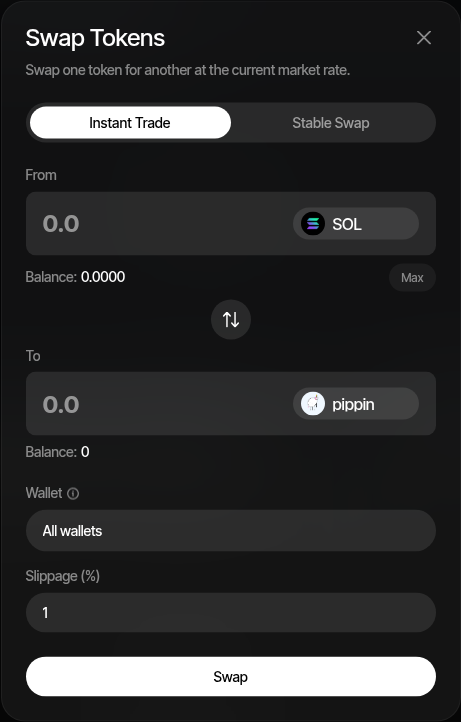
Instant Trade Tab
The Instant Trade tab swaps between the profile token and the profile quote/native asset.
| Field | Description |
|---|---|
| From | The token you're selling and the amount. Shows your current balance with a Max button. |
| To | The token you're receiving. The estimated output updates as you type. |
| Reverse | Click the arrow button to flip the swap direction. |
| Wallet | Choose all active wallets, a wallet group, or an individual wallet. |
| Slippage | Maximum price movement allowed for the trade. |
| Private Relay | On supported EVM profiles, routes eligible trades through private relays for MEV protection. |
Enter an amount in the From field, review the estimated output in the To field, and click Swap to execute.
Treasury Swap
The Treasury Swap tab is available from the same Swap modal on every profile.
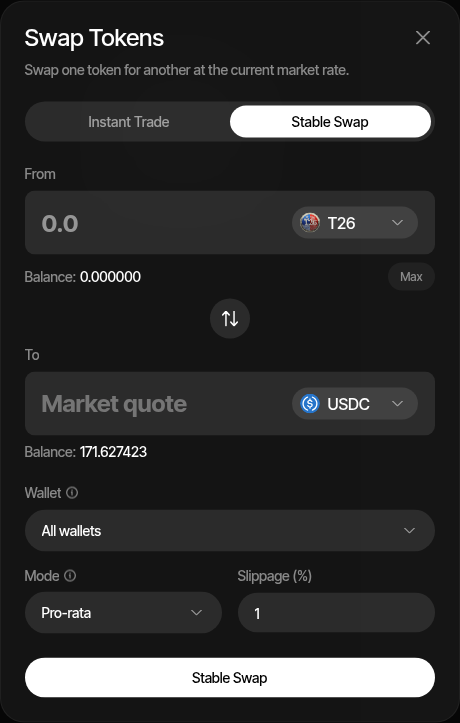
Use Treasury Swap when you want to move between a supported profile asset and a registered stablecoin, or between the native asset and a custom quote token. The available assets depend on the profile's chain and configured token/quote assets. The Custom Trade panel's Convert mode runs the same treasury swap between the native asset, the quote token, and stablecoins without opening the modal (the project token is only traded through Buy and Sell); if your wallets hold the native asset but none of the quote token, a notice above Quick Buy switches the panel to that mode.
| Field | Description |
|---|---|
| From | The asset you're selling and the aggregate amount. |
| To | The asset you're receiving. Market quote output is shown after quoting. |
| Asset Selectors | Choose the From asset first; the To list then shows only the assets that pair with it. Picking the current To asset as From flips the pair. |
| Reverse | Swap the From and To assets. |
| Wallet | Choose all active wallets, a wallet group, or an individual wallet. |
| Mode | Pro-rata spreads the input across wallets proportionally. Rebalance uses wallets with more available balance first to even out balances. |
| Slippage | Maximum price movement allowed for the trade. |
| Private Relay | On supported EVM profiles, routes eligible trades through private relays for MEV protection. |
Enter the amount, choose the wallet target and mode, then click Treasury Swap.
Failed Trades
A failed instant trade shows its reason in the toast and in the Trade Logs tooltip as Label: message. A trade that failed on slippage reads Slippage exceeded: Price moved more than your X% slippage. Try again with higher slippage. When the profile's aggregator runs on auto-slippage, the provider picks the tolerance, so the message leaves the percentage and the advice out. On Solana, when the token charges a Token-2022 transfer fee, the message also names the fee and suggests a slippage above it plus room for price movement. EVM and Tron trades get the slippage sentence without a fee note.
When to Use
- Price support - Quickly buy when you see a large sell hitting the pool
- Taking profit - Sell a portion when price spikes
- Precise amounts - Use Custom Trade or the Swap modal when you need to trade an exact amount rather than a random preset range
- Stablecoin rotation - Use Treasury Swap to move between supported stablecoin/profile asset pairs
- Testing - Verify your wallets and pool are working before setting up automated strategies
For automated trading, use Counter Trade, DCA, or Limit Orders instead.