
Uniswap V3 Robinhood Launch
Launch a tax-free Robinhood Chain ERC-20 token on a full-range Uniswap V3 WETH pool with a selectable fee tier, staged launch buys, holder cleanup, and starter strategies.
Robinhood Uniswap V3 deploys a tax-free ERC-20 launch token on Robinhood Chain, creates a token/WETH Uniswap V3 pool at the fee tier you pick, mints a full-range liquidity position while public trading is still closed, runs launch-wallet buys, then opens public trading and activates the profile.
Choose this launch method for a tax-free token on a Uniswap V3 pool. For launch taxes, wallet limits, or tax clog, see Uniswap V2 Robinhood Launch; for your own LP fee and any quote token, see Uniswap V4 Robinhood Launch.
| Robinhood Uniswap V3 | |
|---|---|
| Pool type | Uniswap V3 pool, token/WETH, fee tier 0.01%, 0.05%, 0.30% or 1.00% |
| Liquidity | Full-range V3 position NFT owned by the dev wallet |
| Tax controls | Not available - V3 launch tokens are tax-free |
| Bundle wallets | Up to 200 |
| Holder cleanup | Token Transfer or Sell / Buy, up to 400 holder wallets |
Prerequisites
Before launching, make sure you have:
- Token metadata ready: name, ticker, image, description, and social links
- Total supply and token decimals
- ETH on Robinhood Chain for deployment, pool setup, initial liquidity, launch buys, and gas buffers
- A launch plan: target supply control, pool-token percentage, pool fee tier, bundle wallet count, and holder cleanup preference
- A wallet plan: use ready wallets from private keys, Wallet Farm, or another profile, or create new Robinhood Chain wallets / buy aged EVM wallets through Wallet Marketplace during the wizard
Robinhood Chain Network
Robinhood Chain uses chain ID eip155:4663 and ETH for gas. Robinhood Uniswap V3 launches use WETH as the quote token, so operators enter ETH amounts in the wizard and Sumo stores the Robinhood Chain WETH quote asset on the active profile after pool creation.
Launch Flow
1. Info
Choose Robinhood Uniswap V3 in the Launchpad field, then enter the token and profile details.
| Field | Required | Description |
|---|---|---|
| Launchpad | Yes | Select Robinhood Uniswap V3. The launchpad is locked after the draft is saved. |
| Profile Name | Yes | Internal Sumo profile name used after launch |
| Token Name | Yes | ERC-20 token name |
| Ticker | Yes | ERC-20 token symbol, auto-uppercased |
| Total Supply | Yes | ERC-20 total supply before decimals |
| Decimals | Yes | ERC-20 display decimals, commonly 18 |
| Image | Yes | JPG or PNG image, up to 2 MB |
| Description | No | Public token description |
| X, Telegram, Website | No | Public social links attached to the profile |
2. Buy Mode
| Setting | Description |
|---|---|
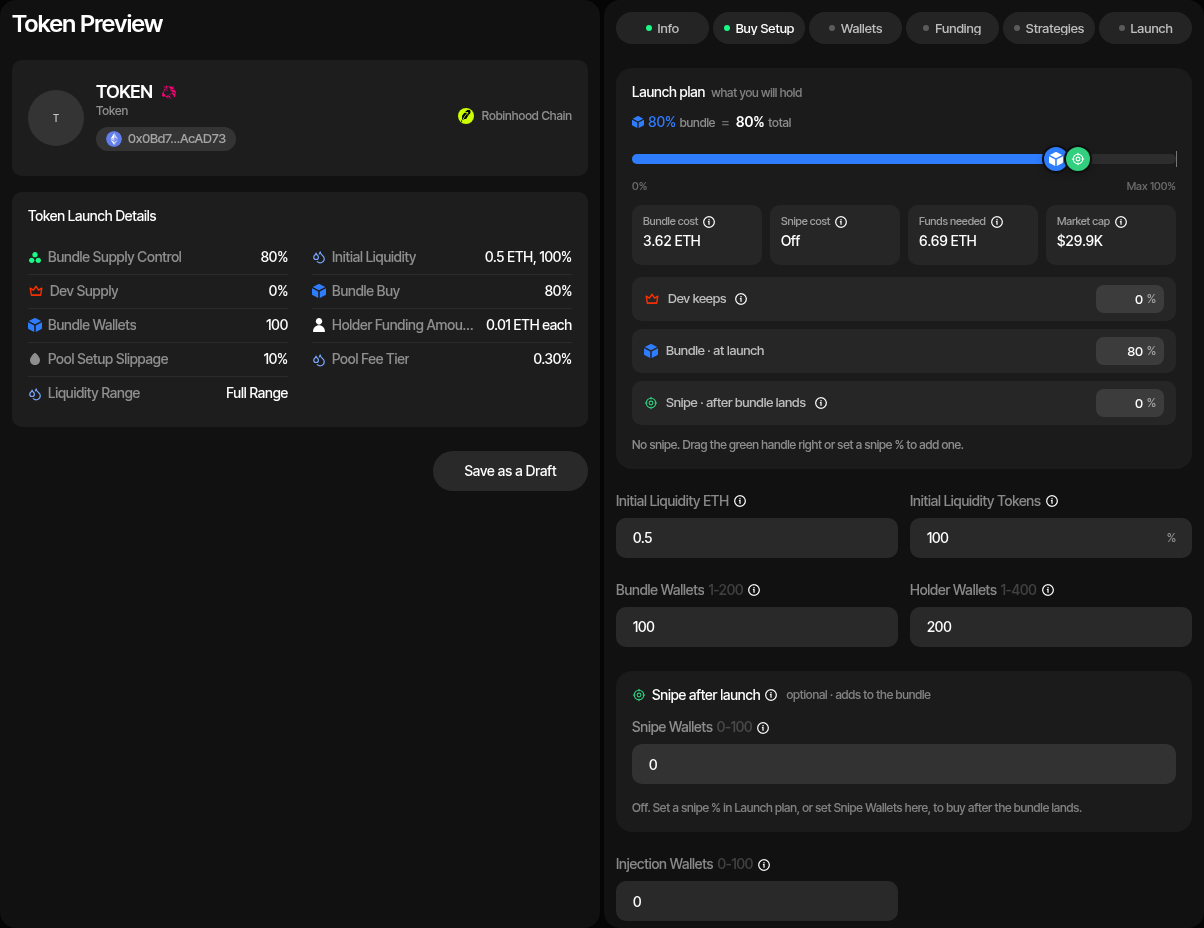
| Launch plan | Sets the supply the dev wallet keeps, the bundle and the snipe on one bar, with the cost strip under it; see Launch Plan. Dev keeps plus bundle: 1% to 99.99% (Max 99.99%). |
| Initial Liquidity ETH | ETH supplied by the dev wallet during pool setup. |
| Initial Liquidity Tokens | Percentage of total supply supplied to the pool. The remainder stays with the dev wallet. |
| Pool Fee Tier | Fee charged by the Uniswap V3 pool on every swap: 0.01%, 0.05%, 0.30% (default), or 1.00%. Initial liquidity always uses the canonical full range. |
| Bundle cost | Launch plan cost strip: initial pool liquidity, launch buys with the pool fee, each wallet's gas reserve, and the deployer's deploy reserve. CEX funding buffers are not part of it; they are added in Funds needed. |
| Market cap | Launch plan cost strip (MCap after with a snipe): estimated from the pool composition after launch buys, using the ETH/USD reference price. |
| Dev keeps | Launch plan row: supply the dev wallet keeps beside the liquidity instead of buying, 0% to 99.9999%. It is the complement of Initial Liquidity Tokens: editing it also updates Initial Liquidity Tokens. |
| Bundle · at launch | Launch plan row: the share the bundle wallets buy from the pool, without the supply the dev wallet keeps. |
| Bundle Wallets | Number of Robinhood Chain wallets used for launch buys, up to 200. With 0 bundle wallets the launch only deploys the token and adds liquidity: there are no launch buys, Holder Wallets are hidden, and no token cleanup runs. With Token Supply launch-fee payment the fee then comes from the supply the dev keeps outside the pool, so that retained share must be at least the fee share of supply; otherwise use a Launch Ticket. |
| Funds Per Bundle Wallet | ETH reserved per bundle wallet for gas. Minimum 0.01 ETH. |
| Injection Wallets | Optional extra wallets, up to 100, funded with ETH for activity after launch. They do not buy in the launch or take part in cleanup. |
| Funds Per Injection Wallet | Shown when Injection Wallets is above 0. ETH sent to each injection wallet during funding. Defaults to 0. |
| Token Cleanup Method | Off, Token Transfer, or Sell / Buy. Redistributes bundle-wallet tokens to holder wallets and sweeps residual native balances after the launch buys confirm. New Robinhood drafts default to Sell / Buy. See Token Cleanup. |
| Holder Wallets | Use at least one holder per bundle wallet and no more than 100 holders per bundle wallet, up to 400 in total. With Token Cleanup Method Off the wallets are still created, but nothing funds or fills them, and the per-bundle-wallet limits do not apply. |
| CEX Funding | Optional funding wallet path for distributing ETH to launch wallets. |
| CEX Funding Buffer Per Wallet | Extra ETH added per wallet when CEX funding is enabled. Minimum 0.01 ETH. |
| Advanced Controls | Pool Setup Slippage, bundle supply jitter, holder supply jitter, and cleanup delay. |
| Trading slippage | Default 1%, at most 10%. Becomes the new profile's default slippage for strategies and instant trades, changeable later in profile settings. |
| Cleanup slippage | Sell / Buy holder cleanup only. Default 2%, at most 10%. Each cleanup sell and buy gets up to three attempts, each with 1% more tolerance, up to 10%. |
3. Wallets
Add, import, or generate wallets for each required Robinhood Chain role.
| Role | Description |
|---|---|
| Dev Wallet | Deploys the token, creates the pool, mints the liquidity position, opens trading, and receives retained supply and the position NFT. |
| Bundle Wallets | Execute launch buys before public trading is opened. |
| Injection Wallets | Optional wallets funded with ETH for activity after launch. They take no part in the launch or cleanup. |
| Holder Wallets | Receive tokens through post-launch cleanup when token cleanup is enabled. With Token Cleanup Method Off they are still created and stay empty. |
You can use ready wallets, create new wallets, or buy aged wallets at this step. Ready-wallet paths include importing private keys, pulling wallets from Wallet Farm, or reusing wallets from another profile. Additional paths include creating new wallets or buying aged inventory from Wallet Marketplace.
Tax and sniper wallets are not used by Robinhood Uniswap V3 launches.
4. Funding
Save the draft before funding. If CEX funding is enabled, deposit the estimated Robinhood Chain ETH into the funding wallet, check the balance, then use Fund to distribute ETH. If CEX funding is disabled, fund the dev and bundle wallets directly and use Check Balances.
The funding table tracks ETH requirements for the dev and bundle wallets. It supports address copying, allocation randomization, per-wallet allocation edits, and balance checks. The dev allocation and final bundle allocation are auto-balanced from the target.
5. Strategies
Optionally add starter strategies to the profile before launch. You can configure Counter Trade, DCA, and Limit Order strategies by hand, or apply a strategy preset: Sumo ships built-in Hyped, Standard, and Staircase presets, and your org can save its own presets for reuse across launches and imports. Strategies are saved with the draft and can be reviewed after the token is live.
6. Launch Preview
The preview action sequence is:
- Deploy Token - Deploys the ERC-20 launch token from the dev wallet with the selected fee tier baked in.
- Create Pool - Creates the token/WETH Uniswap V3 pool, sets launch-wallet exemptions, and mints the full-range liquidity position while public trading remains closed. The preview shows the Position NFT ID once minted.
- Launch - Starts the durable launch runner for bundle-wallet buys with live buy progress, opens public trading, runs token cleanup when enabled, activates the profile, and submits ownership renounce.
Background Launch Runner
Robinhood launches continue in the background after the Launch action starts. The preview shows launch progress while the runner submits and confirms launch buys.
Snipe After Launch
Optional Snipe after launch wallets buy right after the launch lands, with their own sizing, delay, max premium, pacing and gas priority. Set Snipe Wallets to 0 (the default) and the launch is unchanged. See Snipe After Launch. On Uniswap V3 the entry price is only known once the launch lands, so the form shows no supply estimate, and there is no holder cleanup toggle.
After Launch
When all launch buys confirm and public trading opens, the profile becomes active and opens in Live Trading. You can monitor trades, review launch logs, and activate starter strategies.
The dev wallet holds the full-range position NFT, so the pool's trading fees accrue to it: collect them with Claim LP Fees from the Treasury dashboard. To commit the liquidity, Lock Liquidity locks the position NFT through UNCX, permanently or until a date, and keeps its fees claimable; Burn Liquidity gives the liquidity and its fees up for good.
Uniswap V2 Robinhood Launch
Launch a Robinhood Chain ERC-20 token on a Uniswap V2 WETH pair with staged launch buys, optional tax controls, holder cleanup, and starter strategies.
Uniswap V4 Robinhood Launch
Launch a Robinhood Chain token straight into its own hookless Uniswap V4 pool, with an LP fee you choose, single-sided or full-range liquidity quoted in ETH or an ERC-20, the position locked for fees forever by default, an atomic launch bundle, and starter strategies.