
Token Cleanup
Rebalance token holdings between wallet groups using direct transfers or buy/sell redistribution.
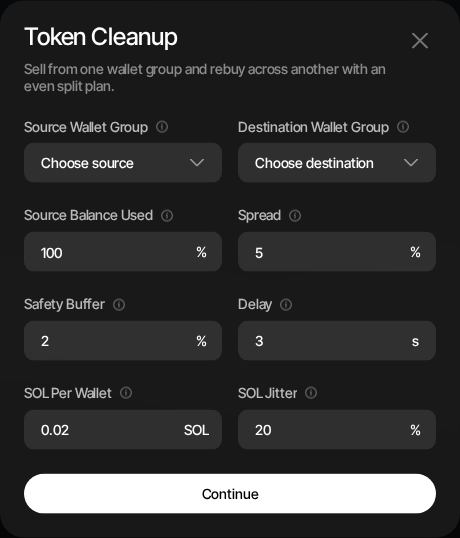
Token Cleanup lets you rebalance project-token holdings from one wallet group to another. You can either transfer tokens directly to the destination group or use buy/sell redistribution where source wallets sell on the DEX and destination wallets buy back through the same market.
Token Cleanup is available on Solana and EVM profiles. Both support direct transfer and buy/sell redistribution. EVM transfer mode uses batched Gaslite transfers; EVM buy/sell mode uses direct Uniswap V2, V3, or V4 execution against a wrapped-native quote pool. Tron profiles do not have token cleanup.
When to Use
- Rebalancing — Redistribute token holdings across a different set of wallets
- Group rotation — Move positions to a fresh wallet group after generating new wallets
- Portfolio restructuring — Consolidate or spread holdings as your profile changes
How to Use
- Open the profile's Wallets tab
- Click Token Cleanup from the wallet actions menu
- Select the Redistribution Mode
- Select the source wallet group
- Select the destination wallet group
- Configure the cleanup parameters
- Click Continue to review the plan
- Click Start Token Cleanup to execute
Redistribution Mode
| Mode | Description |
|---|---|
| Token Transfer | Sends project tokens directly from source wallets to destination wallets. This avoids swap slippage and DEX fees, and is best when you only need to move balances between wallet groups. |
| Buy/Sell | Source wallets sell project tokens on the DEX and destination wallets buy them back. This creates market activity, but proceeds are affected by slippage, DEX fees, token taxes, gas, and the configured safety buffer. |
Buy/Sell is the default mode. On Solana, Bundle sends each source sell and destination buy together in a Sender Max bundle, so they land atomically (adds a Jito Tip, default 0.002 SOL, per bundle). It defaults on when the project's quote is not SOL (for example USDC or USD1), where a bundle hands the quote through more relay wallets than a single transaction can, and off for SOL-quoted projects, where each leg is a single transaction. You can change it either way; the choice is kept if you switch to Token Transfer and back, and a hint shows when it differs from the recommendation. Switch to Token Transfer when you only need to move balances between wallet groups without market activity.
On Solana, Buy/Sell uses the cleanup's own Slippage (default 2%, at most 10%) for each sell and buy, not the profile's trading slippage. It is the tolerance of each leg's first attempt. A leg that fails is retried up to twice, each time from a fresh price and with 1% more tolerance on both the sell and the buy, up to 10%: a 2% cleanup tries at 2%, 3% and 4%, and a 9% cleanup at 9%, 10% and 10%. Every retry gets the wider tolerance, whatever made the previous attempt fail. In Sender Max bundle mode, the buy leg's tolerance is widened by a further 4% on each attempt (capped at 10%, so 6%, 7% and 8% for a 2% cleanup). Because the sell and buy land together or not at all, this only lets the buy go through when the price rose slightly before the bundle landed, so fewer bundles are dropped and retried. The amount sold stays the same; a wider sell tolerance only lowers the floor on what the sell must return, and the buy spends that floor. If the pool migrates mid-cleanup, the leg's attempts on the new pool start again at the cleanup's own Slippage.
On EVM, Buy/Sell uses the cleanup's own Cleanup Slippage (default 2%, at most 10%), never the profile's trading slippage. It does not count the token's tax: for a token launched with a tax on Sumo the sell tax is added to every sell and the buy tax to every buy automatically, on top of the cleanup slippage and outside the 10% cap. For a token with a transfer tax that was not launched on Sumo, Sumo does not know the tax and adds nothing: the Cleanup Slippage itself must cover the token's own tax, still within the 10% cap. If the tax is too high for that (for example a 9% tax leaves only 1% for price movement), use Token Transfer, which has no slippage and still works for these tokens. Each sell and buy gets up to three attempts, each from a fresh price and with 1% more tolerance than the last, up to 10%: a 2% cleanup on a 5% tax token tries at 2%, 3% and 4% plus the tax. A sell that fails moves nothing, so the tokens stay in the source wallet; proceeds wait in the escrow only after a sell succeeds (see below). If the pool migrates mid-cleanup, a leg's attempts on the new pool start again at the Cleanup Slippage. A cleanup started before this change keeps the slippage it was accepted with on every attempt.
On Solana every leg is simulated just before it is sent. If the simulation shows the leg would fail for a reason a fresh build can fix (the price moved, or pool data such as the creator fee vault changed), the leg is rebuilt straight away from fresh pool data, as one of its retries, and nothing is sent until it passes. If it cannot succeed (for example the wallet cannot pay its fees), the leg is marked failed with the reason, noted as "failed simulation before sending; this attempt was not sent", and the cleanup moves on to the next leg. While a bundle waits to land, the identical signed bundle is re-sent every two seconds; it can only ever land once. A cleanup interrupted by a restart or a lost confirmation resumes on its own within about a minute. Legs still run one at a time, and your Delay setting is unchanged.
Configuration
The available fields depend on the redistribution mode.
Token Transfer
| Setting | Description |
|---|---|
| Source Wallet Group | Wallets that will send project tokens. |
| Destination Wallet Group | Wallets that will receive project tokens. |
| Spread (%) | Adds randomness around each destination wallet's token transfer split. |
| Delay (seconds) | Pause after each completed transfer. |
| SOL Per Wallet | Extra SOL sent to each destination wallet after its token transfer. |
| SOL Jitter (%) | Adds randomness around the SOL top-up amount. |
| Quote Per Wallet | Extra quote token sent to each destination wallet, when the project has a non-SOL quote asset. |
| Quote Jitter (%) | Adds randomness around the quote-token top-up amount. |
Buy/Sell
| Setting | Description |
|---|---|
| Source Wallet Group | Wallets that will sell project tokens first. |
| Destination Wallet Group | Wallets that will buy project tokens back. |
| Source Balance Used (%) | Percentage of tokens to sell from each source wallet. |
| Spread (%) | Adds randomness around each wallet's allocation for varied trade sizes. |
| Safety Buffer (%) | Keeps a portion of sell proceeds aside to account for slippage, taxes, and fees. |
| Slippage (%) | Price tolerance for each sell and buy on its first attempt (default 2%, at most 10%). Each retry adds 1%, up to 10%. The preview shows the first-attempt value and the highest a retry reaches. |
| Delay (seconds) | Pause after each completed destination leg. |
| SOL Per Wallet | Extra SOL sent to each destination wallet after its buy completes. |
| SOL Jitter (%) | Adds randomness around the SOL top-up amount. |
| Quote Per Wallet | Extra quote token sent to each destination wallet, when the project has a non-SOL quote asset. |
| Quote Jitter (%) | Adds randomness around the quote-token top-up amount. |
EVM
EVM cleanups share the wallet, spread, delay, and native-funding settings:
| Setting | Description |
|---|---|
| Source Wallet Group | Wallets that will send project tokens. |
| Destination Wallet Group | Wallets that will receive project tokens. |
| Spread (%) | Adds randomness around each destination wallet's token transfer split. |
| Delay (seconds) | Pause after each completed transfer batch or sell-buy pair. |
| Native Funding | Sweep Balance forwards each source wallet's spare native balance; Fixed Amount sends a set native amount per destination wallet. Buy/Sell defaults to a fixed 0.01 native amount with 20% jitter. |
| Native Per Wallet | Native amount per destination wallet in Fixed Amount mode. |
| Native Jitter (%) | Adds randomness around the native funding amount. |
Solana Buy/Sell defaults its Safety Buffer to 0%.
EVM Buy/Sell also exposes Source Balance Used (default 100%), Buy Margin (default 0%), and Cleanup Slippage (default 2%, at most 10%, not counting tax; the preview shows the attempt range and the token's sell and buy tax that is added on top). It requires a direct Uniswap V2, V3, or V4 project with a wrapped-native quote pool. Sell and buy swaps use the chain's private-relay execution path when supported and fall back to the standard executor path on chains without private-relay support.
EVM cleanups support up to 500 source wallets and 1,000 destination wallets, with up to 100 destinations per source transfer batch. Results appear in Treasury Logs under the Token Cleanup filter, including partial confirmations.
On every chain, a source wallet that no longer holds the token when its turn comes (it was traded out, or another cleanup already emptied it) is not counted as a failure. Its legs show as Skipped ("Skipped: wallet already emptied") in Treasury Logs, the cleanup summary shows how many legs were skipped, and the cleanup moves straight on. A cleanup whose only unfinished legs were skipped completes successfully.
In EVM Buy/Sell mode a source wallet's sale proceeds wait in the cleanup escrow until its destination wallet buys. If that buy fails, the pair is reported as partially failed and the destination wallet automatically withdraws the proceeds, together with any native or quote funding held for it, back to itself. The Token Cleanup row in Treasury Logs says whether the quote was returned. The destination wallet pays the gas for that withdrawal; if it cannot, the funds stay reserved for it in the escrow and the withdrawal is retried for several days, so funding the wallet is enough to receive them.
Preview
The preview shows the cleanup plan before execution:
- Source and destination wallet counts
- Total planned token amount
- Redistribution mode
- Largest sell and buy legs, for Buy/Sell mode
- Spread, safety buffer where applicable, top-ups, and delay
- Number of source wallets skipped because they cannot be included in the plan
SOL check (Solana)
Every Solana cleanup leg is paid for by its source wallet: transaction fees, plus the rent for any token accounts the destination wallet does not have yet (in Buy/Sell mode, usually its project-token and quote-token accounts). In Buy/Sell mode with a non-SOL quote, the source also briefly holds the rent of the relay accounts the quote passes through; it gets that back within the same leg. Destinations that already hold their token accounts cost less.
The preview estimates this for each source wallet from its planned legs and compares it with the wallet's current SOL:
| Result | What you see | Can you start? |
|---|---|---|
| Short | "Add SOL to these source wallets before starting", with each short wallet and how much SOL to add (for example "C6ED…k3Fa needs 0.1 SOL more for its 32 legs.") | No. Start Token Cleanup is disabled, and the API refuses the request too. Add the SOL, go Back, and preview again. |
| Close | A warning listing wallets that may need up to a small amount more | Yes. The cleanup will most likely complete; adding the suggested SOL removes any doubt. |
| Covered | Nothing | Yes |
The estimate has a lower and an upper end. The lower end counts only costs every leg will certainly pay, so a wallet is marked short only when it cannot pay for all of its legs; at least part of that cleanup would fail. The upper end adds what may apply (higher compute use, the larger relay count, venue accounts whose exact size is not known in advance, accounts that could not be read). A wallet between the two gets the warning. The suggested amount covers the upper end and is rounded up.
With Sweep Balance, any SOL above the estimate is shared out to the destinations as before; the check only makes sure each leg can be paid for. With Fixed Amount, the fixed SOL per destination and the 0.01 SOL each source keeps in reserve are included.
The check applies to Token Cleanup started from this modal. Holder cleanups that a token launch starts on its own are not affected. EVM cleanups are unchanged.
How It Works
In both modes, destination wallets are shared out across source wallets in proportion to each source's token balance. A source holding 80% of the selected supply feeds roughly 80% of the destination wallets, so unevenly acquired holdings (for example, snipe fills) do not pile into a handful of recipients. Every source wallet with a balance feeds at least one destination, and the destination group must contain at least as many wallets as there are funded sources. On EVM chains a source that would exceed the per-source batch cap is clamped at the cap and the surplus moves to the next largest sources. Quote-only sources in an EVM Token Transfer with a quote top-up keep an even head-count share, split among themselves by quote balance; a source that still holds any project token is mapped by its token balance alone, so its quote top-up reaches only the destinations that share earns. Solana top-up-only cleanups (no token transfer) apportion by SOL balance instead.
In Token Transfer mode:
- Source wallets send project tokens directly to destination wallets
- Sumo applies the spread setting when planning destination splits
- Optional SOL or quote-token top-ups are sent to destination wallets
- The net result is your token exposure rebalanced across a new wallet group without DEX trades
In Buy/Sell mode:
- Source wallets sell a portion of their tokens on the DEX
- On EVM, Universal Router sends native sell proceeds and the configured top-up directly to the destination in the sell transaction
- The confirmed sell receipt is parsed and a fresh destination buy is quoted
- Destination wallets sign and submit the token buy through the same pool
- On Solana, optional SOL or quote-token top-ups are included in the atomic migration transaction
- The net result is your token exposure rebalanced across a new wallet group through market trades
The spread and delay settings help distribute the trades over time and vary the sizes.
Wallet Status After Cleanup
A cleanup that moves tokens updates wallet status only: it activates the destination wallets that receive tokens and archives the source wallets it empties. It never changes your wallet groups or your strategies' wallet settings. This applies on Solana and EVM, to cleanups you start here and to the holder cleanup a token launch starts on its own.
When the cleanup starts, Sumo notes whether each source wallet is active or archived. For each source wallet that was active:
- Each destination wallet it sends tokens to (by transfer or by buy) is activated as soon as that transfer or buy confirms.
- Once all of the source wallet's transfers or sell-buy pairs have succeeded, and the cleanup used 100% of its balance (Source Balance Used 100%, or Token Transfer on Solana), the source wallet is archived.
- With Source Balance Used below 100%, destination wallets are still activated but the source wallet keeps its status.
- If any of its transfers or pairs failed, or ended without a confirmed outcome, the source wallet keeps its status. Destination wallets that did receive tokens are still activated.
- A source wallet that still holds tokens when its legs are done (for example it bought more after the cleanup was planned) keeps its status.
A source wallet that was already archived when the cleanup started is left exactly as it is, and so are its destination wallets.
A cleanup that sends only SOL, native or quote top-ups (no tokens) changes no wallet status. Legs skipped because the source wallet was already empty do not stop the source wallet from being archived, but their destination wallets are not activated.
Wallet groups and strategies
Every wallet stays in the groups it was in: archived source wallets remain in their groups (including the launch's Bundle and Snipe groups), and destination wallets are not added to any group. Strategies keep the wallets and groups you gave them. They react to the status changes the same way as when you archive or activate a wallet yourself:
- A strategy trades only from active wallets, so it stops using archived source wallets and starts using activated destination wallets that it already includes (for example a strategy on All wallets, or one on the Holder group).
- A strategy whose wallets are all archived, such as one built on the bundle wallets after they have all been cleaned, stops by itself and you get a Strategy archived notification. To keep trading, point it at the group of wallets that now hold the tokens.
When it happens
These status changes never delay the cleanup: each next transfer or pair starts on its normal schedule, and the changes are written alongside. If one is missed (for example during a restart), it is applied when the cleanup finishes. Every change appears in the audit log as wallet archived or wallet reactivated.
Launch holder wallets
Holder wallets created by a token launch with a holder cleanup start archived: they hold nothing until the holder cleanup sends them tokens, so strategies and trading panels do not pick them up early. Each one is activated when its tokens arrive, and the bundle and snipe wallets that fed it are archived once all their cleanup legs have succeeded. Archived holder wallets are listed under the Archived filter of the Wallets tab until then. With Token Cleanup Method set to Off, no cleanup feeds them, so they start active, as before. Switching the method between Off and a cleanup before launch updates their status when you save the draft.