
BONK.fun Solana Launch
Launch a Solana token through BONK.fun and Raydium LaunchLab with bundled WSOL buys, a configurable graduation target, holder cleanup, and starter strategies.
Sumo supports BONK.fun launches on Solana. The flow creates the BONK.fun token on Raydium LaunchLab with WSOL quote, submits the create-pool transaction with bundled exact-in WSOL buys, and transitions the draft into an active trading profile.
Prerequisites
Before launching, make sure you have:
- Token metadata ready: name, ticker, image, description, and social links
- SOL for dev buy, bundle buys, transaction fees, Jito tip, and optional holder or injection top-ups
- A launch plan: supply target, dev buy, graduation target, bundle wallet count, holder count, and optional injection wallets
- A wallet plan: use ready wallets from private keys, Wallet Farm, or another profile, or create new Solana wallets / buy aged Solana wallets through Wallet Marketplace during the wizard
Fixed Token Parameters
BONK.fun launch tokens use a fixed supply of 1 billion tokens with 6 decimals and WSOL as the quote asset. Total supply and decimals are not edited in the standard Sumo flow.
Launch Flow
1. Info
Choose BONK.fun in the Launchpad field, then enter the token and profile details.
| Field | Required | Description |
|---|---|---|
| Launchpad | Yes | Select BONK.fun. The launchpad is locked after the draft is saved. |
| Profile Name | Yes | Internal Sumo profile name used after launch |
| Token Name | Yes | Public token name |
| Ticker | Yes | Token symbol, auto-uppercased |
| Image | Yes | JPG or PNG image, up to 2 MB |
| Description | No | Public token description |
| X, Telegram, Website | No | Public social links included with the BONK.fun metadata |
2. Buy Mode
BONK.fun supports normal bundled launches with SOL buys.
| Setting | Description |
|---|---|
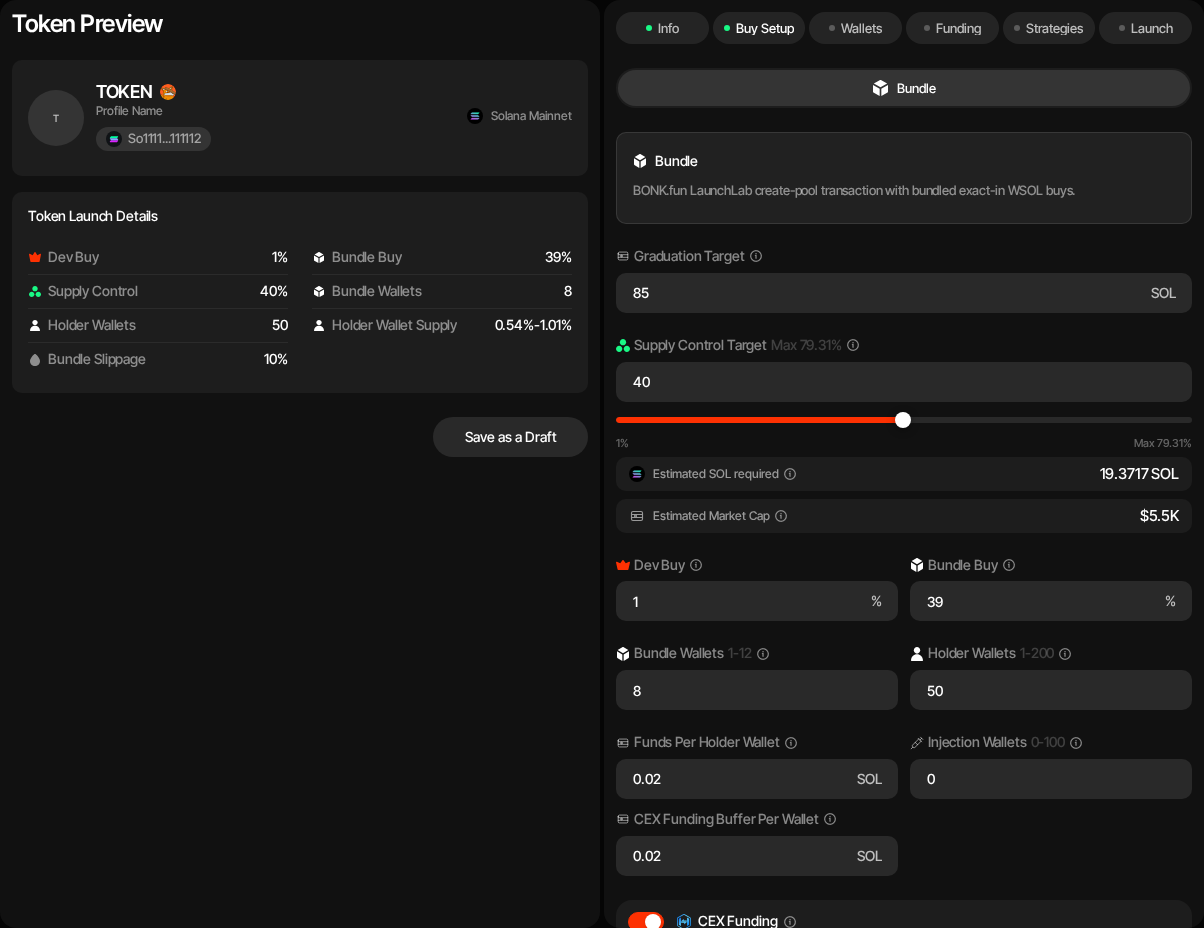
| Launch plan | Sets the dev buy, the bundle and the snipe on one bar, with the cost strip (Bundle cost, Snipe cost, Funds needed, Market cap) under it. See Launch Plan. The dev buy plus the bundle is capped at 79.31% (Max 79.31%). |
| Dev buy | Launch plan row: share of supply the dev wallet buys with SOL. |
| Bundle · at launch | Launch plan row: the share of supply spread across the bundle wallets, without the dev buy. |
| Graduation Target | SOL raise target at which the LaunchLab curve graduates. Range 1 to 1,000 SOL; default 85 SOL. |
| Bundle Wallets | Number of LaunchLab bundle buyers. BONK.fun supports up to 12 bundle wallets. When the Launch plan's bundle is 0% there is no bundle buy (the row reads Dev buy only): the launch is dev-only (create-only when the dev buy is 0% too), so Bundle Wallets and Holder Wallets are hidden, no bundle wallets are created and, unless snipe wallets join holder cleanup (see Snipe After Launch in Launch a New Token), no holder wallets and no token cleanup either. With Token Supply launch-fee payment the fee then comes from the dev wallet, so the dev buy must be at least the fee share of supply; otherwise use a Launch Ticket. |
| Holder Wallets | Wallets funded through token cleanup after launch. |
| Token Cleanup Method | Off, Token Transfer, or Sell / Buy. New drafts default to Sell / Buy, redistributing through buys and sells sent as single transactions, the default for a SOL quote. Turn on Use Bundle for Token Cleanup (Advanced Controls) to send each sell and its buy together in a Sender Max bundle instead (adds a Token Cleanup Tip, default 0.002 SOL, per bundle). Until you set it yourself it follows the launchpad you pick (non-SOL quotes such as Pump.fun USDC default it on); once set, your choice is kept and a hint shows when it differs from the recommendation. A saved draft saved with Sell / Buy keeps the choice it was saved with. Pick Token Transfer for plain token transfers. Pick Off to skip the post-launch redistribution entirely: the holder wallets are still created, but nothing is sent to them (their SOL funding is part of the cleanup). The Token Wash Reserve is still budgeted on the launch wallets, so you can run Token Cleanup yourself later from Live Trading. |
| Snipe after launch | Optional wallets that buy right after the bundle lands. See Snipe After Launch. |
| Injection Wallets | Optional wallets funded for later activity. |
| Funds Per Holder Wallet | SOL top-up delivered through cleanup source wallets. |
| Funds Per Injection Wallet | Optional SOL top-up for injection wallets. |
| CEX Funding | Optional Husher funding path for distributing SOL. |
| Advanced Controls | Category, Launch buy slippage (launch buys), Trading slippage (default 1%, at most 10%: the new profile's default slippage for strategies and instant trades, changeable later in profile settings), Cleanup slippage (Sell / Buy cleanup only; default 2%, at most 10%: the first attempt's tolerance for each cleanup sell and buy, and each of up to two retries adds 1%, up to 10%), bundle supply jitter, holder supply jitter, and Jito tip. |
The Category control selects the BONK.fun platform configuration:
| Category | Description |
|---|---|
| Classic | Default. No creator curve fee; 1.50% total curve fee. |
| BONKers | Includes a 0.05% creator fee; 1.30% total curve fee. |
3. Wallets
Add, import, or generate wallets for each launch role.
| Role | Description |
|---|---|
| Dev Wallet | Creates the token, pays setup costs, and performs the dev buy. |
| Bundle Wallets | Execute bundled Raydium LaunchLab buys. |
| Holder Wallets | Receive post-launch holder distribution through cleanup. |
| Injection Wallets | Optional wallets funded for later injection activity. |
You can use ready wallets, create new wallets, or buy aged wallets at this step. Ready-wallet paths include importing private keys, pulling wallets from Wallet Farm, or reusing wallets from another profile. Additional paths include creating new wallets or buying aged inventory from Wallet Marketplace.
Sniper wallets are not used in the BONK.fun launch flow exposed by Sumo.
4. Funding
Save the draft before funding. The funding table tracks SOL requirements for dev and bundle buys, transaction fees, Jito tip, holder cleanup reserves, and optional injection wallets.
If CEX funding is enabled, deposit the estimated SOL into the funding wallet and use Fund to distribute it through Husher. If CEX funding is disabled, fund the launch wallets directly and use Check Balances.
5. Strategies
Optionally add starter strategies to the profile before launch. You can configure Counter Trade, DCA, and Limit Order strategies by hand, or apply a strategy preset: Sumo ships built-in Hyped, Standard, and Staircase presets, and your org can save its own presets for reuse across launches and imports. Strategies are saved with the draft and can be reviewed after the token is live.
6. Launch Preview
Review:
- BONK.fun metadata and saved launch identifiers
- Category and graduation target
- Dev, bundle, holder, and injection wallet counts
- SOL funding rows
- Supply split across dev and bundle buys
When launched, Sumo prepares the launch bundle, simulates it, then submits the Raydium LaunchLab create-pool transaction with the bundled buys.
After Launch
The launched profile opens in Live Trading. You can monitor Raydium LaunchLab trades, activate starter strategies, run token cleanup, and use normal wallet and treasury tooling.
Launch Logs
BONK.fun profiles add a Launch Logs tab for metadata preparation, bundle simulation, bundle launch, and related launch transactions.
Further Reading
- What Are Memecoin Bonding Curves? — this launchpad's curve overlaid on every other supported launchpad, with graduation math
- How Much Does It Cost to Launch a Memecoin? — simulate launch cost, starting market cap, and supply held for this launchpad
Meteora DAMM v2 Solana Launch
Launch a Solana token on Meteora DAMM v2 with SOL or USDC liquidity, freeze bundle controls, injection wallets, liquidity locking, and starter strategies.
America.Fun Solana Launch
Launch a Solana Token-2022 project through America.Fun with USD1 buys, Meteora DBC migration support, holder cleanup, injection wallets, and starter strategies.