
PumpFun Solana Launch
Launch your token on PumpFun in SOL, USDC, or any registered custom quote asset from Sumo, with automated mint prep, bundled buys, funding, and starter strategies.
Sumo lets you prepare and launch a PumpFun token from a guided launch draft. The flow creates a pre-launch profile, prepares the launch mint automatically, sets up role-based wallets, handles funding, and submits the final bundle when everything is ready.
The launch wizard supports three PumpFun methods: Pumpfun SOL, Pumpfun USDC, and Pumpfun Custom. All three use the same six-step workflow; the difference is which quote asset the market is priced in and how launch wallets get hold of it.
Prerequisites
Before launching, make sure you have:
- Token metadata ready: name, ticker, image, description, and social links
- A funding source for the selected quote asset: SOL for Pumpfun SOL, USDC plus SOL for Pumpfun USDC, or SOL alone for Pumpfun Custom (Sumo swaps it into the selected quote during funding)
- A planned launch shape: supply target, wallet counts, and whether you want a post-migration snipe
- A wallet plan: use ready wallets from private keys, Wallet Farm, or another profile, or create new wallets / buy aged wallets through Wallet Marketplace during the wizard
Non-SOL Quotes Still Need SOL
Pumpfun USDC uses USDC for launch buys and optional USDC holder or injection funding, and Pumpfun Custom uses the selected quote asset for the same rows. In both cases launch wallets still need SOL for network fees, lookup-table preparation, token cleanup reserves, and Jito tips.
Launch Flow
The PumpFun launch wizard has six steps.
1. Info
Enter the token and profile details, then choose the launch method.
To start from an existing token, select Clone from existing token next to Profile Name: paste a Solana mint address or pick one of your launches or drafts (all of them are listed, launched tokens first and then drafts, archived ones included; type to filter by name or ticker), check the preview, and select Use to fill the name, ticker, description, image and social links. Anything the source does not have is left blank. If the source's image or social links could not be loaded, a short note says so and you can add them yourself.
| Field | Required | Description |
|---|---|---|
| Launchpad | Yes | Choose Pumpfun SOL, Pumpfun USDC, or Pumpfun Custom. The launchpad is locked after the draft is saved; create a new draft to switch quote assets. |
| Profile Name | Yes | Internal Sumo profile name used after launch |
| Token Name | Yes | Public token name |
| Ticker | Yes | Token symbol, auto-uppercased |
| Image | Yes | JPG or PNG image, up to 2 MB. A saved draft keeps its image, so editing the other fields later does not ask for it again. |
| Description | No | Public token description. With Paid fee routing on, Fees to @handle via UsePaid is appended when the draft is saved. |
| X, Telegram, Website | No | Public social links included with the PumpFun metadata |
Launch Methods
| Launch method | Quote asset | Use when | Notes |
|---|---|---|---|
| Pumpfun SOL | SOL / WSOL | You want the standard SOL-quoted PumpFun launch path. | Launch buys, holder funding, injection wallets, and fee reserves are SOL-based. |
| Pumpfun USDC | USDC | You want the launch market quoted in USDC. | Launch buys are USDC-based. Sumo also tracks the SOL required for fees, Jito tips, lookup tables, and cleanup reserves. |
| Pumpfun Custom | Any mint admitted by Pump's on-chain quote registry | You want the market priced in a specific token - PUMP, a wrapped major such as ETH or WBTC, or a tokenised equity such as AAPLx or COINx. | Launch buys, holder funding, and injection funding are denominated in the selected quote. Wallets are funded in SOL and swapped into the quote from the Funding tab. See Custom Quote Launches. |
No Manual Vanity Mining
You do not need to mine or select a vanity address manually. When you save the launch draft, Sumo automatically reserves the launch mint and stores it on the draft. The final launch uses that saved mint.
2. Buy Mode
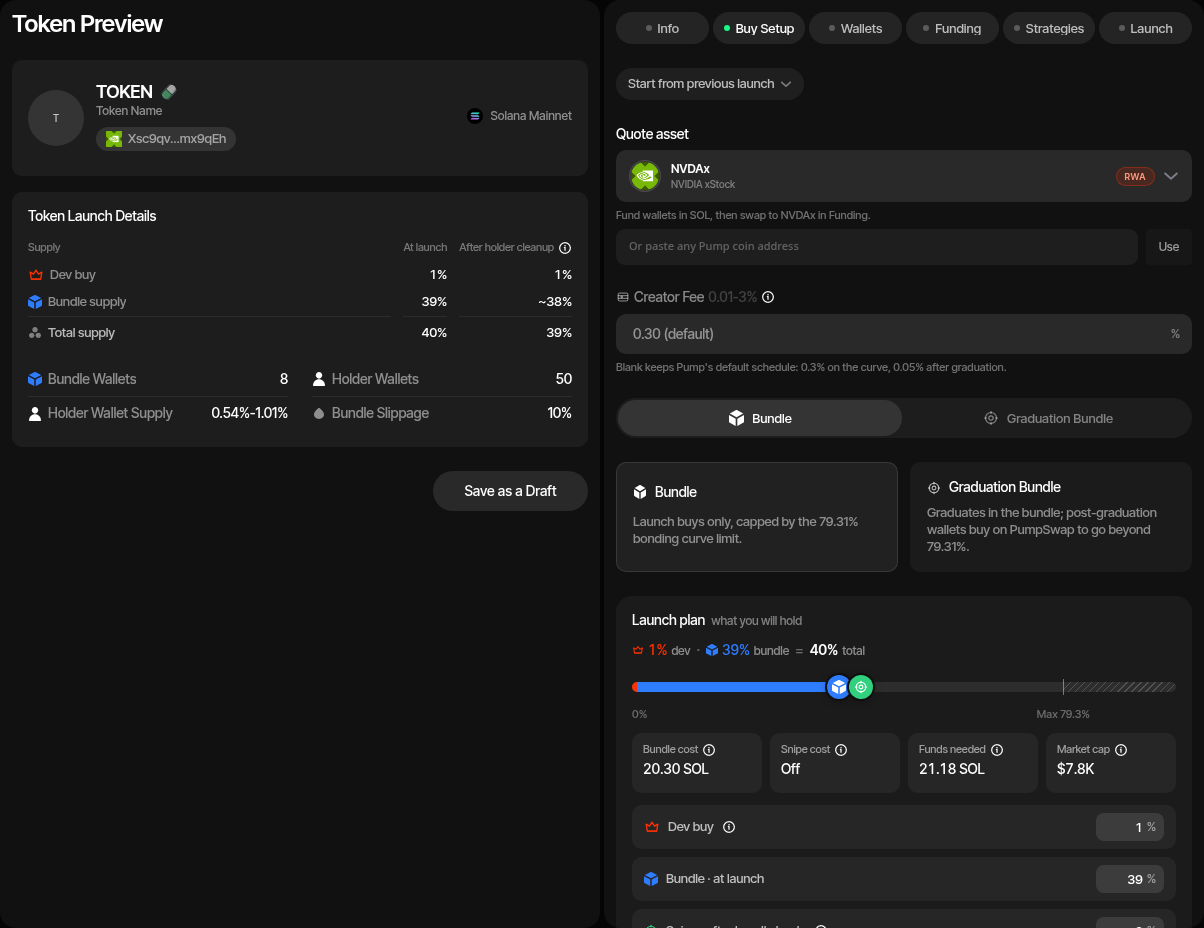
Choose how the launch should acquire supply. A Pumpfun Custom draft adds two fields above the mode selector - Quote asset and Creator Fee - both described under Custom Quote Launches.
| Mode | Description |
|---|---|
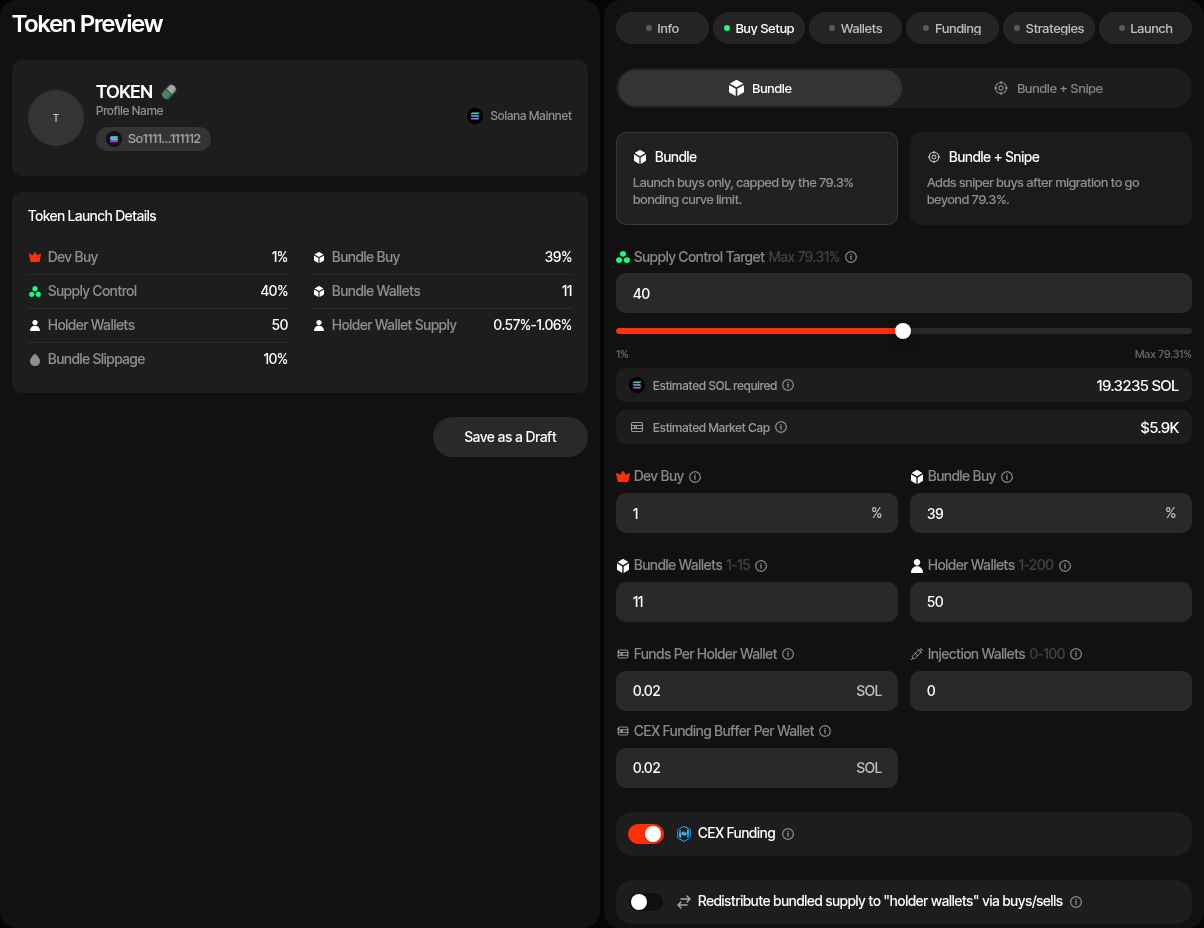
| Bundle | Creates the token and executes launch buys from the dev and bundle wallets. This is capped by the PumpFun bonding curve limit of about 79.31% supply control. |
| Graduation Bundle | Uses bundle buys to reach migration, then adds post-graduation PumpSwap buys. Use this when you need supply control beyond the bonding curve cap. |
Configure the buy plan:
| Setting | Description |
|---|---|
| Launch plan | Sets the dev buy, the bundle and the snipe on one bar, with the cost strip (Bundle cost, Snipe cost, Funds needed, Market cap) under it. See Launch Plan. In Bundle mode the dev buy plus the bundle is capped at 79.3% (Max 79.3%); a Graduation Bundle starts at the 79.31% migration target and can go higher through post-graduation buys. |
| Dev buy | Launch plan row: supply percentage the dev wallet buys. Default 5%. |
| Bundle · at launch | Launch plan row: the bundle wallets' share of supply, without the dev buy. In a Graduation Bundle the bundle wallets buy the rest of the migration target after the dev buy; the part of the plan above it is the Post-Graduation Buy. |
| Post-Graduation Buy | Read-only post-migration allocation shown only for Graduation Bundle. |
| Bundle Wallets | Number of bundle buyer wallets. Pumpfun SOL supports up to 15 in Bundle mode and 9 in Graduation Bundle. Pumpfun USDC and Pumpfun Custom support up to 12 in Bundle mode and 6 in Graduation Bundle. In Bundle mode, when the Launch plan's bundle is 0% there is no bundle buy (the row reads Dev buy only): the launch is dev-only (create-only when the dev buy is 0% too), so Bundle Wallets and Holder Wallets are hidden, no bundle wallets are created and, unless snipe wallets join holder cleanup (see Snipe After Launch in Launch a New Token), no holder wallets and no token cleanup either. With Token Supply launch-fee payment the fee then comes from the dev wallet, so the dev buy must be at least the fee share of supply; otherwise use a Launch Ticket. |
| Post-Graduation Wallets | Number of post-graduation wallets, shown only for Graduation Bundle. Up to 2. |
| Holder Wallets | Wallets funded for post-launch holder distribution. |
| Snipe after launch | Optional wallets that buy right after the bundle lands, with their own sizing, delay, max premium and pacing. On a Graduation Bundle they buy on PumpSwap. See Snipe After Launch. |
| Injection Wallets | Optional wallets funded alongside launch wallets for later injection activity. Pumpfun SOL funds them with SOL; Pumpfun USDC and Pumpfun Custom can fund them with SOL and an optional quote-asset budget. |
| Holder Rewards | Optional PumpFun feature that sets the creator fee of every trade aside for the coin's holders, paid out by PumpFun. The creator earns nothing from creator fees and can never be reassigned. Available for all three PumpFun methods in both launch modes. The choice locks after the initial draft save and is permanent once the coin is launched. |
| Route creator fees to Paid | Available for all three PumpFun methods in both launch modes. Sends 100% of the coin's creator fees to Paid, which pays them to the X handle you enter. Cannot be combined with Holder Rewards. Can be changed until launch and is permanent once the coin is launched. |
| Funds Per Holder Wallet | SOL sent to each holder wallet during cleanup/funding. |
| Token Cleanup Method | Off, Token Transfer, or Sell / Buy. New drafts default to Sell / Buy, redistributing through buys and sells. Use Bundle for Token Cleanup (Advanced Controls) sends each sell and its buy together in a Sender Max bundle (adds a Token Cleanup Tip, default 0.002 SOL, per bundle). It defaults on for a non-SOL quote, where a bundle hands the quote through more relay wallets than a single transaction can, and off for SOL, where cleanup runs as single transactions. Until you set it yourself it follows the launchpad and quote you pick; once set, your choice is kept and a hint shows when it differs from the recommendation. A saved draft saved with Sell / Buy keeps the choice it was saved with. Pick Token Transfer for plain token transfers. Pick Off to skip the post-launch redistribution entirely: the holder wallets are still created, but nothing is sent to them (their SOL funding is part of the cleanup). The Token Wash Reserve is still budgeted on the launch wallets, so you can run Token Cleanup yourself later from Live Trading. |
| <Quote> Funds Per Holder Wallet | Quote asset sent to each holder wallet during cleanup/funding, shown for Pumpfun USDC and Pumpfun Custom. The field is labelled with the quote's ticker and uses that mint's decimals. |
| Funds Per Injection Wallet | SOL sent to each injection wallet when injection wallets are enabled. |
| <Quote> Funds Per Injection Wallet | Quote asset sent to each injection wallet, shown for Pumpfun USDC and Pumpfun Custom when injection wallets are enabled. |
| CEX Funding | Funds launch wallets through Husher. This adds the provider fee to Funds needed. |
| CEX Funding Buffer Per Wallet | Extra SOL sent per wallet when CEX funding is enabled. |
| CEX USDC Funding Buffer Per Wallet | Extra USDC added per wallet for Pumpfun USDC CEX funding. The current minimum is 5 USDC per wallet. Not shown for Pumpfun Custom, whose quote is acquired by swap rather than by cashout. |
| Advanced Controls | Launch buy slippage (launch buys), Trading slippage (default 1%, at most 10%: the new profile's default slippage for strategies and instant trades, changeable later in profile settings), Cleanup slippage (Sell / Buy cleanup only; default 2%, at most 10%: the first attempt's tolerance for each cleanup sell and buy, and each of up to two retries adds 1%, up to 10%), bundle supply jitter, holder supply jitter, and Jito tip. |
Bundle Limit
Pumpfun USDC and Pumpfun Custom use lower bundle-wallet limits than Pumpfun SOL because their v2 transactions carry different account and packet-size constraints. If a launch needs many buyer wallets, Sumo prepares a lookup table before submitting the final bundle; a Pumpfun Custom launch always prepares a launch-specific table.
For Pumpfun USDC, the Launch plan's Bundle cost shows two parts, USDC first:
- USDC - USDC required for launch buys plus optional USDC holder or injection funding.
- SOL - Native SOL required for fees, Jito tip, lookup table budget, token cleanup reserves, and SOL funding rows.
CEX funding buffers and the Husher fee are not part of it; they are added in Funds needed, which also shows USDC and SOL.
Pumpfun Custom shows a single Bundle cost in SOL instead, because its quote is bought with SOL. See Estimates below.
3. Wallets
Add, import, or generate wallets for each launch role.
| Role | Description |
|---|---|
| Dev Wallet | Single deployer wallet used for the launch transaction and dev buy. |
| Bundle Wallets | Wallets used for bundled launch buys before the token is live. |
| Post-Graduation Wallets | Graduation Bundle wallets used for PumpSwap buys after migration. |
| Holder Wallets | Wallets used for post-launch holder distribution. |
| Injection Wallets | Optional wallets funded for later injection activity. |
| Snipe Wallets | Wallets used only by the snipe after launch; shown when Snipe Wallets is above 0. |
You can use ready wallets, create new wallets, or buy aged wallets at this step. Ready-wallet paths include importing private keys, pulling wallets from Wallet Farm, or reusing wallets from another profile. Additional paths include creating new wallets or buying aged inventory from Wallet Marketplace. After saving the draft, Sumo creates the launch wallet groups and persists the selected wallets to the pre-launch profile.
4. Funding
Save the launch draft before funding. Saving the draft creates the pre-launch profile, role wallet groups, the funding wallet, and the automatic launch mint.
If CEX funding is enabled for Pumpfun SOL, deposit the estimated SOL into the funding wallet, check the balance, then use Fund to distribute SOL through Husher to the launch wallets.
If CEX funding is enabled for Pumpfun USDC, deposit both the estimated SOL and USDC into the funding wallet. Use Fund to distribute SOL requirements and Fund USDC to distribute USDC requirements. The funding table marks a wallet complete only after it has enough of every required asset.
For Pumpfun Custom, fund the launch wallets in SOL first - through Husher when CEX funding is enabled, or directly - and then buy the quote asset with the Swap SOL to <QUOTE> action. There is no quote-side cashout for this method. See Funding a custom quote.
If CEX funding is disabled, fund the launch wallets directly and use Check Balances before continuing.
The funding table lets you:
- Copy role wallet addresses
- Randomize token buy allocations
- Edit per-wallet token buy percentages
- Reorder wallets within the same role
- Check SOL balances for Pumpfun SOL, or SOL and quote-asset balances for Pumpfun USDC and Pumpfun Custom
- Fund launch, holder, and injection wallets through the funding wallet when CEX funding is enabled
Every launch wallet must have the required balances before the final launch can be submitted. Pumpfun USDC and Pumpfun Custom launch wallets need enough of the quote asset for their assigned buy amount and enough SOL for execution costs.
5. Strategies
Optionally add starter strategies to the profile before launch. These strategies are saved with the draft so you can review and activate them after the token is live.
You can configure strategies by hand or apply a strategy preset: Sumo ships built-in Hyped, Standard, and Staircase presets, and your org can save its own presets for reuse across launches and imports. Each preset shows a projected hourly volume estimate before you apply it.
Common starter strategies include:
- Counter Trade for reactive market support
- Limit Order for fixed buy or sell levels
- DCA for scheduled accumulation or distribution
6. Launch Preview
Review the final composition before submitting:
- Token metadata and saved launch mint
- Dev, bundle (pre-graduation), post-graduation, holder, injection, and snipe wallet counts
- Supply control split across dev, bundle, and post-graduation buys
- Funding rows and buy allocations
- Starter strategies
Click Launch when the preview is correct and all required wallets are funded. If the bundle needs a lookup table, Sumo prepares it automatically before submitting the launch transaction. Pumpfun USDC and Pumpfun Custom launches always use the v2 PumpFun instruction path; the legacy instructions do not accept a non-SOL quote.
Custom Quote Launches
Pumpfun Custom prices the launch in a token instead of SOL or USDC. Pump keeps an on-chain registry of the mints its create_v2 instruction will accept as a payment asset; Sumo reads that registry live and offers exactly what it admits. The registry is mostly tokenised equities and wrapped majors, most of them on Token-2022, with a tail of mints Pump admitted on request.
Everything else about the launch is unchanged: the same six-step wizard, the same automatic launch mint, the same bundle and post-graduation roles, the same holder cleanup, and the same starter strategies.
Choosing the Quote Asset
Buy Setup shows a searchable Quote asset picker for this method. It is filled from a live read of the registry and searchable by symbol, name, or mint address. The registry itself carries no names or artwork, so Sumo looks every admitted mint up in Jupiter's token list and orders the picker from that:
- Tokenized stocks and ETFs come first: mints Jupiter tags as real-world assets, such as the xStocks and Backpack Securities series.
- Crypto follows: mints Jupiter has verified, plus the wrapped majors and other tokens in Sumo's built-in snapshot of the registry.
- Unknown tokens come last: mints Jupiter has never listed or has declined to verify. These always show their shortened address next to the name, with an Unchecked badge when Jupiter has no opinion and an Unverified badge when it refused the mint. Nothing about an unknown mint is vouched for; check the address yourself before launching against it.
The lookup is display only. It never decides what can be selected. If Jupiter is unreachable the catalogue still loads: mints in Sumo's built-in snapshot keep their name, logo and group, and every other mint is shown as unchecked.
Selecting an asset re-resolves it on the server before it reaches your draft. Sumo reads the registry entry, the mint account, and Pump's current fee configuration in one batch, and returns the authoritative decimals, token program, initial virtual quote reserves, and fee terms. Values supplied by the browser are discarded on save, so the draft always carries what the chain reported.
Pump Coins as the Quote
Any existing Pump coin can also be the quote. Paste its address into Or paste any Pump coin address under the picker and click Use. The coin then appears in a Pump coins group with its status, on bonding curve or migrated to PumpSwap, and an Unverified badge unless Jupiter has verified it. Sumo does not curate these coins; check the address before launching.
Pump.fun refuses some coins, and Sumo shows the reason when you paste one: a coin in Mayhem mode, a coin that is itself priced in another Pump coin, and a coin whose curve has finished but has not migrated yet. A launch priced in a Pump coin cannot use Mayhem mode.
The new curve's starting price follows the Pump coin's live price. Sumo re-reads it when it prepares, simulates and submits the launch, and sizes each bundle buy from it so every wallet still buys its planned share of supply. If the coin's price falls after funding, a wallet may need more of the coin than it holds; run funding again and it tops the wallet up. Funding swaps SOL into the coin through Jupiter, DFlow or OKX. If none of them has a route, funding stops with an error and nothing is swapped.
Registry entries whose mint cannot be used appear in a disabled Unavailable quotes group with the reason. A quote is refused when its mint has an active transfer hook, a transfer fee, is default-frozen, paused, non-transferable, or uninitialised. Permanent delegates, inactive hooks, unpaused pausable mints, scaled-UI amounts, and optional confidential transfers are accepted.
The Quote Asset Is Locked After Saving
The quote asset is fixed when the draft is first saved, because the launch mint, the wallet groups, and every funding amount are sized against it. Create a new draft to launch against a different quote. The same applies to the creator fee and the Holder Rewards choice.
If the resolved terms change on-chain after you save - decimals, token program, initial virtual quote reserves, or Pump's protocol or creator fee - Sumo refuses to fund or launch and asks you to refresh and save the draft before continuing.
Quote Decimals
Every quote-denominated amount uses the selected mint's own decimals, not a fixed six-decimal assumption. Per-wallet buy allocations, holder funds, injection funds, funding-swap sizing, and cleanup all work in that mint's atomic units, so an eight-decimal quote is tracked exactly like a six-decimal one.
Creator Fee
Pumpfun Custom adds an optional Creator Fee percent field. It writes a per-launch creator fee into the curve at creation.
| Value | Effect |
|---|---|
| Blank (default) | Pump's own fee schedule applies: the live global creator fee on the curve (0.30% when this was verified) and 0.05% on the migrated PumpSwap pool. |
| A percentage | Replaces the curve's creator fee, and is inherited by the migrated PumpSwap pool in place of its 0.05% creator component. |
The accepted range runs from 0.01% up to a cap read live from Pump's global account - 3% when this was verified on 13 September 2026. The field's range label reflects the current cap, blur clamps the input to it, and the draft save and the launch both re-check the value against the live cap, so a lowered on-chain maximum fails at save or funding time rather than inside bundle simulation. Zero is not an override: leave the field blank to keep Pump's schedule.
The Buy Setup estimate panel shows the resulting Creator Fee row either as Default (0.3% on the curve, 0.05% after graduation) or as the override applied on both the curve and the pool.
Custom Quotes Only
Pump honours the per-launch creator fee only for custom-quote curves. On SOL and USDC quotes the value is accepted and ignored - the curve stores zero and the global schedule applies - so the field is not offered for those methods.
Modes, Wallets, and Bundle Capacity
Both Bundle and Graduation Bundle are available. Graduation Bundle uses the same migration target as the other PumpFun methods: bundle buys take the curve to graduation, then post-graduation wallets buy from the migrated PumpSwap pool in the same bundle.
| Limit | Value |
|---|---|
| Bundle wallets | 12 in Bundle mode, 6 in Graduation Bundle |
| Post-graduation wallets | 2 |
| Supply control | Up to about 79.31% in Bundle mode; higher in Graduation Bundle through post-graduation buys |
| Token cleanup | Off, Token Transfer, or Sell / Buy, as for Pumpfun SOL and Pumpfun USDC |
A custom-quote bundle carries extra accounts - the quote mint, the curve's quote token account, the quote token program, and the registry - so Sumo always prepares a launch-specific lookup table for these launches and budgets the SOL for it in the Launch cost. The product enforces a five-transaction bundle and each transaction's 1,232-byte wire limit; the verified configuration is the creator plus 12 buyers inside those five transactions.
Estimates
Because the quote is bought with SOL, the Launch plan's cost strip shows one Bundle cost figure in SOL rather than a separate quote total. It covers the SOL that buys every wallet's quote budget, priced at an indicative treasury rate, plus each wallet's preserved SOL reserve. The treasury swap's 2% slippage headroom and the 0.02 SOL minimum reserve for each wallet that has to swap are not part of Bundle cost; they are added in Funds needed, which is what you deposit.
The figure reads Select a quote asset until a quote is validated, Quoting… while the rate is loading, and Rate unavailable when no treasury route can price the pair. The Market cap tile (MCap after with a snipe) converts the same rate into USD and reads Price unavailable when there is no fresh rate; a rate older than two minutes is treated as stale.
No Assumed Dollar Value
A non-SOL quote is never assumed to be worth one dollar. USD figures for these pairs come from a live quote price observation and are reported as unavailable once it expires, rather than being estimated.
Funding a Custom Quote
Custom-quote wallets are funded in two passes.
- Fund SOL. Deposit and distribute SOL exactly as for a Pumpfun SOL launch - through Husher when CEX funding is enabled, or directly into the wallets. Each wallet needs its SOL reserve plus the SOL its swap will spend.
- Swap SOL to the quote. Once the wallets hold that SOL, Swap SOL to <QUOTE> opens a preview of the run: the provider and live rate, how many of the wallets in scope will swap, each wallet's quote shortfall and SOL debit, the SOL kept per wallet, and an adjustable slippage that defaults to 2%. A fresh preview is required before Swap can be confirmed. While the swap request is in flight, Swap and the other controls in the preview are disabled, so a second press cannot start a second run (the server would refuse it with "Pump launch or quote funding is already running for this project"). If wallets fail because the price moved past the slippage, the failure notice says so; when the quote token charges a Token-2022 transfer fee (common for tokenized stocks), it names the fee and suggests a slippage above it plus room for price movement. Raise the slippage in the preview and swap again: the preview re-sizes each wallet's SOL debit at the new slippage.
Wallets that already hold their quote are skipped; a draft whose wallets are all covered reports that there is nothing left to swap. By default the scope is every wallet still short, and any wallet still short is always included; widen the scope to all wallets or pick wallets individually to buy extra beyond the planned buys. Max fills in the largest amount the scope can spend while every wallet keeps its SOL reserve. The preview also has a <QUOTE> → SOL direction that swaps quote back into SOL. Its Amount to return control sells either what the wallets hold above their planned buys (the default, so the launch stays funded) or everything, for instance to change the quote token and re-import the wallets into a new launch; at most the sellable total, split across the chosen wallets, with each selling wallet paying for its own swap out of its SOL. The two directions never run at the same time.
Confirming sends the per-wallet SOL debit caps and minimum quote outputs you reviewed. The server then re-reads native and quote balances, re-sizes the run, and refuses it if the sizing has moved past what you reviewed or if a wallet is still short of SOL - fund the remaining SOL and preview again. Each wallet keeps at least 0.02 SOL after its swap.
Swaps land wallet by wallet, so a wallet whose swap fails keeps its SOL: Check Balances shows the shortfall and the swap can be run again for what is missing. A funding run must reach a known outcome before another run or the launch itself is allowed, and only remaining shortfalls are retried. Overlapping funding and launch operations are refused.
Small leftover quote balances after launch and cleanup are expected: the cleanup sweep distributes the quote balance available before it trades, so a favourable fill can leave a residue behind.
Funding Swaps Pay the Treasury Swap Fee
The SOL-to-quote funding swap runs through Treasury Swap and pays the same platform fee - 0.5% (50 bps) by default, already reflected in the quote you review. Organizations can carry a different rate.
After Launch
Once your token is live on PumpFun or migrated to PumpSwap, the pre-launch profile transitions to an active trading profile. You can then:
- Monitor trades on the Live Trading feed
- Review and activate any starter strategies
- Use Counter Trade to react to external trades and support price action
- Add more wallets from Wallet Farm
- Use DCA or Limit Order strategies to continue managing inventory
- Claim creator fees when they are available (not on Holder Rewards coins or coins using Paid)
- Change the creator-fee recipients when the current creator is managed by Sumo (not on Holder Rewards coins or coins using Paid)
Creator Fee Claims
PumpFun profiles can expose a Claim creator fees action in the profile wallet toolbar when the profile has a creator wallet eligible for fee collection. Use it to submit a creator fee claim from Sumo without leaving the profile workspace.
Creator fees accrue in the asset the market is quoted in, so a Pumpfun Custom launch accrues them in its quote asset rather than in SOL. Claims, the Sumo platform fee, and the audit record all keep that payment mint.
Creator fee claim results appear in Treasury Logs as Creator Fee Claim entries, including the transaction details when the claim is submitted on-chain.
Fees From Before a Creator Change
PumpFun and PumpSwap keep creator fees in vaults that belong to the creator wallet, not to the coin. After Changing the Creator, new fees go to the new recipients, but everything the coin earned before the change stays in the previous creator wallet's own vaults, and only that wallet can collect it.
When the previous creator wallet is managed by the profile, Claim creator fees also collects those vaults:
- Sumo finds the previous creator from the coin's on-chain fee-sharing record (the wallet that made the change), from Change Creator entries in the profile's Treasury Logs, and from the profile's launch deployer wallet. Only wallets managed by this profile are used.
- Each previous creator claims in its own transaction, signed and paid by that wallet, after the current recipients' claim. The fees land in the previous creator wallet, with SOL-paired PumpSwap fees unwrapped to SOL on profiles that trade with native SOL. The same Sumo platform fee as any creator fee claim applies.
- The previous creator wallet needs a little SOL for its network fee. If the transaction would fail, Sumo does not send it and the claim result says why.
- The claim works even when none of the current recipients is managed by the profile, and on archived profiles. An archived previous creator wallet still signs.
- Pump vaults are per wallet, so they also hold fees from any other coin that wallet created on the same quote asset. Those are collected too, into the same wallet.
The Telegram /fees command lists each previous creator's balance on its own line, apart from the current total. Each previous creator claim is a separate Creator Fee Claim entry in Treasury Logs under the previous creator's wallet.
Changing the Creator
Organization admins can use Change creator to permanently route future Pump creator fees to one wallet or split them between multiple wallets. This changes the creator attribution used for fees; it does not transfer the token mint authority or profile ownership.
The action supports existing and newly launched PumpFun coins on any quote asset - SOL, USDC, or a custom quote - while they are on the PumpFun bonding curve, and PumpSwap coins after graduation. Sumo reads the quote mint and its token program from the curve or pool, so a Token-2022 quote needs no extra setup. For PumpSwap, Sumo updates both the historical PumpFun creator record and the PumpSwap pool creator in the same transaction.
To change the creator:
- Open the profile's Wallets tab and open the wallet actions menu
- Select Change creator
- Add between 1 and 10 unique Solana recipient addresses
- Assign a positive percentage to every recipient so the total is exactly 100%
- Review the final split and confirm the transaction
A single replacement wallet should receive 100%. For a shared arrangement, every future creator-fee payment follows the finalized percentage split. Fees earned before the change stay with the current creator wallet; keep it managed by the profile so Claim creator fees can still collect them (see Fees From Before a Creator Change).
Creator Changes Are Permanent
Pump's fee-sharing program revokes its admin after the split is finalized. The recipients and percentages cannot be changed again, so verify every address and the complete 100% allocation before confirming.
The current on-chain creator wallet must be managed by the profile so Sumo can authorize the transaction. If it is not managed, import its private key before continuing. A graduated coin must also be routed to PumpSwap with its canonical pool address recorded on the profile; refresh the profile's migration routing before changing the creator if it still points to a completed PumpFun curve.
After submission, the transaction appears in Treasury Logs as Change Creator. Once it confirms, Sumo refreshes the affected PumpFun and PumpSwap pool caches used for trading.
Trader Cashback Claims
Trader Cashback applies only to coins launched before 12 September 2026, when PumpFun retired it: new drafts cannot enable it, and existing cashback coins keep trading with their accrued cashback claimable. Launch a coin created on or after that date with Holder Rewards instead.
When a launch enabled Trader Cashback, eligible creator fees accrue to trading wallets based on their swap volume. The profile wallet toolbar exposes a Claim cashback action that claims across wallets in one batch:
- Open the profile's Wallets tab and click Claim cashback from the wallet actions menu
- Select the wallets to include — individual wallets, wallet groups, or all wallets
- Review the live preview of claimable balances per wallet, grouped by payment mint - SOL and USDC, plus the launch's quote asset on a Pumpfun Custom coin
- Confirm to queue the batch — one notification arrives when the batch finishes
Wallets with nothing claimable are skipped automatically. Each wallet pays its own network fee (plus rent when its USDC or quote-token account does not exist yet), so a wallet without enough SOL for that is marked failed with "Insufficient SOL for fees" and nothing is sent; fund it and claim again.
Holder Rewards
Holder Rewards is chosen in Buy Setup before the first draft save and is permanent once the coin is launched. The creator fee of every trade is set aside for the coin's holders and paid out by PumpFun; the creator earns nothing from creator fees and can never be reassigned. Trading, bundling, sniping, and cleanup work exactly as they do on any other PumpFun coin.
Because there is no creator fee to collect and no creator to change, a holder-rewards coin does not offer:
- Claim Creator Fees — the fee never reaches a profile wallet
- Change Creator — PumpFun fixes the arrangement at creation
Holders do not claim anything either. PumpFun distributes the rewards to holders itself, so there is no Sumo action to run after launch.
Paid
Paid claims a coin's creator fees and pays 80% of them to an X account through X Money; the other 20% buys and burns $PAID. It is available on Pumpfun SOL, Pumpfun USDC and Pumpfun Custom launches in both Bundle and Graduation Bundle mode, at full bundle capacity.
To use it, turn on Route creator fees to Paid in Buy Setup and enter the recipient's X Handle (with or without @: 1-15 letters, numbers, or underscores). With Paid fee routing on, the token name is limited to 32 bytes (Latin letters and digits count 1 each; most other scripts and emoji count 2-4), because the fee split leaves less room in the launch transaction. The recipient does not need to sign up anywhere; Paid sends the payment to that X account.
When you save the draft, Sumo appends Fees to @handle via UsePaid to the token description; this is the line Paid reads the recipient from. At launch, the first transaction of the bundle creates the coin and immediately locks 100% of its creator fees to the Paid treasury, so every trade, including your own dev and bundle buys, pays Paid from the first block. Paid registers the coin automatically; there is no approval step.
On Pumpfun USDC and Pumpfun Custom, creator fees accrue in the quote asset. Just before the bundle, and also when you run Simulate Bundle, Sumo may send one small setup transaction from the dev wallet that opens up to four quote-asset accounts the launch needs anyway (Pump's two fee recipients', the dev wallet's own, and with a dev buy the dev wallet's volume account). It is skipped when they already exist, which is always the case for USDC fee recipients, and costs only the accounts' rent. Simulation sends it for real so the simulated bundle matches the launch. A Pumpfun USDC launch with Paid fee routing also always prepares its own lookup table, even with few bundle wallets, because the fee split does not fit the launch transaction otherwise; the funding plan includes its small SOL budget, as it already does for Pumpfun Custom.
Paid Fee Routing Is Permanent
The fee split is locked on-chain when the coin is created and cannot be changed or undone. You can change the handle or turn Paid fee routing off until launch; after that, neither the creator fees nor the recipient can be changed. Turning Paid fee routing on or off after the first draft save discards a lookup table already prepared for the launch (a new one is prepared automatically).
Because every creator fee goes to Paid, a coin using Paid does not offer:
- Claim Creator Fees - the fee never reaches a profile wallet
- Change Creator - the split is locked at creation
Paid cannot be combined with Holder Rewards. To check that Paid has registered a launched coin, open https://usepaid.app/api/fee-proof?mint=<mint>; a registered coin reports confirmed. Paid indexes on a schedule, so a coin launched moments ago may not appear yet.
Launch Logs
Launch profiles also add a Launch Logs tab to the Logs workspace. Use it to review launch-specific activity such as token creation, bundle launch submission, bundle confirmation, and related launch transactions.
Launch Logs are shown only when the profile has launch metadata. The tab sits alongside Trade Logs, Treasury Logs, and Audit Logs so launch activity can be reviewed without mixing it into normal trading history.
Counter Trade
Automatically counter external trades to maintain price stability.
Strategies Overview
Learn about all available trading strategies.
Further Reading
- How to Launch a Token on Pump.fun — step-by-step guide to launching on the pump.fun website or with Sumo, with a full live-launch video
- Which Memecoin Bundling Tool Is the Best on Solana — what a bundle is, why teams bundle, and how Sumo compares to the alternatives
- What Are Memecoin Bonding Curves? — PumpFun's virtual reserves and graduation math, side by side with other launchpads
- How to Launch a Memecoin in 2026 — the end-to-end launch playbook