
StonkFun Solana Launch
Launch a Solana Token-2022 coin through StonkFun and Raydium LaunchLab, quoted in SOL, a stablecoin, an xStock, or any other asset in StonkFun's pair catalogue, with a locked raise, bundle wallets, a SOL-to-quote funding swap, holder cleanup, and starter strategies.
Sumo supports StonkFun launches on Solana. StonkFun coins are Raydium LaunchLab pools, and Sumo builds them directly: it creates the Token-2022 base mint, initializes the LaunchLab curve against the quote asset you picked from StonkFun's catalogue, and submits the create-pool transaction with bundled exact-in buys. There is no StonkFun launch submission and no StonkFun launch fee on this path — StonkFun adopts the pool from the chain on its own, usually within a minute or two, and the coin then appears on its site.
Prerequisites
Before launching, make sure you have:
- Token metadata ready: name, ticker, image, description, and social links
- SOL for dev buy, bundle buys, transaction fees, Jito tip, lookup-table preparation when required, and optional holder or injection top-ups
- On a token-quoted launch, enough extra SOL for the funding swap that acquires the quote asset, including its treasury swap fee
- A launch plan: quote asset, supply target, dev buy, bundle wallet count, holder count, and optional injection wallets
- A wallet plan: use ready wallets from private keys, Wallet Farm, or another profile, or create new Solana wallets / buy aged Solana wallets through Wallet Marketplace during the wizard
Fixed Token Parameters
StonkFun launch tokens are Token-2022 mints with a fixed supply of 1 billion tokens and 6 decimals, and the mint carries its own metadata extension rather than a separate metadata account. The curve is a constant curve that migrates to a Raydium CPMM pool at graduation. Total supply and decimals are not edited in the standard Sumo flow.
Two Launch Modes
Sumo launches both StonkFun token types: a Standard untaxed mint, or a Reward mint carrying an immutable holder tax. See Reward Mode.
Quote Assets
The quote asset is picked from StonkFun's own pair catalogue — roughly 530 assets, refreshed from StonkFun and filtered down to the ones Sumo can also fund, transfer, and trade. The picker groups them the way StonkFun labels them, with the curated groups first and the user-requested custom mints last:
| Group | Contents |
|---|---|
| Solana | SOL, which stays pinned to the top of the list because it is the only quote that needs no funding swap. |
| xStock | Tokenized equities and ETFs such as NVDAx and SPYx. |
| PreStock | Pre-IPO stock tokens. |
| Sunrise | Backpack-issued assets. |
| Currency | Stablecoins and currency tokens: USDC, USDT, EURC, and the rest. |
| Leverage | Leveraged tokens. |
| Tessera | Tessera assets. |
| Collectibles | Collectible tokens. |
| Custom | Memecoins and other mints listed on user request. These are the bulk of the catalogue and always sort last. |
Inside a group, Jupiter-verified mints lead and ties break on ticker. Any quote StonkFun lists but Sumo cannot support stays visible at the bottom of the list as an unavailable row with the reason — retired by StonkFun, or no LaunchLab config on-chain yet. StonkFun can also decline to price a listed quote (a few very low-priced Custom mints, or one with no price feed); picking it then shows a pricing error and the draft keeps its previous quote. The picker also says which funding path the pick implies: SOL funds the wallets directly with no swap step, while a token quote means funding the wallets in SOL and then swapping in the Funding step.
Repeated or ambiguous tickers show the shortened mint address next to the name, so the impostors of a duplicated ticker sit below the real token and can be told apart. Custom mints are also checked against Jupiter's verified token list:
| Badge | Meaning |
|---|---|
| Unverified | Jupiter does not list the mint as verified. The address is always shown, and selecting the quote raises a warning with the full mint. |
| Unchecked | Jupiter could not be reached, or has no opinion on the mint. Informational, never a warning; the address is still shown. |
Check the Mint Address on a Custom Quote
Anyone can request a quote asset on StonkFun, so a familiar ticker in the Custom group is not proof of a familiar token. Compare the full mint address against a source you trust before saving the draft — the quote asset cannot be changed afterwards.
Taxed Quote Assets
Some Custom quotes are themselves StonkFun Reward tokens — GP is one — and withhold a tax (usually 1% or 3%) on every transfer of the quote. Sumo supports them: when you pick one, the picker states the rate, and every figure is sized with it.
- Buys: LaunchLab takes the tax out of each wallet's payment before its trading fee, so each dev and bundle wallet is funded and debited the gross amount that still buys its planned share. The supply-control figures are unchanged.
- Funding: the treasury's SOL-to-quote rate is already net of the tax, so the Funding step delivers what each wallet needs.
- Holder cleanup: Token Transfer or Off only. Sell / Buy passes the quote between wallets through several transfers, each taxed, so it is not offered for a taxed quote and a draft saved with it is rejected. With Token Transfer, holders receive swept quote net of the tax applied twice (it moves through a temporary account).
- Rate changes: the quote's own tax authority can change the rate. The rate is locked with the draft, and the launch is refused if the live rate differs; refresh the quote on the draft to re-size.
Reward Mode
Every StonkFun launch is one of two modes, chosen in Buy Mode under the quote asset:
| Mode | The mint |
|---|---|
| Standard | An untaxed Token-2022 mint. Transfers move the full amount. |
| Reward | A Token-2022 mint carrying a transfer fee — the holder tax — at one of the rates StonkFun publishes, currently 1% or 3%. |
In Reward mode the tax is withheld on every transfer of the token, and StonkFun collects the withheld amount and distributes it to holders. The rate is written into the mint when it is created and the launcher never holds any authority over it: while the token is on the curve the fee-config authority sits with LaunchLab's program, and graduation hands it to StonkFun together with the withheld-tax collector. There is no way for you to lower, raise, or remove the tax after launch, and no way to exempt a wallet from it.
The tax applies to the launch itself, not only to later trading. Each bundle buy, each holder-cleanup transfer or sell / buy, and each injection-wallet transfer is taxed like any other transfer. Sumo prices the whole plan net of the tax: the token amounts shown for dev and bundle wallets, the holder-wallet projections, and the supply-control figures derived from them, are what those wallets actually end up holding — no separate deduction appears later.
The rate choice appears only when Reward is selected, and the offered rates come from StonkFun itself, so a rate StonkFun retires stops being offered. Mode and rate are locked after the first draft save, exactly like the quote asset; create a new draft to launch the other mode.
The Tax Is Permanent
A Reward mint's transfer tax cannot be changed by the launcher. Confirm the mode and rate in the Launch Preview before launching — the only way to change either is to launch a different token.
The Raise
StonkFun prices the graduation target — the quote raised before the curve graduates — in USD, so the raise depends both on the quote asset and on when it was priced. Sumo resolves it from StonkFun's pricing, cross-checks it against the LaunchLab global config's minimum, and locks it into the draft when the quote is first saved: a plan you reviewed is never re-priced silently underneath you.
The Buy Mode step shows the locked raise in quote units with its USD value, how long ago it was priced (Priced just now, Priced 3 hours ago, Priced 3 days ago), and — once the draft has been saved and until the pool exists — a Refresh terms button. Terms older than 24 hours are called out in warning tone with re-price before launching.
Refresh terms saves the draft again with a fresh price, which can move the raise and therefore the funding plan. It is refused while a quote-funding swap is still settling: resolve that swap's status first. A refresh keeps the server-owned funding attempt and the prepared lookup table, whose addresses do not depend on the raise; funding previews simply re-size from live balances afterwards.
Sumo also re-reads the curve, fee, and platform rates from the chain before funding, simulation, and launch. If StonkFun changes them underneath a saved draft, the action stops and asks you to refresh the quote rather than launching on terms you did not review.
Launch Flow
1. Info
Choose StonkFun in the Launchpad field, then enter the token and profile details.
| Field | Required | Description |
|---|---|---|
| Launchpad | Yes | Select StonkFun. The launchpad is locked after the draft is saved. |
| Profile Name | Yes | Internal Sumo profile name used after launch |
| Token Name | Yes | Public token name |
| Ticker | Yes | Token symbol, auto-uppercased |
| Image | Yes | JPG or PNG image, up to 2 MB |
| Description | No | Public token description |
| X, Telegram, Website | No | Public social links included with the launch metadata |
2. Buy Mode
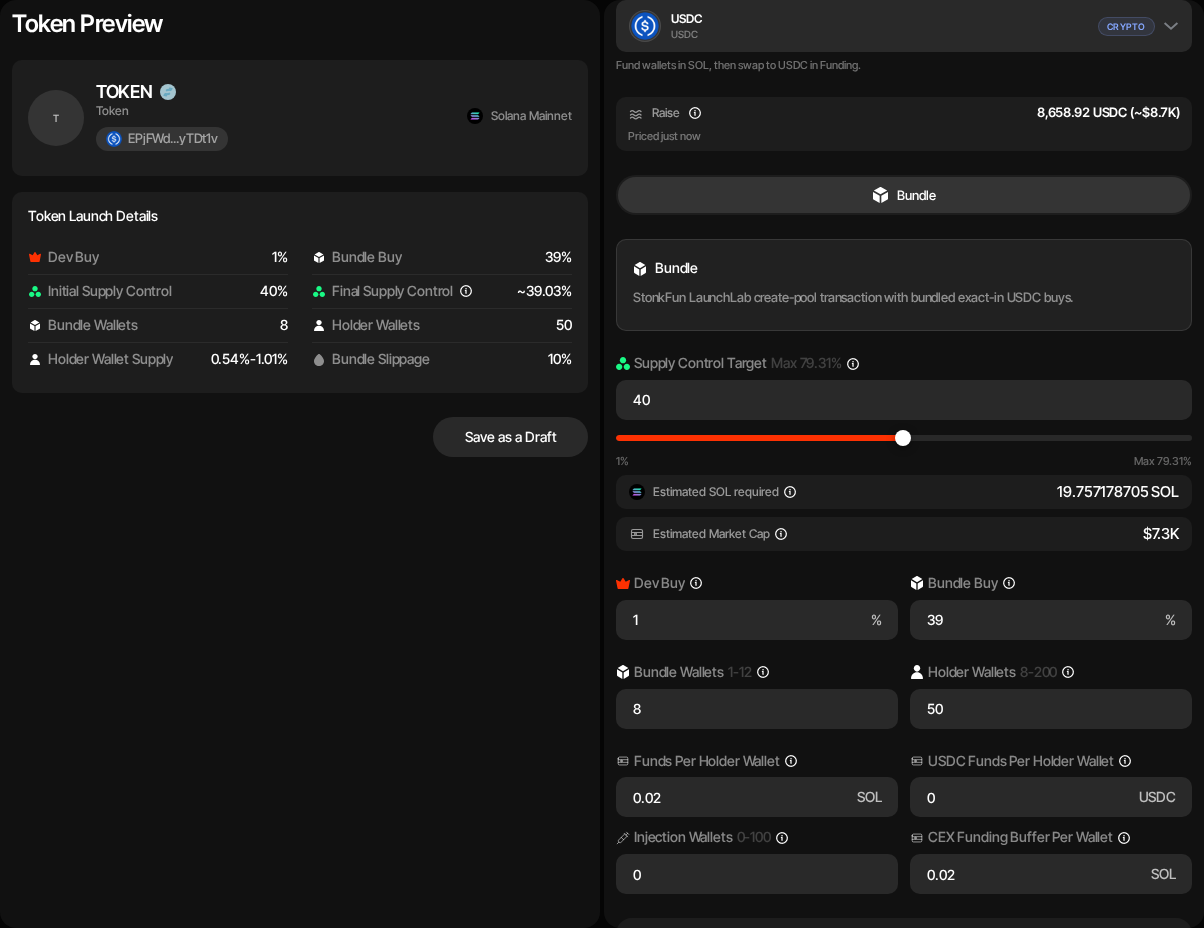
StonkFun supports bundled launches only: the dev buy and every bundle buy land in one Jito bundle alongside the LaunchLab create-pool transaction. There is no Bundle + Snipe mode and no sniper wallets.
| Setting | Description |
|---|---|
| Quote Asset | The asset the LaunchLab curve is priced in, picked from StonkFun's catalogue. Locked after the first draft save; create a new draft to switch quote assets. See Quote Assets. |
| Launch Mode | Standard (untaxed) or Reward (immutable holder tax at 1% or 3%). Changing it re-prices the launch against StonkFun's other platform. Locked after the first draft save. See Reward Mode. |
| Raise | Read-only graduation target StonkFun fixed for the saved quote, with its age and a Refresh terms action. See The Raise. |
| Launch plan | Sets the dev buy, the bundle and the snipe on one bar, with the cost strip (Bundle cost, Snipe cost, Funds needed, Market cap) under it. See Launch Plan. The dev buy plus the bundle is capped at 79.31%; the exact ceiling is the share of supply the saved curve actually puts up for sale, net of the holder tax in Reward mode (about 76.93% at 3%, 78.51% at 1%), and a target above it is rejected when the draft is saved. |
| Dev buy | Launch plan row: share of supply the dev wallet buys with the quote asset. Dev-only launches with no bundle buyers are supported. |
| Bundle · at launch | Launch plan row: the share of supply spread across the bundle wallets, without the dev buy. |
| Bundle Wallets | Number of LaunchLab bundle buyers. StonkFun supports up to 12 bundle wallets; new drafts default to 8. When the Launch plan's bundle is 0% there is no bundle buy (the row reads Dev buy only): the launch is dev-only (create-only when the dev buy is 0% too), so Bundle Wallets and Holder Wallets are hidden, no bundle wallets are created and, unless snipe wallets join holder cleanup (see Snipe After Launch in Launch a New Token), no holder wallets and no token cleanup either. With Token Supply launch-fee payment the fee then comes from the dev wallet, so the dev buy must be at least the fee share of supply; otherwise use a Launch Ticket. |
| Holder Wallets | Wallets funded through token cleanup after launch. Up to 400. |
| Snipe after launch | Optional wallets that buy right after the bundle lands; on a quote-token launch they spend their quote amount. See Snipe After Launch. |
| Injection Wallets | Optional wallets funded for later activity, up to 100. They do not buy in the launch bundle. |
| Funds Per Holder Wallet | SOL top-up delivered through cleanup source wallets. |
| Funds Per Injection Wallet | Optional SOL top-up for injection wallets. |
| Token Cleanup Method | Off, Token Transfer, or Sell / Buy (not offered for a taxed quote). New drafts default to Sell / Buy, redistributing through buys and sells. Use Bundle for Token Cleanup (Advanced Controls) sends each sell and its buy together in a Sender Max bundle (adds a Token Cleanup Tip, default 0.002 SOL, per bundle). It defaults on for a non-SOL quote, where a bundle hands the quote through more relay wallets than a single transaction can, and off for SOL, where cleanup runs as single transactions. Until you set it yourself it follows the launchpad and quote you pick; once set, your choice is kept and a hint shows when it differs from the recommendation. A saved draft saved with Sell / Buy keeps the choice it was saved with. Pick Token Transfer for plain token transfers. Pick Off to skip the post-launch redistribution entirely: the holder wallets are still created, but nothing is sent to them (their SOL funding is part of the cleanup). The Token Wash Reserve is still budgeted on the launch wallets, so you can run Token Cleanup yourself later from Live Trading. On a Reward token the cleanup declares the holder tax automatically; note that Token Transfer moves tokens through a temporary account, so holders receive the amount net of the tax applied twice, while Sell / Buy prices the tax once through the sell. |
| CEX Funding | Optional Husher funding path for distributing SOL. |
| Advanced Controls | Token mint (random or vanity), Launch buy slippage (launch buys), Trading slippage (default 1%, at most 10%: the new profile's default slippage for strategies and instant trades, changeable later in profile settings), Cleanup slippage (Sell / Buy cleanup only; default 2%, at most 10%: the first attempt's tolerance for each cleanup sell and buy, and each of up to two retries adds 1%, up to 10%), bundle supply jitter, holder supply jitter, and Jito tip. |
On a token-quoted launch the Launch plan's Bundle cost is in SOL: it includes the SOL the funding swap is expected to spend for the quote the buys need, at the indicative treasury rate. The treasury swap's 2% slippage headroom and the 0.02 SOL minimum reserve for each wallet that has to swap are added in Funds needed.
Lookup Table Preparation
Bundle buyers are packed two per transaction, raised to three once a lookup table is present, and the whole launch has to fit Jito's five-transaction limit. Nine or more buyers therefore require a launch-specific lookup table: Sumo prepares it before submitting, stores it on the draft, and reuses it for simulation and launch.
Vanity Mint Address
In Advanced Controls, the Token mint setting can mine a vanity launch mint: choose Random (default), Vanity Address: Starts With, or Vanity Address: Ends With, then enter up to 4 case-sensitive base58 characters. Characters outside Solana's base58 alphabet — 0, O, I, and l — are removed as you type. Sumo's vanity service mines the mint before the launch, and the saved mint is the one the launch uses.
3. Wallets
Add, import, or generate wallets for each launch role.
| Role | Description |
|---|---|
| Dev Wallet | Creates the Token-2022 mint and the LaunchLab pool, pays setup costs, and performs the dev buy. |
| Bundle Wallets | Execute the bundled Raydium LaunchLab buys. |
| Holder Wallets | Receive post-launch holder distribution through cleanup. |
| Injection Wallets | Optional wallets funded for later injection activity. |
You can use ready wallets, create new wallets, or buy aged wallets at this step. Ready-wallet paths include importing private keys, pulling wallets from Wallet Farm, or reusing wallets from another profile. Additional paths include creating new wallets or buying aged inventory from Wallet Marketplace.
Sniper wallets are not used in the StonkFun launch flow exposed by Sumo.
4. Funding
Save the draft before funding. The funding table tracks SOL requirements for transaction fees, Jito tip, lookup-table preparation when required, holder cleanup reserves, and optional injection wallets, plus the buy amounts themselves in the launch's quote asset.
If CEX funding is enabled, deposit the estimated SOL into the funding wallet and use Fund to distribute it through Husher. If CEX funding is disabled, fund the launch wallets directly and use Check Balances.
On a SOL-quoted launch that is all. The wallets are funded in SOL, and the shared LaunchLab builder wraps and syncNatives at buy time, so no swap is involved and the quote-swap action is refused.
On every other quote the wallets are funded in SOL first and then swapped into the quote before the bundle. Once every wallet holds at least the swap's own SOL sizing (the funding table shows a wallet's balance in red until it does), Swap SOL to <QUOTE> opens a preview of the swap: the live rate and provider, each wallet's quote shortfall, the SOL it will spend and keep, and an adjustable slippage. Confirming asks Sumo to swap, per wallet, only the SOL that wallet's remaining shortfall needs into the quote token; wallets that already hold their quote are skipped. Holder and injection quote budgets are included in the sizing. The swap runs through the treasury swap and pays its normal treasury swap fee. The preview also has a <QUOTE> → SOL direction that swaps quote back into SOL. Its Amount to return control sells either what the wallets hold above their planned buys (the default, so the launch stays funded) or everything, for instance to change the quote token and re-import the wallets into a new launch; at most the sellable total, split across the chosen wallets, with each selling wallet paying for its own swap out of its SOL. The two directions never run at the same time. While the swap request is in flight, Swap and the other controls in the preview are disabled, so a second press cannot start a second run (the server would refuse it with "A StonkFun funding or launch step is already running for this project"). If wallets fail because the price moved past the slippage, the failure notice says so; when the quote token charges a Token-2022 transfer fee (common for tokenized stocks), it names the fee and suggests a slippage above it plus room for price movement. Raise the slippage in the preview and swap again: the preview re-sizes each wallet's SOL debit at the new slippage.
The swaps land wallet by wallet, so a wallet whose swap fails on-chain keeps its SOL: Check Balances shows the shortfall and the swap can simply be run again for what is missing. A second swap is refused while one is still executing, and small leftover quote balances after launch are expected.
Readiness requires funded wallets — resolved funding results and fresh confirmed balances — before Preview and Launch will accept the draft.
The funding table supports address copying, allocation randomization, per-wallet allocation edits, and balance checks.
5. Strategies
Optionally add starter strategies to the profile before launch. You can configure Counter Trade, DCA, and Limit Order strategies by hand, or apply a strategy preset: Sumo ships built-in Hyped, Standard, and Staircase presets, and your org can save its own presets for reuse across launches and imports. Strategies are saved with the draft and can be reviewed after the token is live.
6. Launch Preview
Review:
- Token metadata and the saved launch mint
- Quote asset and the locked raise
- Launch mode, with the holder tax rate on a Reward token
- Dev, bundle, holder, and injection wallet counts
- SOL and quote funding rows
- Supply split across dev and bundle buys
- Prepared lookup table status when required
Simulate Launch builds and signs the saved plan and reports any blockers before funds move. Launch submits it: Sumo creates the Token-2022 mint, initializes the LaunchLab pool attributed to StonkFun's platform config, and lands the dev buy and the ordered bundle buys in the same Jito bundle.
Fees and Costs
StonkFun charges no launch fee on this path: Sumo builds the pool itself, so there is nothing to pay StonkFun at launch. You pay Solana rent and transaction fees plus the Jito tip, and — on a token-quoted launch — the treasury swap fee on the funding swap.
You still pay Sumo's usual launch charge - one Launch Ticket or the 0.5% token-supply dev allocation - as on every other launchpad. See Platform Fees.
StonkFun's own revenue comes from trading. Its platform configuration charges a 1% platform fee on curve trades and pays the creator's share of it, so the creator receives 0.5% of trades. StonkFun pays that out itself — there is nothing to claim from Sumo. The rates are read from StonkFun's on-chain platform config and re-verified before every funding, simulation, and launch action, so a change on StonkFun's side stops the action instead of quietly repricing the launch.
After Launch
The launched profile opens in Live Trading with dexId: raydium-launchpad and a Token-2022 base mint. You can monitor Raydium LaunchLab trades, activate starter strategies, run token cleanup, and use normal wallet and treasury tooling.
Sumo also shows a StonkFun token-page link on Live Trading once the coin is live, so you can open it on StonkFun's own site.
Project activation does not wait for StonkFun. Sumo checks adoption separately for a few minutes after the launch confirms and records the result on the profile; a listing that has not appeared yet is an integration delay, never a reason to launch again.
The curve graduates naturally into a Raydium CPMM pool once the raise is reached. Sumo follows the migration and keeps trading, strategies, and treasury actions running against the CPMM pool. Sumo does not force graduation, so there is no Graduation Bundle and there are no post-graduation wallets on this launchpad.
Launch Logs
StonkFun profiles add a Launch Logs tab for mint and metadata preparation, lookup-table preparation, bundle simulation, bundle launch, and related launch transactions.
Further Reading
- What Are Memecoin Bonding Curves? — this launchpad's curve overlaid on every other supported launchpad, with graduation math
- How to Launch a Memecoin in 2026 — the full launch playbook, from wallet prep to post-launch market making
- How Much Does It Cost to Launch a Memecoin? — simulate launch cost, starting market cap, and supply held across supported launchpads
Memoo Solana Launch
Launch a Solana token through Memoo and Raydium LaunchLab with SOL buys, funding tiers, bundle wallets, holder cleanup, and starter strategies.
meme.fun Solana Launch
Launch a Solana token on meme.fun with a creator buy and bundled SOL buys in one Jito bundle, holder cleanup, and starter strategies.