
Burn
Permanently remove project tokens or LP tokens from a treasury wallet.
Burning permanently removes tokens from circulation. Sumo exposes two burn actions from the profile's Wallets tab, in the wallet actions menu.
Burns are irreversible
Burned tokens cannot be recovered. Preview amounts carefully before confirming.
Burn Tokens
Removes the project token from one treasury wallet.
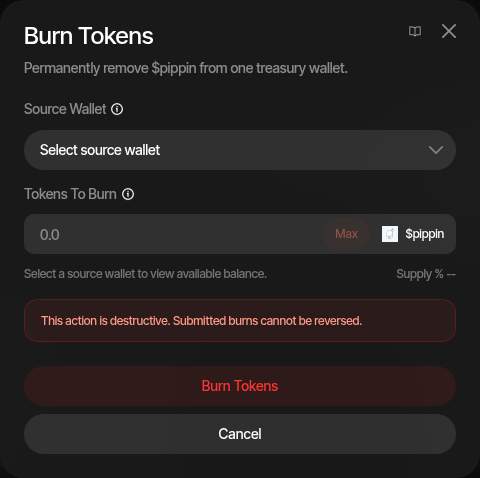
- Open the profile's Wallets tab and click Burn Tokens from the wallet actions menu
- Select the source wallet
- Enter the tokens to burn — the dialog shows the wallet's available balance and the supply percentage
- On EVM profiles, choose the burn method
- Confirm
| Method (EVM) | Description |
|---|---|
| Contract burn | Burns through the token's built-in burn function, reducing supply directly. If the contract does not support burning, Sumo falls back to the dead-address transfer automatically. |
| Transfer to dead address | Always sends the tokens to the dead address, removing them from circulation without a contract-level burn. |
The method choice only exists on EVM because not every ERC-20 implements a burn function. Solana tokens always support burning, so no choice is needed there.
Supply after a burn
Once the burn confirms, Sumo re-reads the token's supply and updates the profile on its own, usually within seconds. Your organization's other non-archived profiles for the same token on the same chain are updated too, up to 20 profiles per burn. Market cap, supply percentages, the supply fields in Profile Settings and the market-cap range of running Limit Orders then reflect the burn without a manual refresh.
- Solana and EVM contract burns lower the total supply.
- EVM dead-address transfers leave the total supply unchanged and lower the circulating supply instead, which excludes the balances held by the zero and dead addresses. Market cap uses the circulating supply.
If the new supply does not show up, use Refresh Supply in Profile Settings. Burning liquidity does not change the token's supply.
Burn Liquidity
Sends LP tokens from one treasury wallet to the dead address, permanently locking the underlying liquidity in the pool. Available on EVM profiles whose pool uses V2-style LP tokens.
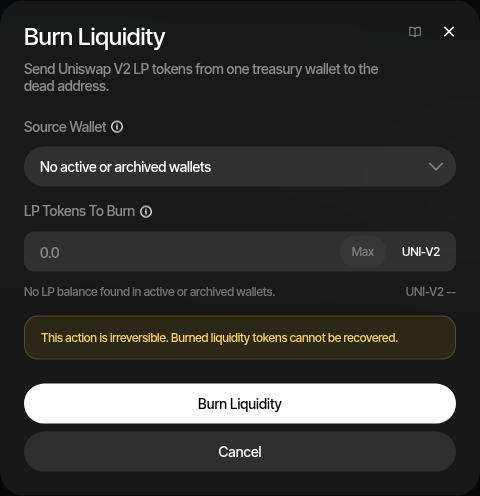
- Open the profile's Wallets tab and click Burn Liquidity from the wallet actions menu
- Select the wallet holding the LP tokens — active, archived or excluded
- Enter the LP token amount to burn
- Confirm
Burning LP tokens is a common post-launch commitment signal: the pool's liquidity can no longer be withdrawn by the team.
On a Uniswap V4 launch (Base, Robinhood) launched with Lock liquidity off, Burn Liquidity sends the whole position NFT from the dev wallet to the dead address instead. The liquidity stays in the pool for good, and the position's unclaimed and future LP fees are given up with it, so claim first. A locked V4 position cannot be burned: its liquidity is already permanent and its fees stay claimable.
Lock Liquidity is the alternative when you want the liquidity back after a date, or want to keep a V3 position's trading fees claimable. It locks through UNCX on EVM chains and through the DEX's own lock on Solana, where it is the only option: Solana profiles have no LP burn.
Logs
Both burn types are recorded in Treasury Logs with the transaction details.