
Memoo Solana Launch
Launch a Solana token through Memoo and Raydium LaunchLab with SOL buys, funding tiers, bundle wallets, holder cleanup, and starter strategies.
Sumo supports Memoo launches on Solana. The flow creates and saves Memoo metadata, uses Raydium LaunchLab with WSOL quote, prepares any required lookup table, submits bundled launch buys, and transitions the draft into an active trading profile.
Prerequisites
Before launching, make sure you have:
- Token metadata ready: name, ticker, image, description, and social links
- SOL for dev buy, bundle buys, transaction fees, Jito tip, and optional holder or injection top-ups
- A funding tier selection for the Raydium LaunchLab configuration
- A launch plan: supply target, dev buy, bundle wallet count, holder count, and optional injection wallets
- A wallet plan: use ready wallets from private keys, Wallet Farm, or another profile, or create new Solana wallets / buy aged Solana wallets through Wallet Marketplace during the wizard
Launch Flow
1. Info
Choose Memoo in the Launchpad field, then enter the token and profile details.
| Field | Required | Description |
|---|---|---|
| Launchpad | Yes | Select Memoo. The launchpad is locked after the draft is saved. |
| Profile Name | Yes | Internal Sumo profile name used after launch |
| Token Name | Yes | Public token name |
| Ticker | Yes | Token symbol, auto-uppercased |
| Image | Yes | JPG or PNG image, up to 2 MB |
| Description | No | Public token description |
| X, Telegram, Website | No | Public social links included with the Memoo metadata |
Memoo uses fixed launch-token supply settings in the standard Sumo launch flow.
2. Buy Mode
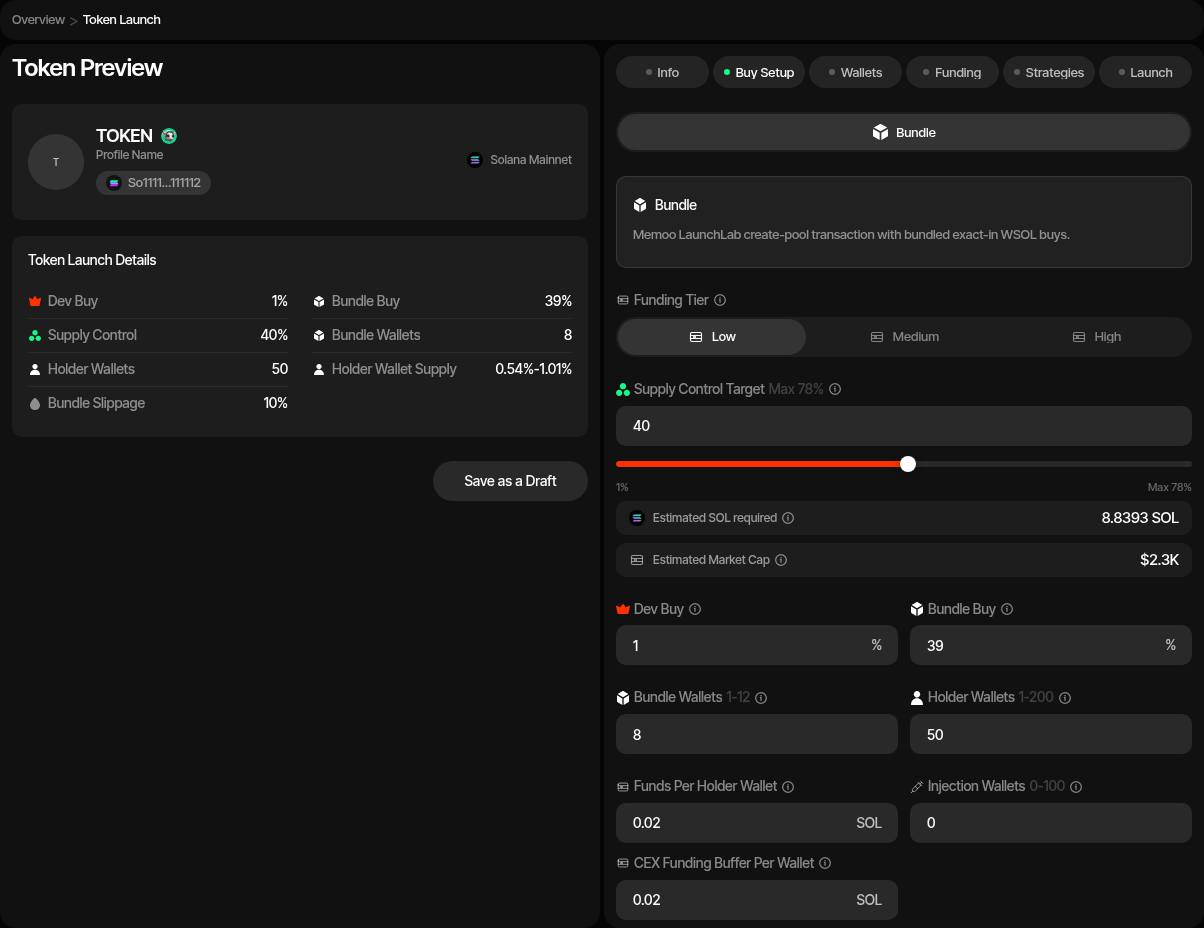
Memoo supports normal bundled launches with SOL buys.
| Setting | Description |
|---|---|
| Launch plan | Sets the dev buy, the bundle and the snipe on one bar, with the cost strip (Bundle cost, Snipe cost, Funds needed, Market cap) under it. See Launch Plan. The dev buy plus the bundle is capped at 78% (Max 78%). |
| Dev buy | Launch plan row: share of supply the dev wallet buys with SOL. |
| Bundle · at launch | Launch plan row: the share of supply spread across the bundle wallets, without the dev buy. |
| Funding Tier | LaunchLab migration funding target. Low, medium, and high correspond to larger SOL migration targets. |
| Bundle Wallets | Number of LaunchLab bundle buyers. Memoo supports up to 12 bundle wallets. When the Launch plan's bundle is 0% there is no bundle buy (the row reads Dev buy only): the launch is dev-only (create-only when the dev buy is 0% too), so Bundle Wallets and Holder Wallets are hidden, no bundle wallets are created and, unless snipe wallets join holder cleanup (see Snipe After Launch in Launch a New Token), no holder wallets and no token cleanup either. With Token Supply launch-fee payment the fee then comes from the dev wallet, so the dev buy must be at least the fee share of supply; otherwise use a Launch Ticket. |
| Holder Wallets | Wallets funded through token cleanup after launch. |
| Snipe after launch | Optional wallets that buy right after the bundle lands (normal Bundle only). See Snipe After Launch. |
| Injection Wallets | Optional wallets funded for later activity. |
| Funds Per Holder Wallet | SOL top-up delivered through cleanup source wallets. |
| Funds Per Injection Wallet | Optional SOL top-up for injection wallets. |
| Token Cleanup Method | Off, Token Transfer, or Sell / Buy. New drafts default to Sell / Buy, redistributing through buys and sells sent as single transactions, the default for a SOL quote. Turn on Use Bundle for Token Cleanup (Advanced Controls) to send each sell and its buy together in a Sender Max bundle instead (adds a Token Cleanup Tip, default 0.002 SOL, per bundle). Until you set it yourself it follows the launchpad you pick (non-SOL quotes such as Pump.fun USDC default it on); once set, your choice is kept and a hint shows when it differs from the recommendation. A saved draft saved with Sell / Buy keeps the choice it was saved with. Pick Token Transfer for plain token transfers. Pick Off to skip the post-launch redistribution entirely: the holder wallets are still created, but nothing is sent to them (their SOL funding is part of the cleanup). The Token Wash Reserve is still budgeted on the launch wallets, so you can run Token Cleanup yourself later from Live Trading. |
| CEX Funding | Optional Husher funding path for distributing SOL. |
| Advanced Controls | Launch buy slippage (launch buys), Trading slippage (default 1%, at most 10%: the new profile's default slippage for strategies and instant trades, changeable later in profile settings), Cleanup slippage (Sell / Buy cleanup only; default 2%, at most 10%: the first attempt's tolerance for each cleanup sell and buy, and each of up to two retries adds 1%, up to 10%), bundle supply jitter, holder supply jitter, and Jito tip. |
Lookup Table Preparation
Memoo can prepare a launch-specific lookup table when wallet counts require it. The wizard stores the prepared lookup table on the draft and reuses it for simulation and launch.
3. Wallets
Add, import, or generate wallets for each launch role.
| Role | Description |
|---|---|
| Dev Wallet | Authenticates with Memoo, creates launch metadata, pays setup costs, and performs the dev buy. |
| Bundle Wallets | Execute bundled Raydium LaunchLab buys. |
| Holder Wallets | Receive post-launch holder distribution through cleanup. |
| Injection Wallets | Optional wallets funded for later injection activity. |
You can use ready wallets, create new wallets, or buy aged wallets at this step. Ready-wallet paths include importing private keys, pulling wallets from Wallet Farm, or reusing wallets from another profile. Additional paths include creating new wallets or buying aged inventory from Wallet Marketplace.
Sniper wallets are not used in the Memoo launch flow exposed by Sumo.
4. Funding
Save the draft before funding. The funding table tracks SOL requirements for dev and bundle buys, transaction fees, Jito tip, optional lookup-table preparation, holder cleanup reserves, and optional injection wallets.
If CEX funding is enabled, deposit the estimated SOL into the funding wallet and use Fund to distribute it through Husher. If CEX funding is disabled, fund the launch wallets directly and use Check Balances.
5. Strategies
Optionally add starter strategies to the profile before launch. You can configure Counter Trade, DCA, and Limit Order strategies by hand, or apply a strategy preset: Sumo ships built-in Hyped, Standard, and Staircase presets, and your org can save its own presets for reuse across launches and imports. Strategies are saved with the draft and can be reviewed after the token is live.
6. Launch Preview
Review:
- Memoo metadata and saved launch identifiers
- Funding tier
- Dev, bundle, holder, and injection wallet counts
- SOL funding rows
- Supply split across dev and bundle buys
- Prepared lookup table status when required
When launched, Sumo uses Memoo's signing flow for token creation, builds the Raydium LaunchLab bundle, and submits the launch transaction sequence.
After Launch
The launched profile opens in Live Trading. You can monitor Raydium LaunchLab trades, activate starter strategies, run token cleanup, and use normal wallet and treasury tooling.
Launch Logs
Memoo profiles add a Launch Logs tab for metadata preparation, lookup-table preparation, bundle launch, and related launch transactions.
America.Fun Solana Launch
Launch a Solana Token-2022 project through America.Fun with USD1 buys, Meteora DBC migration support, holder cleanup, injection wallets, and starter strategies.
StonkFun Solana Launch
Launch a Solana Token-2022 coin through StonkFun and Raydium LaunchLab, quoted in SOL, a stablecoin, an xStock, or any other asset in StonkFun's pair catalogue, with a locked raise, bundle wallets, a SOL-to-quote funding swap, holder cleanup, and starter strategies.