
Wallet Groups
Organize wallets into groups for batch operations and strategy assignment.

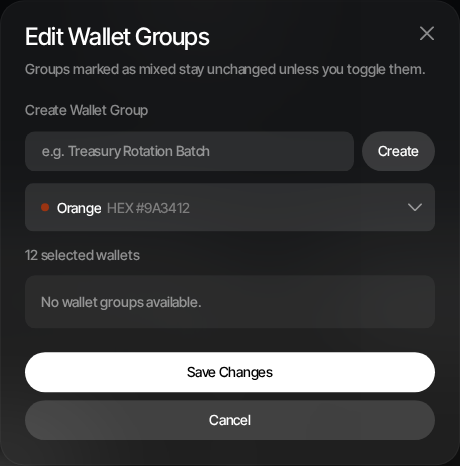
Wallet groups let you organize wallets into named, color-coded sets. Groups are used throughout Sumo for strategy assignment, treasury operations, and batch actions.
Why Use Groups
- Strategy isolation — Run Counter Trade on one group and DCA on another
- Treasury operations — Withdraw from or swap a specific group of wallets
- Visual organization — Color-coded indicators make it easy to identify wallets at a glance
- Launch bundles — Select a wallet group as buyer wallets for token launches
Creating a Group
During Wallet Creation
When generating or importing wallets, you can create a new group inline:
- Click Create New Group in the wallet creation modal
- Enter a group name
- Pick a color from the palette
- The new group is assigned to the wallets being created
From the Wallets Page
- Select one or more wallets using the checkboxes
- Click Grouping in the toolbar to open the Edit Wallet Groups modal
- To put them in a new group, enter a name, pick a color and click Create & add. The group is created with the selected wallets in it right away.
- To add them to or remove them from existing groups, toggle those groups and click Save Changes
If you close the modal with toggles you have not saved, or with a group name you typed but did not create, Sumo asks before discarding them. If a new group is created but the wallets cannot be added, it stays ticked in the list; click Save Changes to add them.
Managing Groups
The Edit Wallet Groups modal shows all groups with:
- Color indicator
- Group name
- Member count
- Selection state relative to the selected wallets
Groups marked as mixed stay unchanged unless you toggle them. This makes it safe to bulk-edit several wallets without accidentally removing existing group assignments.
Deleting a Group
With no wallets selected, click Groups to open Manage Wallet Groups, choose the group, and click the trash icon next to it. Deleting a group only removes the group; its wallets stay in the profile.
A group can't be deleted while something still depends on it:
- A strategy uses it — any strategy that isn't deleted, including paused or completed ones, since they can be restarted. Change the strategy's wallets or delete the strategy first.
- It belongs to your token launch — the Dev, Bundle, Holder and other launch groups are used during the launch and by post-launch cleanup.
- A Wallet Marketplace import is still adding wallets to it — try again once the import finishes.
The message you see names what's blocking the delete.
Groups in Strategies
When creating a strategy, the Wallet selector lets you choose:
- All wallets — Ignores groups, uses everything
- A specific group — Only wallets in that group participate
- An individual wallet — Single wallet only
Groups in Treasury
Treasury operations like Withdraw, Privacy Cashout, and Wrap/Unwrap also support filtering by wallet group.