
Meteora DAMM v2 Solana Launch
Launch a Solana token on Meteora DAMM v2 with SOL or USDC liquidity, freeze bundle controls, injection wallets, liquidity locking, and starter strategies.
Sumo supports Solana launches through Meteora DAMM v2. The wizard supports both Meteora DAMM v2 SOL and Meteora DAMM v2 USDC. Both paths create a new token mint, create the DAMM v2 pool, run bundle-wallet buys while freeze controls are active, optionally lock liquidity, and then transition the launch draft into an active trading profile.
Prerequisites
Before launching, make sure you have:
- Token metadata ready: name, ticker, image, description, and social links
- A SOL funding source for network fees, priority fees, and SOL-quoted launches
- USDC when using Meteora DAMM v2 USDC
- A launch plan: initial liquidity, initial token liquidity percentage, bundle wallet count, and optional injection wallets
- A wallet plan: use ready wallets from private keys, Wallet Farm, or another profile, or create new Solana wallets / buy aged Solana wallets through Wallet Marketplace during the wizard
SOL and USDC Variants
Meteora DAMM v2 SOL uses WSOL as the quote side. Meteora DAMM v2 USDC uses USDC for liquidity and launch buys, while still requiring SOL for transaction fees and priority fees.
Launch Flow
1. Info
Enter the token and profile details, then choose the launch method.
| Field | Required | Description |
|---|---|---|
| Launchpad | Yes | Choose Meteora DAMM v2 SOL or Meteora DAMM v2 USDC. The launchpad is locked after the draft is saved. |
| Profile Name | Yes | Internal Sumo profile name used after launch |
| Token Name | Yes | Public token name |
| Ticker | Yes | Token symbol, auto-uppercased |
| Total Supply | Yes | SPL token total supply before decimals. Maximum 1T; defaults to 1,000,000,000. |
| Decimals | Yes | Meteora launches support 0 to 9 decimals; defaults to 6. |
| Image | Yes | JPG or PNG image, up to 2 MB |
| Description | No | Public token description |
| X, Telegram, Website | No | Public social links attached to the profile |
2. Buy Mode
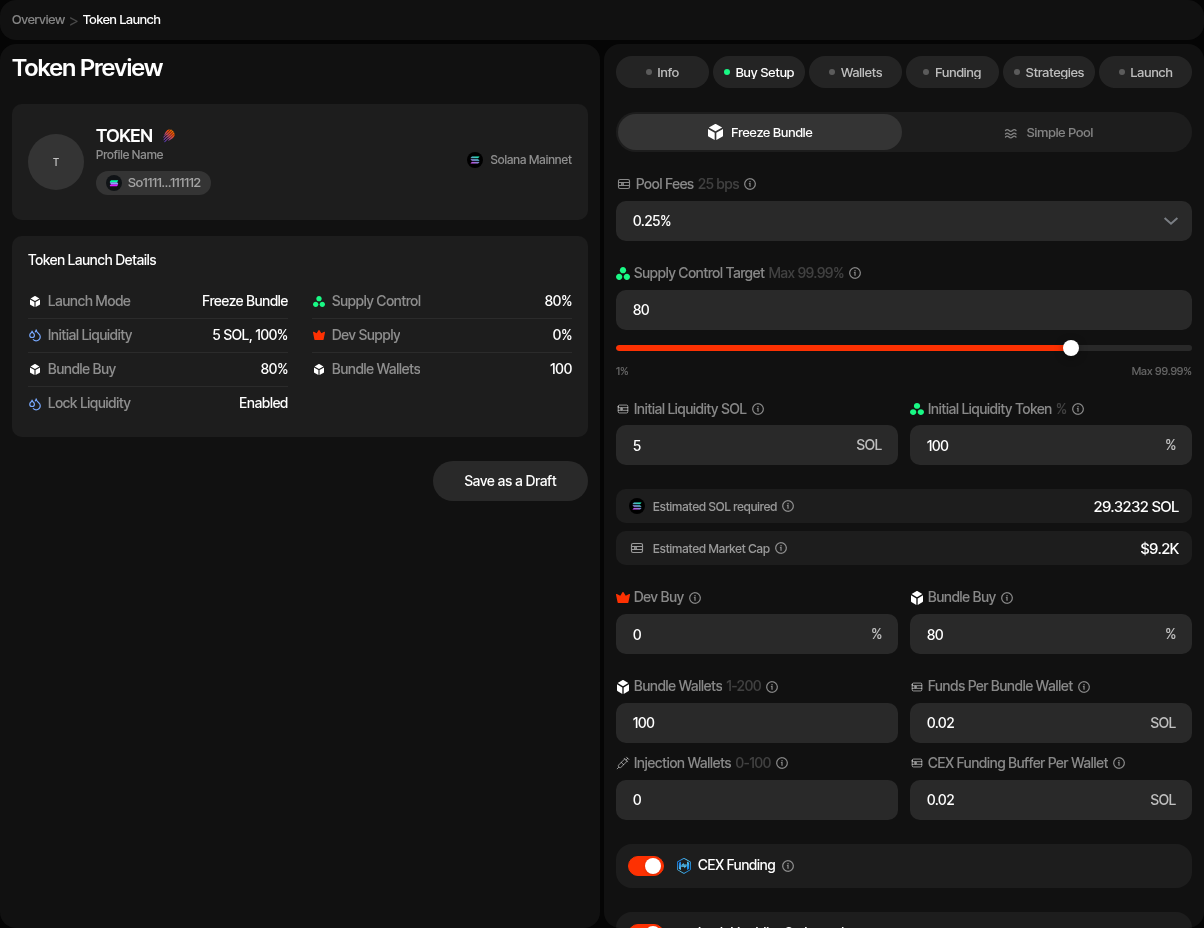
Meteora DAMM v2 supports two launch modes:
| Mode | Description |
|---|---|
| Freeze Bundle | Creates the pool and runs bundle-wallet buys while freeze controls protect the launch sequence. |
| Simple Pool | Dev-only launch: creates the pool with initial liquidity and no bundle buys or injection wallets. |
| Setting | Description |
|---|---|
| Initial Liquidity SOL / USDC | Quote asset supplied by the dev wallet when the pool is created. |
| Pool Fees | Meteora DAMM v2 fee configuration selected for the pool: 0.25% (default), 1%, 2%, 4%, or 6%. |
| Initial Token Liquidity | Percentage of token supply paired into the pool. |
| Bundle Wallets | Number of bundle wallets used for launch buys. Meteora supports up to 200 bundle wallets. |
| Funds Per Bundle Wallet | Native SOL reserved per bundle wallet. For USDC launches, this is separate from USDC buy allocation. |
| USDC Funds Per Bundle Wallet | Extra USDC top-up per bundle wallet, shown for the USDC variant. |
| Injection Wallets | Optional wallets funded for later injection activity. They do not participate in the launch bundle. |
| Funds Per Injection Wallet | SOL top-up for each injection wallet. |
| USDC Funds Per Injection Wallet | Optional USDC top-up for each injection wallet, shown for the USDC variant. |
| Lock Liquidity | Permanently locks the Meteora LP position after trading opens and launch transactions complete. Left off, the position can still be locked later, permanently or until a date, with Lock Liquidity. |
| Advanced Controls | Priority fee, bundle supply jitter, delay per bundle transaction, and the launch mint address type. |
Vanity Mint Address
In Advanced Controls, the Address Type setting can mine a vanity launch mint: choose Random (default), Vanity Address: Starts With, or Vanity Address: Ends With, then enter up to 4 case-sensitive base58 characters.
Injection Wallets
Injection wallets are funding targets for later activity. They are not bundle buyers and do not receive launch-token allocation during the initial bundle.
3. Wallets
Add, import, or generate wallets for each required Solana role.
| Role | Description |
|---|---|
| Dev Wallet | Creates the mint, creates the pool, supplies initial liquidity, and pays launch setup costs. |
| Freeze Wallet | Controls freeze/thaw operations during the freeze-bundle flow and signs final freeze-authority revoke transactions. |
| Bundle Wallets | Execute launch buys while freeze controls protect the launch sequence. |
| Injection Wallets | Optional wallets funded for later injection activity. |
You can use ready wallets, create new wallets, or buy aged wallets at this step. Ready-wallet paths include importing private keys, pulling wallets from Wallet Farm, or reusing wallets from another profile. Additional paths include creating new wallets or buying aged inventory from Wallet Marketplace.
4. Funding
Save the launch draft before funding. Saving creates the pre-launch profile, role wallet groups, token mint details, and launch settings.
For SOL launches, the funding table tracks SOL requirements for setup, liquidity, bundle wallets, priority fees, and optional injection wallets.
For USDC launches, the funding table tracks both SOL and USDC requirements. USDC covers liquidity, buy allocations, and optional USDC top-ups. SOL covers transaction fees, priority fees, setup transactions, and optional native top-ups.
If CEX funding is enabled, deposit the Total cost shown in Buy Setup into the funding wallet and use the funding actions to distribute them. If CEX funding is disabled, fund the launch wallets directly and use Check Balances before launch.
5. Strategies
Optionally add starter strategies to the profile before launch. You can configure Counter Trade, DCA, and Limit Order strategies by hand, or apply a strategy preset: Sumo ships built-in Hyped, Standard, and Staircase presets, and your org can save its own presets for reuse across launches and imports. Strategies are saved with the draft and can be reviewed after the token is live.
6. Launch Preview
Review the final launch composition before submitting:
- Token metadata and mint
- Pool fee and initial liquidity
- Dev, freeze, bundle, and injection wallet counts
- Bundle allocation and funding rows
- Liquidity-lock setting
- Starter strategies
The preview sequence creates the pool, submits bundle buys, finalizes freeze state, optionally locks liquidity, and activates the trading profile.
After Launch
After the Meteora pool is live, the profile opens in Live Trading. You can monitor trades, review launch logs, run starter strategies, manage wallets, and use the Meteora profile actions that are available for the launched pool.
Launch Logs
Meteora launch profiles add a Launch Logs tab to the Logs workspace. Use it to review pool creation, bundle execution, freeze/finalize actions, liquidity-lock actions, and related launch transactions.
PumpFun Solana Launch
Launch your token on PumpFun in SOL, USDC, or any registered custom quote asset from Sumo, with automated mint prep, bundled buys, funding, and starter strategies.
BONK.fun Solana Launch
Launch a Solana token through BONK.fun and Raydium LaunchLab with bundled WSOL buys, a configurable graduation target, holder cleanup, and starter strategies.