
Aerodrome Base Launch
Launch a Base ERC-20 token on Aerodrome Classic with WETH liquidity, staged launch buys, tax controls, and starter strategies.
Sumo supports Base launches through Base Aerodrome. The flow deploys a Base ERC-20 launch token, creates an Aerodrome Classic volatile WETH pool, adds initial liquidity while public trading is still closed, runs launch-wallet buys, then opens public trading.
Prerequisites
Before launching, make sure you have:
- Token metadata ready: name, ticker, image, description, and social links
- Total supply and token decimals
- ETH on Base for deployment, pool setup, initial liquidity, launch buys, and gas buffers
- A launch plan: target supply control, pool-token percentage, bundle wallet count, and optional tax settings
- A wallet plan: use ready wallets from private keys, Wallet Farm, or another profile, or create new Base wallets / buy aged Base wallets through Wallet Marketplace during the wizard
Launch Flow
1. Info
Choose Base Aerodrome in the Launchpad field, then enter the token and profile details.
| Field | Required | Description |
|---|---|---|
| Launchpad | Yes | Select Base Aerodrome. The launchpad is locked after the draft is saved. |
| Profile Name | Yes | Internal Sumo profile name used after launch |
| Token Name | Yes | ERC-20 token name |
| Ticker | Yes | ERC-20 token symbol, auto-uppercased |
| Total Supply | Yes | ERC-20 total supply before decimals |
| Decimals | Yes | ERC-20 display decimals, commonly 18 |
| Image | Yes | JPG or PNG image, up to 2 MB |
| Description | No | Public token description |
| X, Telegram, Website | No | Public social links attached to the profile |
2. Buy Mode
Base Aerodrome uses the shared EVM buy setup controls.
| Setting | Description |
|---|---|
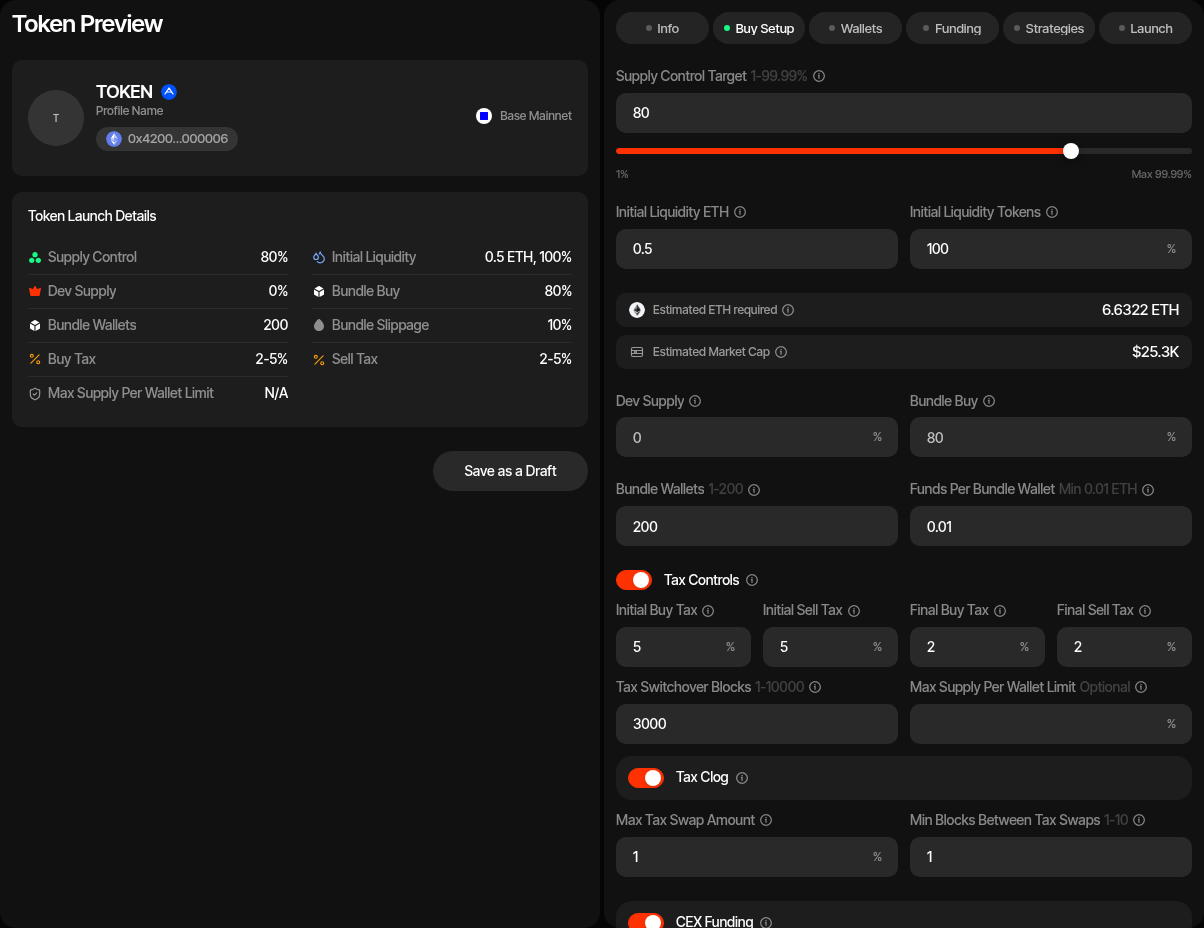
| Launch plan | Sets the supply the dev wallet keeps, the bundle and the snipe on one bar, with the cost strip under it; see Launch Plan. Dev keeps plus bundle: 1% to 99.99% (Max 99.99%). |
| Initial Liquidity ETH | ETH supplied by the dev wallet during pool setup. |
| Initial Liquidity Tokens | Percentage of total supply supplied to the pool. The remainder stays with the dev wallet. |
| Bundle cost | Launch plan cost strip: initial pool liquidity, launch buys with the pool fee, each wallet's gas reserve, and the deployer's deploy reserve. CEX funding buffers are not part of it; they are added in Funds needed. |
| Market cap | Launch plan cost strip (MCap after with a snipe): estimated from Aerodrome pool reserves after launch buys, using the ETH/USD reference price. |
| Dev keeps | Launch plan row: supply the dev wallet keeps beside the liquidity instead of buying, 0% to 99.9999%. It is the complement of Initial Liquidity Tokens: editing it also updates Initial Liquidity Tokens. |
| Bundle · at launch | Launch plan row: the share the bundle wallets buy from the pool, without the supply the dev wallet keeps. |
| Bundle Wallets | Number of Base wallets used for launch buys. Base launch methods support up to 200. With 0 bundle wallets the launch only deploys the token and adds liquidity: there are no launch buys, Holder Wallets are hidden, and no token cleanup runs. With Token Supply launch-fee payment the fee then comes from the supply the dev keeps outside the pool, so that retained share must be at least the fee share of supply; otherwise use a Launch Ticket. |
| Funds Per Bundle Wallet | ETH reserved per bundle wallet for gas. Minimum 0.01 ETH. |
| Injection Wallets | Optional extra wallets, up to 100, funded with ETH for activity after launch. They do not buy in the launch or take part in cleanup. |
| Funds Per Injection Wallet | Shown when Injection Wallets is above 0. ETH sent to each injection wallet during funding. Defaults to 0. |
| CEX Funding | Optional Husher funding path for distributing ETH to launch wallets. |
| CEX Funding Buffer Per Wallet | Extra ETH added per wallet when CEX funding is enabled. Minimum 0.01 ETH. |
| Advanced Controls | Slippage, bundle supply jitter, and bundle priority fee in gwei. |
| Trading slippage | Default 1%, at most 10%. Becomes the new profile's default slippage for strategies and instant trades, changeable later in profile settings. On a taxed token the tax is added on top and saved (for example 1% + 5% tax = 6%). |
Tax Controls
Base Aerodrome launch tokens support configurable taxes, wallet limits, and tax clog behavior. Tax controls are optional and disabled by default; when disabled, the token deploys from the no-tax contract template.
| Setting | Description |
|---|---|
| Initial Buy Tax / Initial Sell Tax | Taxes used during the initial post-launch tax window. |
| Final Buy Tax / Final Sell Tax | Taxes used after the tax switchover block window. |
| Tax Switchover Blocks | Number of blocks before final taxes replace initial taxes. Base defaults are longer than Ethereum defaults. |
| Max Supply Per Wallet Limit | Optional maximum token balance per non-excluded wallet. |
| Tax Clog | Collects tax on the contract and sells it for the launch's quote (ETH, or the ERC-20 you picked), paid to the tax wallet through Aerodrome. If a stablecoin quote ever blocks the tax wallet, sells fail until the tax wallet turns auto-sell off or changes the tax wallet. |
| Max Tax Swap Amount | Maximum tax-token amount sold in one automatic swap. |
| Min Blocks Between Tax Swaps | Cooldown between automatic tax-token swaps. |
3. Wallets
Add, import, or generate wallets for each required Base role.
| Role | Description |
|---|---|
| Dev Wallet | Deploys the token, creates the Aerodrome pool, adds liquidity, opens trading, and receives retained supply. |
| Tax Wallet | Receives tax proceeds and submits later tax or limit updates. |
| Bundle Wallets | Execute launch buys before public trading is opened. |
| Injection Wallets | Optional wallets funded with ETH for activity after launch. They take no part in the launch or cleanup. |
You can use ready wallets, create new wallets, or buy aged wallets at this step. Ready-wallet paths include importing private keys, pulling wallets from Wallet Farm, or reusing wallets from another profile. Additional paths include creating new wallets or buying aged inventory from Wallet Marketplace.
Holder and sniper wallets are not used by Base Aerodrome launches.
4. Funding
Save the draft before funding. If CEX funding is enabled, deposit the estimated Base ETH into the funding wallet, check the balance, then use Fund to distribute ETH through Husher. If CEX funding is disabled, fund the dev, tax, and bundle wallets directly and use Check Balances.
The funding table tracks ETH requirements for the dev and bundle wallets. It supports address copying, allocation randomization, per-wallet allocation edits, and balance checks. The dev allocation and final bundle allocation are auto-balanced from the target.
5. Strategies
Optionally add starter strategies to the profile before launch. You can configure Counter Trade, DCA, and Limit Order strategies by hand, or apply a strategy preset: Sumo ships built-in Hyped, Standard, and Staircase presets, and your org can save its own presets for reuse across launches and imports. Strategies are saved with the draft and can be reviewed after the token is live.
6. Launch Preview
For Base Aerodrome, the preview action sequence is:
- Deploy Token - Deploys the generated Base Aerodrome launch token from the dev wallet.
- Create Pool - Creates the Aerodrome Classic pool, sets launch-wallet fee exemptions, and adds initial liquidity while public trading remains closed.
- Launch - Starts the durable launch runner. It submits bundle-wallet buys in batches, opens public trading after the launch buys are confirmed, activates the profile, and submits ownership renounce.
Background Launch Runner
Base launches continue in the background after the Launch action starts. The preview shows launch progress while the runner submits and confirms launch buys.
Snipe After Launch
Optional Snipe after launch wallets buy right after the launch lands, with their own sizing, delay, max premium, pacing and gas priority. Set Snipe Wallets to 0 (the default) and the launch is unchanged. See Snipe After Launch. With launch taxes on, the Initial Delay defaults to just after the initial tax window. On Ethereum and Base the default initial tax window (about 100 minutes) is longer than the 1-hour maximum delay, so the delay stops at 1 hour and the form warns that snipes still pay the initial tax.
After Launch
When all launch buys confirm and public trading opens, the profile becomes active and opens in Live Trading.
Uniswap V4 Base Launch
Launch a Base token straight into its own hookless Uniswap V4 pool, with an LP fee you choose, single-sided or full-range liquidity quoted in ETH or an ERC-20, the position locked for fees forever by default, an atomic launch bundle, and starter strategies.
Uniswap V2 Robinhood Launch
Launch a Robinhood Chain ERC-20 token on a Uniswap V2 WETH pair with staged launch buys, optional tax controls, holder cleanup, and starter strategies.