
Treasury Logs
Log of all treasury operations including withdrawals and wallet swaps.

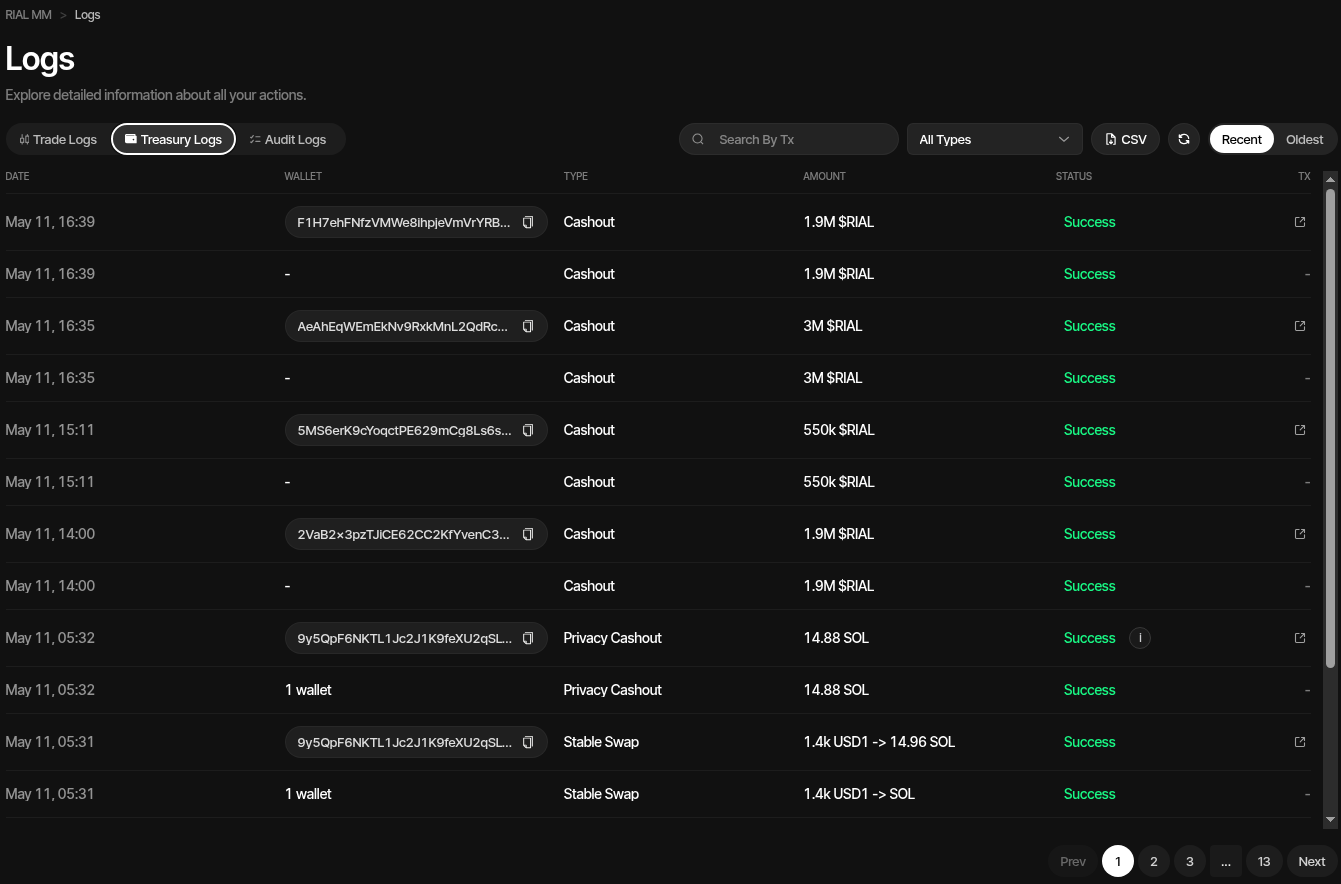
Treasury Logs record every treasury operation performed on your profile. Access them from the profile Logs view and select the Treasury Logs tab.
The same Logs workspace also includes Trade Logs, Launch Logs when available, and Audit Logs.
Columns
| Column | Description |
|---|---|
| Date | When the operation was executed |
| Wallet | Wallet involved in the operation, destination count, or summary label |
| Type | The operation type |
| Amount | Amount transferred |
| Status | Success, Failed, Pending, or Skipped (a token cleanup leg whose source wallet was already emptied) |
| Tx | Link to the transaction on the block explorer |
Operation Types
- Withdraw — Standard withdrawals to external addresses
- Privacy Swap — Private native asset or stablecoin distributions
- Privacy Cashout — Multi-source privacy cashout operations with destination-side settlement
- Treasury Swap — Native-to-stable or stable-to-native treasury swaps
- Cross-Chain Swap — Project wallet swaps to a destination on another chain
- Swap Wallets — Wallet replacement transfers
- Token Cleanup — Token transfers or buy/sell redistribution between wallet groups
- Token Burn — Project-token burns
- Liquidity Burn — Liquidity-token burns
- Lock Liquidity — Solana liquidity locks, with the lock mechanism, lock account and unlock date
- Wrap/Unwrap Native — Native asset wrap/unwrap operations
- Creator Fee Claim — PumpFun/PumpSwap, meme.fun, Floor Carpenter and Pons V2 creator-fee claims when available
- Change Creator — A finalized PumpFun/PumpSwap creator-fee recipient change, including the recipient count and transaction
Withdrawals and privacy cashouts sent with a Note show a note icon next to the type; hover or click it to read the note. Notes are not shown on Client Portal links.
For cross-chain swaps, the transaction link points to the destination receipt when the provider returns one. The tooltip can include the source deposit transaction so you can reconcile both sides of the bridge route.
Filtering & Sorting
- Type filter — Show only specific operation types
- Status filter — Show only Pending, Success, Failed, or Skipped rows. Skipped also lists finished token cleanups that skipped any wallet; those also stay under their own status
- Search — Search by transaction signature
- Sort — Click sortable column headers such as Date, Wallet, Type, Amount, or Status
- Order — Toggle between Recent (newest first) and Oldest (oldest first)
- Refresh — Reload the current log view
CSV Export
Click the CSV button to download treasury logs for external review or reconciliation.
Pagination
Use the page controls at the bottom to move through older or newer log pages.