
Rewards
Your trading rate and cashback, perks, launch tickets, and Sumo Balance activity.
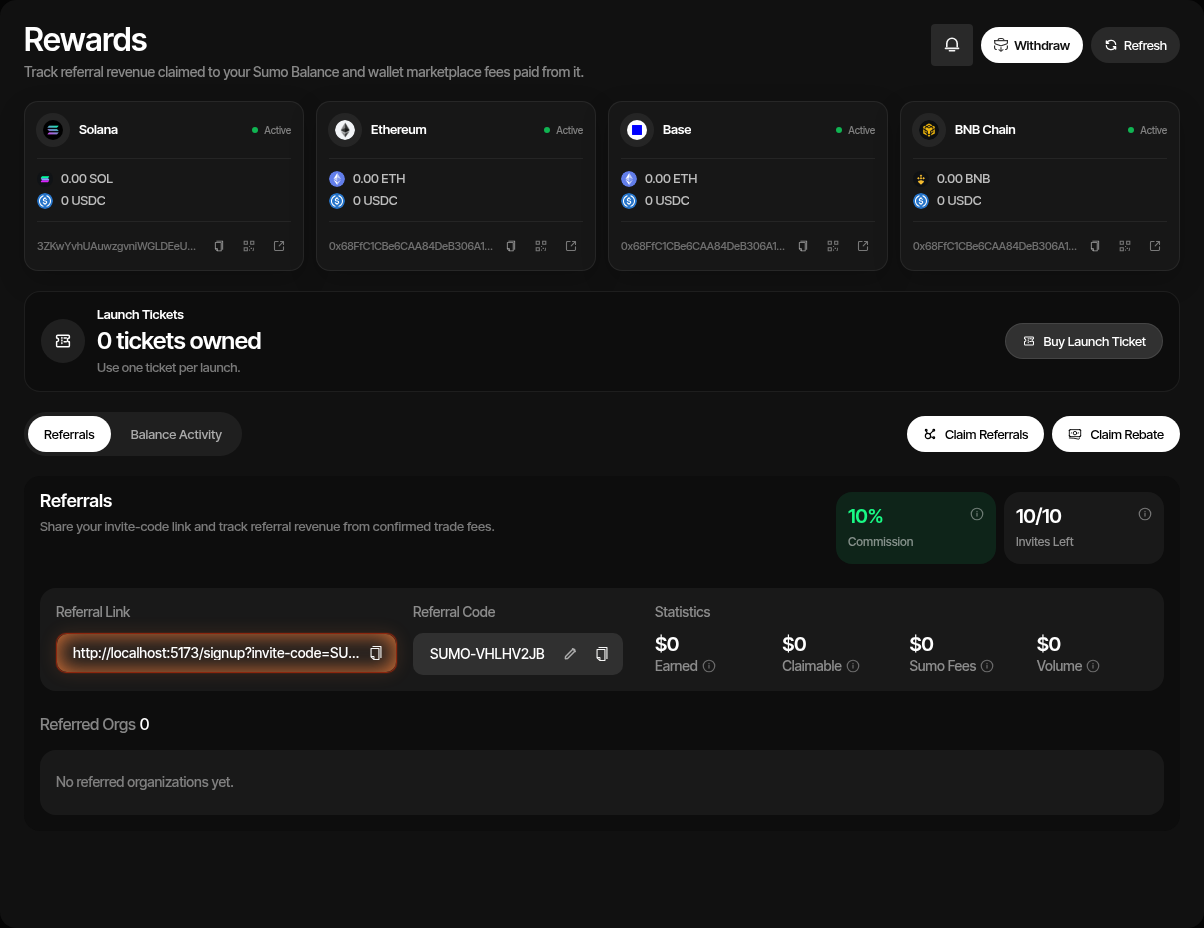
The Rewards page is where organization rewards, launch-ticket inventory, and Sumo Balance activity live. It combines:
- Your organization's trading rate
- Launch tickets for token launches
- Cashback / fee rebate claims
- Sumo Balance deposits, withdrawals, and ledger activity
Open it from Rewards in the app sidebar. The page also hosts the referral program, which is covered separately in Referrals.
Your Rate
The rate card near the top of Rewards shows what your organization pays on Sumo-executed trades:
| Item | Description |
|---|---|
| Trading fee | The platform fee charged on buys and sells (shown separately when they differ) |
| Cashback | The share of that fee returned to your Sumo Balance (see Cashback / Rebates) |
| Net fee | Trading fee after cashback, for example 1% with 10% cashback is 0.90% |
| 30d volume | Your rolling 30-day trading volume, refreshed hourly |
| Cashback earned / Saved (30d) | Cashback accrued over the last 30 complete days; organizations on an exclusive rate see the estimated saving against the usual rate instead |
| Leaderboard | Your 30-day volume rank once your 30-day volume is above $50k (private leaderboard organizations included); otherwise Unranked |
| Lifetime | Your organization's total volume and launches with month-by-month growth, plus when it joined; updated daily through yesterday |
Organizations on an exclusive rate see it compared with the usual rate. The rate applies to every trade automatically; nothing needs to be claimed except the cashback itself.
Your Perks
The rate card also lists perks your organization unlocks as it grows. Locked perks are shown dimmed until they unlock. Perks are checked once a day from your lifetime figures through yesterday, and every member gets an in-app notification when one unlocks.
| Perk | Unlocks at |
|---|---|
| Token X-Ray | $20K lifetime volume |
| Priority support | $10M lifetime volume or 50 launches |
| Referral invites | Your referral quota grows with the lifetime volume of the organizations you referred: 15 at $50K, 20 at $250K, 30 at $1M and 50 at $5M. It never goes down. |
| Free launch tickets | One ticket each at 10, 20 and 40 lifetime launches (not offered on the lowest exclusive rates) |
Unlocks are permanent. Free launch tickets are granted only when a milestone is reached, never for milestones reached before perks were introduced, and never twice for the same milestone. They appear under Launch Tickets and work like purchased tickets.
Launch Tickets
Launch tickets let you prepay for token launches at a fixed price.
| Item | Description |
|---|---|
| Price | $250 per ticket, paid in canonical USDC from your Sumo Balance |
| Coverage | One ticket covers one token launch |
| Inventory | Tickets belong to the organization and remain available until applied to a launch |
| Bulk Purchase | You can buy multiple tickets at once from Rewards |
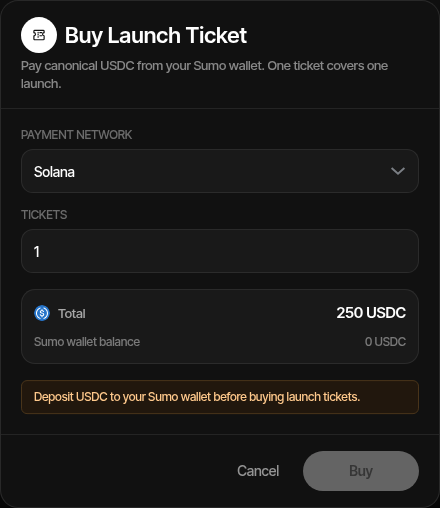
During a launch, choose Launch Ticket as the launch-fee payment method to consume an available ticket. If you do not want to use a ticket, choose the dev-allocation method instead; that method charges 0.5% of token supply as the launch fee.
Sumo Balance
Sumo Balance is the organization-level balance used for rewards and platform settlement activity.
You can use it to:
- Deposit supported assets on Solana, Ethereum, Base, or BNB Chain
- Buy launch tickets with canonical USDC
- Receive referral revenue claims
- Receive fee rebate claims
- Pay wallet marketplace fees
- Withdraw supported balances
- Swap between the native asset and the settlement stablecoin on a chain (admin only; the standard treasury swap fee applies and the result is reported in Rewards notifications)
- Review ledger entries and export history
The ledger tracks credits and debits such as referral revenue, fee rebate claims, wallet marketplace fees, and withdrawals.
Cashback / Rebates
Cashback, shown in-app as fee rebates, returns eligible fee amounts to your Sumo Balance. When rebates are available, Rewards shows the claim action and chain-specific claimable amounts.
- Open Rewards
- Click the rebate claim action
- Select the chain with claimable rebate amount
- Confirm the claim
- Review the transaction link and ledger entry after submission
Rebate availability depends on your organization's fee settings and confirmed activity.
Profiles with a custom quote token
Cashback is paid in the chain's native asset or its settlement stablecoin. When a profile trades against any other quote token (a custom quote), the fees it pays in that token are sold to the chain's native asset once a day, and its cashback is calculated from what the sale actually returned, less a standard 1% conversion charge, never from a token price.
In the claim dialog:
- Native already includes the cashback on custom-quote fees that have been sold; the line under it says how much of this period's cashback came from converted fees (including any part you have already claimed).
- Pending conversion lists, per token, the fees still waiting for their daily sale, in that token's units. They have no native value and cannot be claimed yet; their cashback is added to Native after the sale.
A few things to know:
- The amount credited depends on what the sale returns, so it can be lower than the token's quoted value, for example on thinly traded tokens. Pending amounts are an upper bound.
- Tokens with no available route or too little liquidity can stay pending for longer. Fees worth less than a few dollars may wait until more accumulate.
- Fees paid in your project's own token earn no cashback.
- Converted fees count toward a cashback period by when they are sold, not when the trade happened.
- Referral revenue from custom-quote fees is credited the same way, from the sale's proceeds after the same 1% conversion charge.
Launch Fee Choices
For each launch, choose the payment method that fits that launch:
| Method | Use When |
|---|---|
| Launch Ticket | You want a fixed $250 launch cost and already have or want to buy ticket inventory. |
| Dev Allocation | You prefer to pay 0.5% of token supply instead of prepaying in USDC. |