
Launch a New Token
Start a Sumo launch draft, configure wallets and funding, then activate the trading profile after launch.
Use Launch New Token when you want Sumo to create the token and run the launch sequence for you. This is different from importing an existing token: a launch starts as a pre-launch profile, then becomes an active trading profile after the launch completes.
How Launch Profiles Work
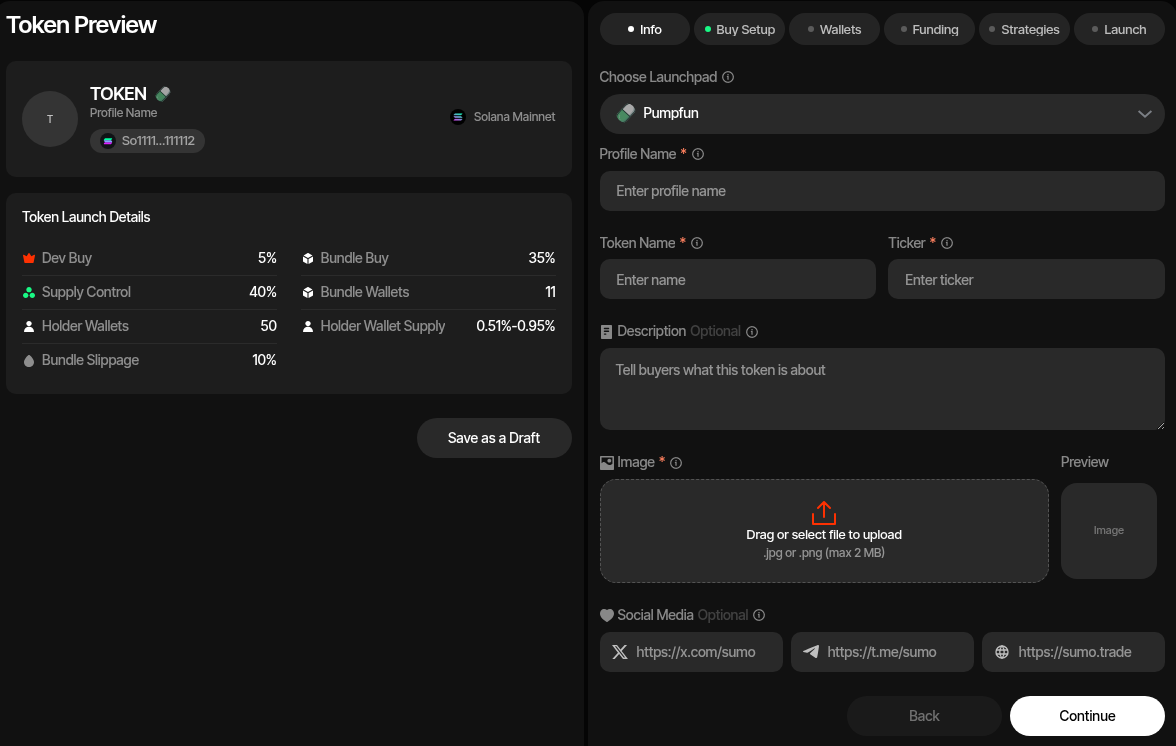
- Start from the dashboard and click Launch New Token
- Pick a launch method
- Enter token metadata and launch settings
- Create, import, or buy the wallets needed for the launch
- Fund the launch wallets
- Optionally add starter strategies, by hand, from a built-in or org-saved strategy preset, or copied from another profile
- Review the preview and submit the launch
- After launch, Sumo activates the profile for live trading, strategies, wallets, logs, and reporting
Launch profiles usually create role-based wallet groups such as dev wallets, bundle wallets, holder wallets, sniper wallets, tax wallets, or injection wallets depending on the launch method.
When the launch runs a holder cleanup, holder wallets start archived and are activated when the cleanup delivers their tokens (with Token Cleanup Method Off they start active); the bundle and snipe wallets that feed them are archived once all their cleanup legs succeed. The cleanup changes wallet status only: wallet groups and strategy wallet settings stay as you set them. See Token Cleanup.
Each launch also needs a launch-fee payment method. You can use one Launch Ticket from your organization's ticket inventory, or pay the launch fee as a 0.5% token-supply dev allocation for that launch. A Solana launch whose dev buy equals its supply target is dev-only (no bundle or holder wallets); it pays the token-supply fee from the dev wallet, so a dev buy below the fee needs a Launch Ticket. See Platform Fees and Rewards for the ticket purchase and fee details.
Supported Launch Methods
| Launch method | Chain | Use when |
|---|---|---|
| PumpFun Solana | Solana | You want a PumpFun SOL or PumpFun USDC launch with bundle and optional migration controls |
| Meteora DAMM v2 Solana | Solana | You want a Meteora DAMM v2 SOL or USDC pool launch |
| BONK.fun Solana | Solana | You want a BONK.fun / Raydium LaunchLab launch with bundled WSOL buys |
| America.Fun Solana | Solana | You want an America.Fun USD1 launch with Meteora DBC migration support |
| Memoo Solana | Solana | You want a Memoo / Raydium LaunchLab launch |
| StonkFun Solana | Solana | You want a StonkFun / Raydium LaunchLab launch quoted in SOL, a stablecoin, an xStock, or any other asset in StonkFun's pair catalogue |
| meme.fun Solana | Solana | You want a meme.fun launch: a never-migrating bonding curve with a creator buy and bundled SOL buys |
| Meteora DBC Solana | Solana | You want a Meteora Dynamic Bonding Curve launch with your own config, quoted in SOL, USDC, USD1 or another token, optionally graduating to DAMM v2 in the launch bundle |
| Uniswap V2 Ethereum | Ethereum | You want to deploy an ERC-20 and launch a WETH pool on Ethereum |
| moto.fun Ethereum | Ethereum | You want a moto.fun bonding-curve launch with a dev buy and up to 49 bundle wallets in one Flashbots bundle |
| Uniswap V2 Base | Base | You want to deploy an ERC-20 and launch a Uniswap V2 WETH pair on Base, with optional launch taxes |
| Uniswap V3 Base | Base | You want to deploy a tax-free ERC-20 and launch a full-range Uniswap V3 WETH pool on Base at the fee tier you pick |
| Uniswap V4 Base | Base | You want your own hookless Uniswap V4 pool with an LP fee you choose (0.01%–10%), single-sided or full-range liquidity quoted in ETH or an ERC-20, the position locked for fees forever, and every buy in one transaction |
| Aerodrome Base | Base | You want to deploy an ERC-20 and launch an Aerodrome Classic pool |
| Uniswap V2 Robinhood | Robinhood Chain | You want to deploy an ERC-20 and launch a Uniswap V2 WETH pair on Robinhood Chain, with optional launch taxes and holder cleanup |
| Uniswap V3 Robinhood | Robinhood Chain | You want to deploy a tax-free ERC-20 and launch a full-range Uniswap V3 WETH pool on Robinhood Chain at the fee tier you pick, with holder cleanup |
| Uniswap V4 Robinhood | Robinhood Chain | You want your own hookless Uniswap V4 pool with an LP fee you choose (0.01%–10%), single-sided or full-range liquidity quoted in ETH or an ERC-20, the position locked for fees forever, and every buy in one transaction |
| SushiSwap Robinhood | Robinhood Chain | You want a SushiSwap Launchpad token where the launchpad seeds liquidity and every buy lands in one creator transaction |
| Pons V2 Robinhood | Robinhood Chain | You want a Pons V2 native bonding-curve launch that graduates to a Pons V4 pool |
| lunch.fun Robinhood | Robinhood Chain | You want a lunch.fun launch straight into a permanent Uniswap pool, quoted in ETH, HOOD, USDG, or a tokenized stock, with an optional creator tax |
| Flywheel Robinhood | Robinhood Chain | You want a Flywheel launch straight into a permanent hooked Uniswap V4 pool with a 4% swap tax paid as creator or holder rewards, priced by Flywheel's $10,000 graduation target rule |
| Uniswap V3 Stable | Stable | You want to deploy an ERC-20 and launch a USDT0-quoted Uniswap V3 pool on Stable |
| PancakeSwap V2 BSC | BNB Smart Chain | You want to deploy an ERC-20 and launch a WBNB pool on BSC |
| Four.meme BSC | BNB Smart Chain | You want to launch through Four.meme and submit BSC bundle buys |
| Flap BSC | BNB Smart Chain | You want a Flap bonding-curve launch with Tax V3 duration, anti-farmer, and dividend controls |
Start From a Previous Launch
When your organization has launched or saved a draft on the same launchpad family before, the top of the Buy Setup step shows Start from previous launch. Its menu lists all of your organization's launches and drafts on that family in two sections, Launched (tokens that went live, including ones archived since) and then Drafts, newest first within each; type in the search field at the top to find one by token name, ticker or profile name, archived ones included. Pumpfun SOL, USDC and Custom are one family, as are Meteora DAMM v2 SOL and USDC, the mainnet Uniswap V2 launchpads, and the Uniswap V3 launchpads; every other launchpad is its own family, and testnet launchpads (Uniswap V2 Sepolia) only offer testnet launches. Each row shows the launch's setup as icon chips (dev buy, bundle share and wallets, holder wallets, Snipe after launch wallets and buy size per wallet, launch buy slippage); a row's chips appear as it scrolls into view.
Picking a row copies that launch's Buy Setup into the form at once: launch mode, dev buy, supply target, wallet counts, cleanup, slippage, funding options, launchpad fee and tax settings, and Snipe after launch. Everything stays editable, and the cost estimate is recalculated from the copied values. It never copies the token itself, wallets or keys (launch wallets are always new), a vanity mint, funding state, a Paid handle, or quote terms the server locks for a launch. Strategies are not copied.
Copied values are checked against today's limits for the launchpad you are on. A value that no longer fits (for example more bundle wallets than Pumpfun USDC allows) is adjusted and listed under the "Copied from" line, which also shows the copied chips (hover one for its full label). Amounts in a different quote or native asset, such as USDC holder funding copied into a Pumpfun SOL launch, are left at this launch's values and listed as not copied. Undo copy restores the form exactly as it was before the copy, so edits made after copying are discarded too. Start from is offered until the launch wallets are created.
Launch Plan
On every launchpad with Snipe after launch, the Buy Setup step shows a Launch plan card ("what you will hold"). It is where you set how much of the supply the dev wallet, the bundle and the snipe take. It sits directly under the Bundle / Graduation Bundle tabs, or at the top of the step on EVM launchpads without tabs. Meteora DAMM v2, Balloon, Uniswap V3 on Stable and Uniswap V2 Sepolia have no Launch plan card; their Buy Setup keeps its own supply target, dev and bundle fields and cost rows.
| Part | What it shows |
|---|---|
| Header | The plan in one line, for example "1% dev · 39% bundle = 40% total", or "1% dev · 29% bundle · ~9.5–15% snipe = ~40–45% total" with a snipe. With a Sell / Buy holder cleanup, hover the total to see the estimate after holder cleanup. |
| Bar | One bar from 0 to 100% of supply: dev (orange), bundle (blue), snipe (green) and the rest of the supply (grey). The launchpad's ceiling is marked Max X%, and the part beyond it is striped. Drag the blue handle to set where the bundle ends and the green handle to set how far the snipe may reach; the snipe handle never goes below the bundle handle or past what the venue can sell. The snipe is drawn solid to its low estimate and hatched to its high estimate, because it is not guaranteed. When the bundle has to start high (a Graduation Bundle's migration point, for example 79.3% on Pump.fun), the part below it is drawn short and labelled, for example "≈ 79.3% graduation". With a handle focused, the arrow keys move it by 0.1%, and Shift + arrows or Page Up / Page Down by 1%. |
| Cost strip | Four tiles under the bar; see Launch Costs. |
| Dev buy | The share of supply the dev wallet buys. On Uniswap V2 / V3 / V4, Aerodrome and PancakeSwap pools the dev wallet keeps supply beside the liquidity instead of buying, so the row reads Dev keeps. SushiSwap has no dev share and no dev row. Changing it keeps the bundle and moves the total. |
| Bundle · at launch | The bundle wallets' share alone, without the dev share. Changing it keeps the dev buy. On launchpads that allow dev-only launches, 0% makes the launch dev-only and the row reads Dev buy only (create-only when the dev buy is 0% too). |
| Snipe · after bundle lands | How much the snipe may buy, as "up to" a % of supply, with the estimated range in the header. Above 0% turns Snipe after launch on (with the snipe wallet count you last used, 10 by default); 0% or blank turns it off and keeps its other settings. Moving the bundle keeps this % and re-sizes the snipe's buy amounts and funds; when the bundle leaves less room, the snipe is sized for the room left. |
Each % box keeps what you type while you type, applies values that are in range straight away, and clamps to the allowed range when you leave the box or press Enter. Each launchpad's page lists its ceiling and dev buy rules; where a launchpad has its own rules, the info icon beside the row explains them.
The snipe row says when it cannot be set:
- Not available with Graduation Bundle, Not available for a Graduation Bundle with a token quote or Not available on this launchpad where no snipe is offered for that setup.
- Nothing left to snipe at this bundle size when the bundle already buys everything the venue sells (for example a Pump.fun bundle at its 79.3% maximum). The snipe % you set is kept, so lowering the bundle brings the snipe back; the launch is not blocked.
- Snipe wallets can only be added before the first save on a saved draft without snipe wallets (wallet counts are fixed once the draft is saved).
- On America.Fun, which has no snipe supply estimate, the row reads Snipe · set in Snipe after launch below and shows the snipe's state; set its wallets and buy size in the Snipe after launch section.
While a value the estimate needs is missing (a quote token, the quote rate, the launch terms, a Max Premium), the snipe box is disabled and the reason shows under the card.
The Token Launch Details panel beside the wizard shows the same plan as a supply table on bonding-curve launchpads: Dev buy, Bundle supply (post-graduation buys included), Snipe supply (est.) while the snipe is on, and Total supply (a range with a snipe). An After holder cleanup column appears only with a Sell / Buy holder cleanup. Uniswap V2 / V3 / V4, Aerodrome, PancakeSwap, SushiSwap and Meteora DAMM v2 launches show a Bundle Supply Control row there instead.
Wallets
You can use ready wallets, create new wallets, or buy aged wallets during the launch wizard. Ready-wallet paths include importing private keys, pulling wallets from Wallet Farm, or reusing wallets from another profile. Additional paths include creating new wallets or buying aged inventory from Wallet Marketplace.
The From Farm tab offers the same Include In Progress and Keep in Wallet Farm toggles as profile imports. Both start off each time the modal opens, and they apply to the wallets added in that import.
Snipe After Launch
On Solana bundle launches (Pumpfun SOL, USDC and Custom, StonkFun, BONK.fun, meme.fun, Meteora DBC, Memoo in Bundle mode, and America.Fun), the Buy Setup step has a Snipe after launch section above Injection Wallets. Separate wallets buy right after the bundle lands, on top of the bundle's supply. The Launch plan card's Snipe · after bundle lands row (or the green handle on its bar) sets how much supply the snipe may buy and sizes the buys for it; see Launch Plan. This section holds the snipe's wallets, sizing, delay, price limit and pacing.
Set Snipe Wallets to 0 (the default), or the Launch plan's snipe % to 0, and the launch is exactly as before. Above 0:
| Setting | What it does |
|---|---|
| Snipe Wallets | 1 to 100 wallets. They are created with the launch, in their own Snipe Wallets group, and are fixed once the draft is saved. |
| Buy Size | Per wallet (an amount each), Total (split evenly), or % of balance (a share of what each wallet can spend). Each can add a random ± jitter of up to 50%. |
| Funds Per Snipe Wallet | SOL sent to each snipe wallet in Funding (default 0.1, minimum 0.015). On USDC, USD1 and custom-quote launches you also set the quote amount each wallet receives. The snipe spends from these funds by the sizing above and always keeps back a reserve for the network fee, priority fee, Sender tip, token accounts and a 0.005 SOL buffer. With Include snipe wallets in holder cleanup on, the reserve also keeps back what each snipe wallet pays as a cleanup source (transaction fees and the holders' new token accounts), budgeted for an even share of the holders plus one, so the minimum rises: for example 0.053 SOL instead of 0.010 SOL with 25 holders, 4 bundle and 5 snipe wallets and buys and sells for holders. A snipe wallet holding far more than its share, or several snipe wallets that buy nothing, can still leave a few cleanup transfers short. The form shows the reserve and blocks the launch when the sizing cannot fit. |
| Initial Delay | Seconds after the bundle lands before the snipe fires (shown as Initial Delay (after bundle lands)). |
| Max Premium | Highest price any snipe may pay, as a premium over the modelled price of our own last snipe buy on the pool as your launch bundle leaves it. The cap is fixed when the bundle lands, so buying by others during the delay does not raise it: snipes that would pay more do not fill (they retry within the retry window if the price comes back). The Snipe max price (MCap) row below the pacing settings (and Preview) shows the cap as a market cap, up to $Y; its tooltip gives the range from the modelled price of our last snipe buy with no outside buying to the cap. It is a price limit, not where the market cap ends up: that is MCap after in the Launch plan's cost strip. |
| Est. snipe supply | Under the snipe max price: the share of supply the snipe would get, as ~low–high% (the same range the Launch plan's header shows). High: no outside buyers after the bundle. Low: outside buyers already pushed the price up so the last snipe buy lands at the max price. It is an estimate, not a guarantee: snipes above the max price do not buy. It never exceeds what the bundle leaves to buy. |
| Pacing | Burst (all at once), Waves (a wave size and a minimum gap) or Serial (one at a time, fixed or random delay). |
| Include snipe wallets in holder cleanup | On by default. Off: holder cleanup runs as usual and never touches snipe wallets. On: one holder cleanup starts after the snipe ends (and the launch fee is collected), sweeping bundle and snipe wallets, including leftover SOL and quote, into the holder wallets. On a dev-only or create-only launch (no bundle wallets) this toggle is how the launch gets holder wallets: Holder Wallets appears (at least one per snipe wallet), the snipe wallets are the cleanup's only sources, the dev wallet is never touched, and Token Cleanup Method offers the launchpad's usual choice: Token Transfer, or Sell / Buy where the launchpad offers it outside a Graduation Bundle. Picking Off there turns this toggle off. Once the draft is saved its wallets are fixed, so Off can no longer be picked or left. With the toggle off, a dev-only or create-only launch has no holder wallets and no cleanup, as before. Cleanup needs at least one holder wallet per source (bundle, graduation and snipe wallets); if there are too few, the form says how many to add, for example "Add 6 more holder wallets: cleanup needs 16 (one per bundle and snipe wallet)." |
| Advanced | Priority level and the retry window (counted from when every wallet has had its first try). Anti-MEV routing is always on. |
On a Graduation Bundle the snipe buys on the graduated pool (PumpSwap, or DAMM v2 on America.Fun). On America.Fun the snipe never fires before America.Fun confirms the launch; if confirmation fails it is cancelled. Snipe wallets are never a launch-fee source.
After launch you go straight to live trading; the snipe runs on its own. The Snipe button shows it: the seconds left before it fires, then how many snipe wallets have filled. During the initial delay the Snipe button opens a Scheduled panel with the countdown, Cancel and Fire now; once it fires, the usual Snipe status panel opens. You get a notification when it finishes, is cancelled, is skipped or fails. If the API restarts during the delay, the snipe still fires when it is no more than 30 seconds late; otherwise it is skipped and you are notified.
On EVM Launchpads
Snipe after launch is also on every EVM launchpad except Balloon and Uniswap V3 on Stable: Flap BSC, Four.meme, PancakeSwap V2, Uniswap V2 (Ethereum, Base, Ink, Robinhood), Aerodrome, Uniswap V3 (Base, Ink, Robinhood, Arc), Uniswap V4 (Base, Robinhood), moto.fun, Robinhood Flap, Pons V2, lunch.fun, Flywheel, LetsCash, Pools.trade and Sushi. The section is the same, with these differences:
| Difference | What it means |
|---|---|
| Funds Per Snipe Wallet | In the chain's native asset (BNB, ETH, or USDC on Arc), for gas and buys. Defaults: 0.05 on BSC and Ethereum, 0.02 on L2s, 5 USDC on Arc. The minimum is the gas reserve the snipe keeps back, including each snipe wallet's holder cleanup gas when the snipe wallets join holder cleanup. On Robinhood Flap, Pons V2, lunch.fun, Flywheel and Uniswap V4 launches with a token quote you also set the quote amount; Funding swaps it from ETH with the launch's own funding swap. Flap BSC and Four.meme token quotes need no quote amount: snipe wallets hold BNB and the launchpad converts it inside each buy. |
| Gas Priority | Under Advanced: 1.5x, 2.5x or 5x the network priority-fee suggestion, with the estimated max gas per wallet (unused gas is refunded). The gas bid is fixed when the launch lands. Sends go through a private relay. |
| Initial Delay | Defaults to just after the launch's time-based buy tax: Pons V2's opening tax (its live window + 1 s, 4 s today), or the initial tax window of a taxed Uniswap V2 / PancakeSwap V2 / Aerodrome token. You can lower it; the form warns that snipes inside the window pay the tax. Snipe wallets are never tax-exempt. |
| Taxes and max wallet | Max Premium is the only price tolerance; on taxed tokens the floor is taken after the tax. On tokens with a max wallet each buy is capped below it. |
| Snipe max price (MCap) / Est. snipe supply | On hooked Uniswap V4 pools (Pons V2 and Looping Graduation Bundles, lunch.fun with creator tax, LetsCash) the supply estimate is only a cap, up to B%, and the Launch plan's MCap after reads $X – up to $Y. |
| Graduation Bundle with a token quote | Not available on Flap BSC and Four.meme: after migration the pool needs the quote token, but snipe wallets there only hold BNB. A normal Bundle with any quote, or a Graduation Bundle on BNB, can snipe. |
| Holder cleanup | The toggle shows only where the launch has a holder cleanup. Snipe wallets that bought send their tokens, leftover gas and quote to holder wallets; snipe wallets that bought nothing keep their gas. On a dev-only or create-only launch, turning it on adds holder wallets (at least one per snipe wallet) whose only sources are the snipe wallets; the dev wallet is never swept. Token Cleanup Method then appears with the launchpad's usual options (Token Transfer, or Sell / Buy where offered outside a Graduation Bundle; Off turns the toggle off). |
On launchpads that launch through one delegated transaction (Robinhood Flap, Pons V2, lunch.fun, Flywheel, Uniswap V4, LetsCash, Pools.trade, Sushi) snipe wallets pay their own gas, unlike bundle wallets.
Launch Costs
The Buy Setup step shows what the launch costs. On launchpads with the Launch plan card the figures are the card's cost strip: four tiles directly under the bar, Bundle cost, Snipe cost, Funds needed and Market cap (MCap after while the snipe is on). There is no separate Launch cost, Total cost or Estimated Market Cap row and no Summary at the end of the step. Launchpads without the card show Launch cost and Total cost rows instead.
| Figure | What it covers |
|---|---|
| Bundle cost (Launch cost without the card) | What the dev and bundle wallets need: the buys with all buy fees and taxes, the launchpad's own launch fee where Sumo models it, gas reserves and per-wallet buffers, and in-wallet headroom such as crossing or hop headroom. On Solana it also includes the Jito tip, the lookup table budget, holder cleanup and injection funding. On a quote launch the quote amount shows too, quote first (for example "1,235 USDC + 0.05 SOL"; without the card as a second row, Launch cost in <QUOTE>). Where the native asset buys the quote (Pumpfun Custom, StonkFun or Meteora DBC on a token, EVM launches on an ERC-20 quote) it is the native amount alone, and on EVM its tooltip shows the quote the buys need. A Curve max or Pool max note shows at the launchpad's ceiling, and a warning when the plan cannot be reached. |
| Snipe cost | What Snipe after launch spends, shown as "up to": the buys at your buy size (each at the jitter maximum when Jitter is on), each snipe wallet's fees and token accounts and, with the snipe wallets in holder cleanup, their cleanup reserve. The small buffer each snipe wallet keeps back is not spent, so it is not included. It reads Off without a snipe and Nothing left to snipe at this bundle size when the bundle leaves the snipe nothing to buy. Its tooltip lists the parts. |
| Funds needed (Total cost without the card) | What you deposit: the amount the Funding step asks for before any launch wallet is funded. Its tooltip lists the parts, which add up to it: Launch (the Bundle cost), Snipe (the Snipe cost), Unspent snipe funds (snipe funding the snipe does not spend, which stays in the snipe wallets) and Funding fees & buffers, which cover holder gas and injection wallets, the quote swap's overhead on a non-native quote (its slippage margin and per-wallet gas or SOL allowance, described on each launchpad's page), the CEX Funding Buffer Per Wallet and the 1% Husher fee when CEX funding is on, and the funding wallet's own small gas reserve. Only non-zero parts are listed. On Pumpfun USDC and America.Fun, where the quote is funded directly, it shows the quote and SOL. |
| Market cap / MCap after | With the snipe off, Market cap is the estimate after the planned bundle. With the snipe on, MCap after is the estimate after the bundle and the snipe's planned buys. Both count our buys only; outside buyers move it further. On hooked Uniswap V4 pools it reads $X – up to $Y (after the bundle, up to the snipe's max price), and — where it cannot be estimated, with the reason in its tooltip. |
Launch cost leaves out CEX and privacy funding costs, the quote swap's overhead, and Snipe after launch. On launchpads without the card, a Total cost row appears under Launch cost whenever the deposit is above it.
The Preview step repeats these in a Costs card when they apply (Launch cost on Solana launchpads, Snipe cost, Unspent snipe funds, Funding fees & buffers and Total cost, the same amount as Funds needed). In the Funding step, deposit the amount shown next to the funding wallet's balance. Before any wallet is funded it equals Funds needed (Total cost); it then drops to what the launch wallets still need. With CEX funding, each exchange has a minimum transfer: a wallet short by less than it is sent the minimum instead (about 0.0125 SOL), without a buffer, and every other wallet gets its gap plus the CEX Funding Buffer Per Wallet (for as many wallets of each kind as the buffer covers). The CEX Funding Buffer Per Wallet does not need to cover exchange minimums. If an exchange or Husher raises its minimum, the funding window shows which wallets and the total go up and waits for you to confirm.
After Launch
After the launch lands, Sumo opens the live trading workspace for the new token. From there you can monitor the chart, inspect trade flow, manage wallets, activate strategies, use treasury actions, and review launch logs.
Import an Existing Token
Use this path instead when the token or pool already exists.
Wallet Farm
Prepare wallets before a launch or import flow.
Further Reading
- How to Launch a Memecoin in 2026 — the full launch playbook, from wallet prep to post-launch market making
- How Much Does It Cost to Launch a Memecoin? — interactive simulator with real bonding-curve math for every supported launchpad
- Do You Need a Dev to Launch a Memecoin? — why most launches need zero custom code