
Snipe Token Supply
Buy the project token across many wallets at once, capped by a maximum premium over the current price.
Snipe Token Supply fires one buy from every selected wallet in parallel. Use it to accumulate supply quickly across your treasury — after a launch, on a dip, or when you want many wallets positioned at once. Anti-MEV routing is always on.
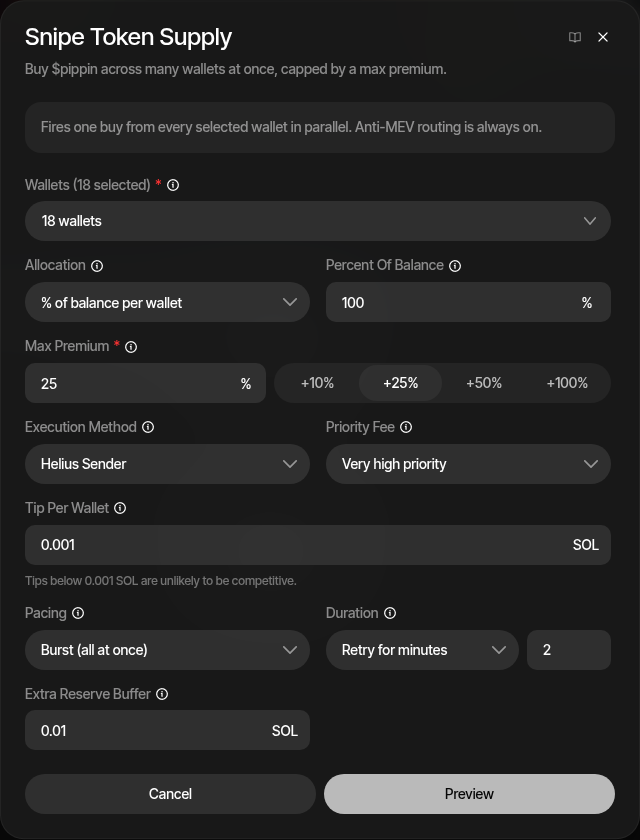
It is available on Solana and EVM profiles.
How It Works
Every selected wallet submits its own buy at the same time. Because your own buys move the price, the wallets that land last pay more than the wallets that land first — so instead of a fixed price limit, you set a maximum premium: how far above the current price the last-landing wallet is allowed to pay. Wallets that would exceed the cap simply do not buy.
The preview translates your settings into concrete outcomes before you commit: how many of the selected wallets are expected to fill, the expected token amount, and the maximum premium actually paid.
How to Use
- Open the profile's Strategies tab and click the snipe action
- Select the wallets — individual wallets, wallet groups, or everything
- Choose the allocation and amount
- Set the max premium
- Review the execution settings — method, priority, tip, and pacing
- Click Preview to see expected fills, tokens, and spend
- Confirm to fire
Wallets
The selected wallets buy in parallel. Groups expand to their eligible members. Each wallet's spendable balance excludes fees, tips, rent, and the reserve buffer.
Allocation
| Mode | Description |
|---|---|
| % of balance per wallet | Each wallet spends this share of its spendable balance. |
| Fixed per wallet | Every wallet spends the same fixed amount. |
| Total split | One total is split across the wallets, with optional jitter to vary each wallet's share. |
Max Premium
The price control. It caps what the last wallet to land can pay, as a percentage above the price your own buys are expected to reach — protection against other buyers landing at the same time, not a cap on today's market cap. Preset chips offer +10%, +25%, +50%, and +100%, or enter a custom value.
Wallets that would exceed the cap do not buy; the preview shows how many wallets are expected to fill within it. The derived absolute price cap is persisted with the snipe, so it stays meaningful if the pool moves.
Execution Settings
| Setting | Description |
|---|---|
| Execution Method (Solana) | Helius Sender lands fastest with MEV protection — the tip picks the pathway. RPC submits plainly with no tip. |
| Priority Fee | Compute-unit priority applied to every transaction. |
| Tip Per Wallet (Solana) | Tip attached to each wallet's transaction. Tips below 0.001 SOL are unlikely to be competitive. |
| Gas Priority (EVM) | Gas pricing applied to every transaction. |
| Extra Reserve Buffer | Extra native kept out of every wallet's spendable balance, on top of fees, tips, and rent (or gas on EVM). |
Pacing
| Mode | Description |
|---|---|
| Burst | Sends every wallet at once. Maximum speed; the premium cap alone bounds the price, so slippage does not apply. |
| Waves | Sends wallets in groups, waiting for observed landings before releasing the next wave. |
| Serial | Sends one wallet at a time with a delay. |
In waves and serial pacing, a Slippage setting adds room above each leg's modeled floor. Duration controls how long failed buys keep retrying.
On a launchpad bonding curve (Pump.fun, Meteora DBC, Raydium LaunchLab, Four.meme, Flap, Pons, moto.fun, SURGE), a buy that completes the curve (graduation) stops it trading: it refuses every trade until it migrates to its DEX pool. The snipe ends there whatever the Duration: wallets that filled keep their tokens, and the rest show Not sent.
Why the last wallet pays more
Your own buys move the price while they land. Burst pacing embraces this: all wallets fire together and the premium cap decides which fills are acceptable, rather than sequencing wallets and hoping the price holds.
Preview and Results
The preview shows expected fills (≈K of N wallets), expected tokens, total spend, and the maximum premium paid before you commit. After firing, the progress view tracks wallets filled, tokens acquired, actual spend, and tips as landings confirm.