
Lock Liquidity
Lock a pool's liquidity permanently or until a date, with the DEX's own lock on Solana and UNCX lockers on EVM chains.
Locking liquidity shows buyers that the team cannot pull the pool. Sumo locks the liquidity a treasury wallet holds in the profile's pool, from the profile's Wallets tab, in the wallet actions menu.
The profile's chain and DEX decide how the lock works. You never choose a locker. On Solana, Sumo uses the DEX's own lock where one exists, because that is what explorers and trading terminals recognise, and Jupiter Lock for LP tokens that have no native timed lock. On EVM chains, Sumo locks through UNCX, the locker trading terminals check for.
Permanent locks are irreversible
Permanently locked liquidity can never be withdrawn, by you or by Sumo. Trading fees stay claimable. Check the wallet, position and amount before confirming.
Solana pools
| Pool | Permanent | Until a date | Trading fees while locked |
|---|---|---|---|
| Meteora DAMM v2 | Meteora's position lock | Meteora's vesting lock | Stay claimable |
| Raydium CPMM | Raydium Burn & Earn | Jupiter Lock | Permanent: claimable with the Fee Key NFT. Until a date: compound into the LP tokens and return at unlock |
| Raydium CLMM | Raydium Burn & Earn | Not available | Claimable with the lock NFT |
| Raydium AMM v4 | Not available | Jupiter Lock | Compound into the LP tokens and return at unlock |
| PumpSwap | Not available | Jupiter Lock | Compound into the LP tokens and return at unlock |
Meteora DLMM positions cannot be locked: Meteora has no lock for them. Use a DAMM v2 pool if you need locked liquidity.
Pump.fun graduations are already locked
When a Pump.fun token graduates, the migration burns the pool's LP tokens, so that liquidity is locked for good and there is nothing to lock here. Lock Liquidity on a PumpSwap profile only applies to liquidity you added yourself afterwards.
EVM pools
| Chain | Pools | Locker | What is locked |
|---|---|---|---|
| Ethereum | Uniswap V2 | UNCX V2 | LP tokens |
| Ethereum | Uniswap V3 | UNCX V3 | The position NFT |
| Ethereum | Uniswap V4 | UNCX V4 | The position NFT |
| BNB Smart Chain | PancakeSwap V2, Uniswap V2 | UNCX V2 | LP tokens |
| BNB Smart Chain | PancakeSwap V3, Uniswap V3 | UNCX V3 | The position NFT |
| BNB Smart Chain | PancakeSwap Infinity | UNCX V4 | The position NFT |
| Base | Uniswap V2, SushiSwap V2 | UNCX V2 | LP tokens |
| Base | Uniswap V3 | UNCX V3 | The position NFT |
| Base | Uniswap V4, PancakeSwap Infinity | UNCX V4 | The position NFT |
| Robinhood Chain | Uniswap V3 | UNCX V3 | The position NFT |
| Robinhood Chain | Uniswap V4 | UNCX V4 | The position NFT |
Both lock types are available on every EVM pool above.
- LP token locks (V2) can lock any share of the wallet's LP tokens. Trading fees keep compounding into the locked LP tokens and come back with them. UNCX's V2 lockers have no true permanent lock, so Permanent locks until the year 2286, the furthest date the locker accepts. To remove LP tokens from existence instead, use Burn.
- Position locks (V3 and V4) lock the whole position NFT. A Permanent lock can never be withdrawn, but its trading fees stay claimable in Sumo, which burning the NFT would give up. The position keeps the price range it has: the locker does not widen it, so a position whose range the price has left earns nothing until the price returns. The dialog flags out-of-range positions.
Uniswap V4 and PancakeSwap Infinity do not let anyone list the positions a wallet holds, so on those pools you enter the position NFT id yourself. You can find it on the DEX's own positions page or in the transaction that created the position. Sumo then checks that the selected wallet holds that position, that it belongs to this profile's pool, and that UNCX's locker accepts the pool's hook, and tells you which check failed if one does.
A Uniswap V4 launch (Base, Robinhood) made with Lock liquidity on is already locked for good at launch, in a fee locker that keeps its LP fees claimable, so there is nothing to lock here. With Lock liquidity off, the dev wallet holds the position and you can lock it here.
What UNCX charges
UNCX's fees are set by UNCX and read from the locker when you open the dialog and again when you confirm, so the dialog always shows what the lock will cost. Sumo adds no fee of its own.
- LP token locks: a flat fee in the chain's native token, plus 1% of the LP tokens being locked.
- V3 position locks: you choose one of UNCX's three fee options. Each combines a flat fee in the native token, a share of the position's liquidity taken when locking, and a share of the trading fees you claim later. Pick the low-liquidity-fee option for a large position you rarely claim from, or the low-claim-fee option for a pool with heavy volume.
- V4 position locks: one fee schedule per chain and DEX, with the same three parts. The share of later fee claims differs between deployments, and the dialog shows the one that applies.
Where UNCX offers a referral discount on the flat fee, Sumo applies it for you. Fees the position had already earned are paid out to the wallet when it is locked.
Live numbers in the dialog
On EVM profiles the dialog reads the pool directly from the chain and refreshes while it is open: the token's price, the value of what you are about to lock, and for LP tokens the share of the pool's LP supply that is held by the UNCX locker or burned, now and after your lock. That share counts every UNCX lock of the pair, including matured locks nobody has withdrawn yet.
Your locks
The Your locks tab lists the selected wallet's UNCX locks in the pool, read from the locker, so locks made with the same wallet outside Sumo appear too.
- Claim fees collects a locked position's trading fees to the wallet. UNCX keeps the share set by the fee option the lock was made with.
- Withdraw returns a lock whose unlock date has passed, in full, to the wallet.
Lock liquidity
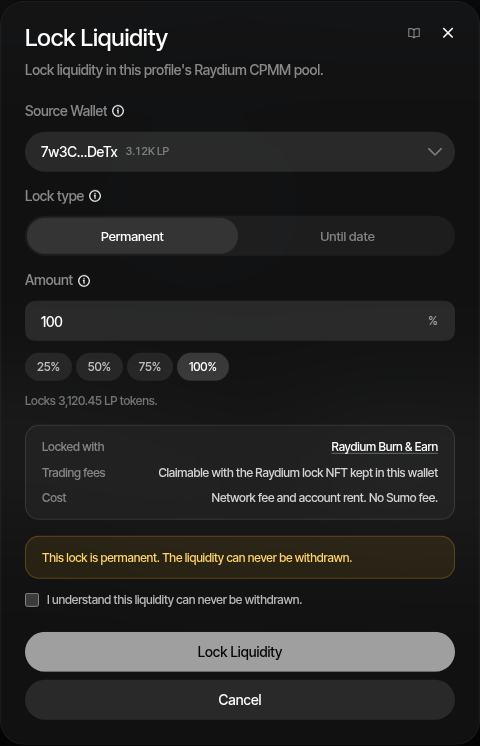
- Open the profile's Wallets tab and click Lock Liquidity from the wallet actions menu
- Select the source wallet holding the liquidity — active, archived or excluded
- If the wallet holds more than one position in the pool, choose the position
- Choose the lock type when the pool offers both: Permanent or Until date
- On a Uniswap V4 or PancakeSwap Infinity pool, enter the position NFT id
- Set the amount as a share of the position's unlocked liquidity. Raydium CLMM positions and EVM position NFTs lock in full
- For Until date, pick the unlock date — at least 1 hour and at most 10 years ahead
- On a V3 position lock, choose UNCX's fee option
- Review Locked with, Trading fees and Cost, tick the acknowledgement for a permanent lock, and confirm
Sumo charges no fee for a lock. On Solana you pay the network fee and the rent for the accounts the lock creates. On EVM you pay UNCX's fees and gas.
An EVM lock is two transactions from the wallet: an approval for the locker, then the lock itself. Sumo sends the lock once the approval has confirmed, so confirming can take a minute or two on Ethereum. The wallet needs enough native balance for UNCX's flat fee and gas.
Sumo checks the lock against the chain before sending it, after the approval has confirmed. If that check fails, the lock is not sent and nothing is locked, but the approval has already been paid for. It only lets UNCX's locker move the approved LP tokens or position as part of a lock made by the same wallet, and the next lock attempt reuses or replaces it.
Raydium CLMM positions must be full range
A locked CLMM position cannot be rebalanced. If its range were narrower than the full price range, it would stop earning fees for good once price left the range, so Sumo only locks full-range positions.
Fee Key and lock NFTs
A Raydium Burn & Earn lock mints an NFT to the source wallet: a Fee Key for CPMM, a lock NFT for CLMM. Whoever holds that NFT can claim the locked liquidity's trading fees, so keep it in the wallet. Claim the fees with Claim LP fees from the same menu.
Unlocking a timed lock
- Meteora DAMM v2: the liquidity becomes withdrawable from the position again once the unlock date passes. Some DAMM v2 pools count time in slots instead of seconds. For those pools Sumo converts your date to a slot number, so the unlock can land somewhat earlier or later than the date, and the dialog says so.
- Jupiter Lock: the LP tokens sit in an escrow that pays out to the source wallet. After the unlock date, claim them back to that wallet from Your locks in Lock tokens, which lists every Jupiter Lock escrow the wallet can claim from, including LP locks made here.
Timed locks cannot be cancelled and their recipient cannot be changed.
Logs
Every lock is recorded in Treasury Logs as Lock Liquidity, with the mechanism, the lock account or locker, the unlock date and the transaction. Withdrawals of EVM locks are recorded as Withdraw Locked Liquidity, and fee claims as LP fee claims.