
Bubblemaps Analysis
Inspect token-holder clusters, Magic Nodes, Time Nodes, and matching Sumo wallet groups.
Sumo includes two Bubblemaps workflows for token-holder review: a quick map view from the live chart and a saved wallet analysis from the Wallets tab. Bubblemaps is available for profiles on Solana, Ethereum, BNB Chain, Base, Robinhood Chain, and Tron.
Bubblemaps From the Chart
Click Bubblemaps in the bottom-left of the live trading chart to open the token's Bubblemaps view without leaving the profile workspace.
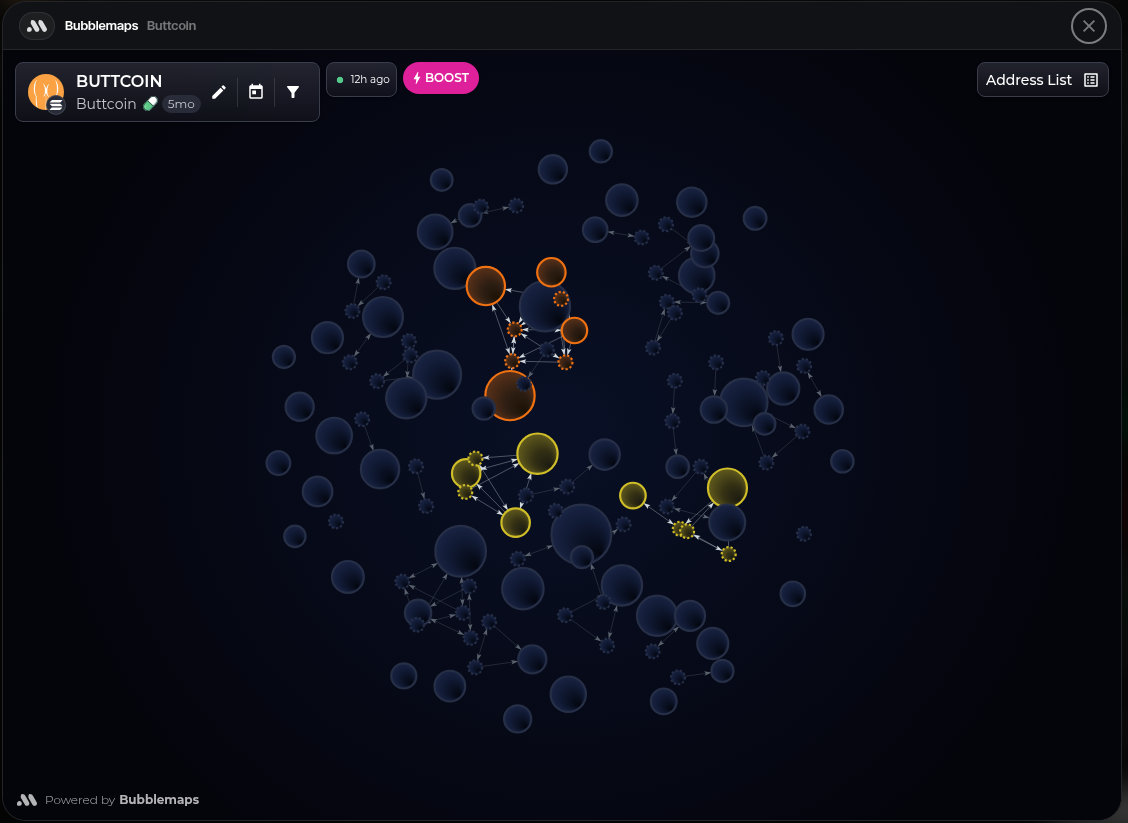
Use this view when you want to quickly inspect holder distribution while watching flow. Bubblemaps represents token holders as bubbles: larger bubbles hold more supply, and links between bubbles show on-chain transfers between holders. Connected bubbles form clusters, which can reveal groups of related wallets, coordinated holders, or concentration patterns that deserve a closer look.
Bubblemaps can also surface indirect relationships. Magic Nodes add non-holder intermediary addresses when they connect top holders that would otherwise look unrelated. Time Nodes highlight wallets that interacted through common venues, such as exchanges or bridges, within similar time windows. For launch monitoring, these views can help you spot related snipers, coordinated wallets, or hidden distribution patterns faster than scanning addresses one by one.
Wallets Tab Analysis
The Wallets tab has a Bubblemaps analysis action in the overflow menu. This runs Sumo's saved analysis for the current project token.
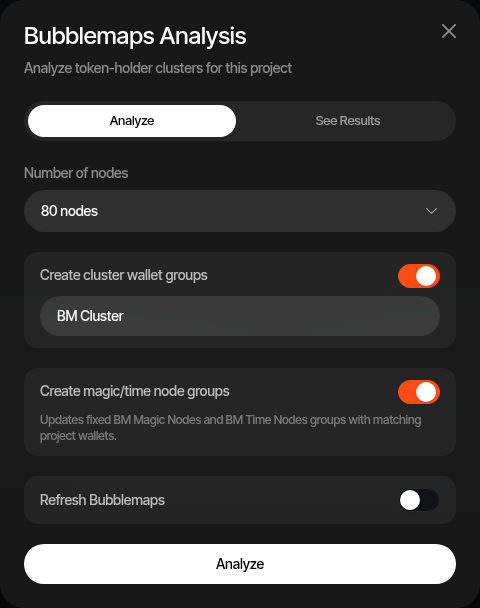
The analysis can:
- Fetch the latest token-holder map summary for the project token
- Choose how many top nodes to inspect: 80, 250, or 500
- Optionally refresh Bubblemaps data instead of using the current cached map
- Save the latest summary for the project, replacing the prior saved analysis
- Create cluster wallet groups named with your prefix, such as BM Cluster #1, BM Cluster #2, and so on
- Create fixed BM Magic Nodes and BM Time Nodes wallet groups
Wallet groups are only created or updated when at least one address in the Bubblemaps result matches a Sumo wallet in the current profile. External holders still appear in the Bubblemaps result, but Sumo does not create wallet-group memberships for addresses you do not manage.
Saved Results
The saved results panel shows the latest analysis metrics:
| Metric | Meaning |
|---|---|
| Total Cluster | Combined supply share held by all detected clusters |
| Biggest Cluster | Supply share held by the largest detected cluster |
| Magic Nodes | Count of matching Sumo wallets found in Bubblemaps Magic Nodes |
| Time Nodes | Count of matching Sumo wallets found in Bubblemaps Time Nodes |
| Top 10 | Adjusted top-holder concentration |
| Fresh Wallets | Supply share held by newly active wallets |
| Contracts / DEX / CEX | Supply share associated with contracts, DEXs, and centralized exchanges |
| Bubblemaps Score | Bubblemaps' decentralization score for the token |
Wallet Link Check
Check wallet links shows the on-chain connections between wallets you manage (direct transfers, shared counterparties and common exchange funding) with the transactions behind each one. Use it to understand and document how your wallets relate, so you can disclose and explain these relationships accurately. It is a read-only report and changes nothing. Open it from the Wallets tab … menu, the Live Trading Actions (bolt) menu, the Wallet Farm … menu, the command palette, or the Wallet links row on a token launch's Wallets step once every launch wallet exists. Pick wallets or groups (up to 300 per check, 10 checks per organization per day), then Check links.
Wallets are connected by a direct transfer between them, a shared counterparty (one plain wallet that funded, received from, or passed funds between them), or a first funding from the same exchange within 30 minutes. Programs, contracts, named services, exchange deposits, Sumo's fee wallets, dust and unsolicited token airdrops never connect wallets. Click a bubble, hub or line on the map to see the transfers and whether Bubblemaps also displays each connection. Available on Solana, Ethereum, BNB Chain, Base, Robinhood Chain, HyperEVM, Ink and Arc.
The check window shows a profile's last check and the Wallet Farm's previous checks (the last 10); opening one shows its map again without using a check, and Re-run starts a new one.
For Bubblemaps terminology, see the Bubblemaps docs on how bubble maps work, Magic Nodes, and Time Nodes.